

- METHOD TYPEReal-Time Bank Transfer
- PAYMENTS

- PAYOUTS
- REFUNDS

- RECURRING
Introduction
Bre-B is Colombia’s national, interoperable real-time payment system developed by the Banco de la República and officially operational since October 2025. Twenty-four hours per day, seven days per week, it allows instant account-to-account transfers (P2P and P2M) using a simple digital key such a phone number, ID number, or email address, rather than full bank account details.
Supported Countries
- Colombia
Supported Currencies
- COP
REST API 1.0
Payment (Deposit) Flow
Follow these steps to perform a payment using Nuvei REST API integration:
1. Generate a sessionToken
Press here for details.
2. Send a /payment Request
Requests
Example /payment Request without UPO
{
    "sessionToken": "f8417f7dd10a4550ae99572403435dae0111",
    "merchantId": "{{merchantId}}",
    "merchantSiteId": "{{merchantSiteId}}",
    "userTokenId": "BreBRest1RESTDeposit",
    "paymentOption": {
        "alternativePaymentMethod": {
            "paymentMethod": "apmgw_Bre_B",
            "brebKeyType": "ALPHANUMERIC",
            "brebKeyValue":"@CCO4566"
        }
    },

    "currency": "COP",
    "amount": "55",
    "deviceDetails": {},
    "billingAddress": {
        "email": "[email protected]",
        "country": "CO"
    },
    "userDetails": {
        "email": "[email protected]",
        "country": "CO"
    },
    "timeStamp": "{{timestamp}}",
    "checksum": "{{checksum}}"
}
Example /payment Request with UPO
{
    "sessionToken": "f6fc9f7cc42649a0bf10999ad2c4f4ab0111",
    "merchantId": "{{merchantId}}",
    "merchantSiteId": "{{merchantSiteId}}",
    "userTokenId": "BreBRest1RESTDeposit",
    "clientRequestId": "{{clientRequestId}}",
    "clientUniqueId": "{{clientRequestId}}",
    "paymentOption": {
        "userPaymentOptionId": "230592587111"
    },
    "currency": "COP",
    "amount": "77",
    "userDetails": {
        "country": "CO",
        "email": "[email protected]",
        "phone": "+520111000000"
    },
    "deviceDetails": {
        "deviceType": null,
        "deviceName": null,
        "deviceOS": null,
        "browser": null,
        "ipAddress": "127.0.0.1",
        "deviceManufacturerIdentifier": null
    },
    "timeStamp": "{{timestamp}}",
    "checksum": "{{checksum}}"
}
Responses
Example Response without UPO
{
    "merchantSiteId": "{{merchantSiteId}}",
    "merchantId": "{{merchantId}}",
    "userTokenId": "RestUserForWDBREB",
    "clientRequestId": "{{clientRequestId}}",
    "timeStamp": "{{timestamp}}",
    "paymentMethodName": "apmgw_Bre_B",
   "apmData": {
            "brebKeyType": "ALPHANUMERIC",
            "brebKeyValue":"@CCO4566"
              },
    "checksum": "{{checksum}}"
Example Response with UPO
{
    "merchantId": "{{merchantId}}",
    "merchantSiteId": "{{merchantSiteId}}",
    "userTokenId": "RestUserForWDBREB",
    "clientUniqueId": "{{clientUniqueId}}",
    "clientRequestId": "{{clientRequestId}}",
    "currency": "COP",
    "amount": "77",
    "userPaymentOption": {
        "userPaymentOptionId": "230592615111"
    },
    "merchantDetails": {
        "customField1": "${customField1}",
        "customField2": "${customField2}"
    },
    "comment": "${comment}",
    "urlDetails": {
        "notificationUrl": "http://srv-bsf-devppptrunk.gw-4u.com/ppptest/NotifyMerchantTest"
    },
    "sourceApplication": "${sourceApplication}",
    "timeStamp": "{{timestamp}}",
    "checksum": "{{checksum}}"
}
Example Response – Redirect URL
https://apmtest.gate2shop.com/ppp/resources/cdn/v1/deposit-instructions-30372.html?locale=es_CO&amount=19.00¤cy=COP&paymentId=CO.COM.CRB.TRXIDP8efb08b768e9550c4a&wss=wss%3A%2f%2fsrv-bsf-websock.gw-4u.com&sessionId=56f82646021a5d397a46903fdd2c&expTime=2026-07-09T06%3A03%3A22Z&qrCode=iVBORw0KGgoAAAANSUhEUgAAAZAAAAGQAQMAAAC6caSPAAAABlBMVEX%2f%2f%2f8AAABVwtN%2BAAAGqUlEQVR42uxcPbK0PK9sisChl%2BCdwMaog6fYGOzES3DogKJvqcX8PO9NvtgzzphDE6gsqSW1Dn7nd37nd%2f7nE0jyILkVJMyYuWPliZYw8IqPupax3K%2Bw9gfZgXgwYyRSA6a4Y4mbf%2BjCwBMjWTA0YPhBBOEVjwp7q3AX6MQCoM3co31qK4EY2sxHrxDdMRag2cXKWEtDmzCZkRJLQzg6huxYK3Am7tzjFXO0%2B9KGNsnblhTYL8T8pS7xBBLZ7LeRGeYiPOpaF%2f3%2B%2f12sE4gCQ13iVs4U9jZFf2gpHG2Kj7okf%2fhvTP5aiJ%2fIOnIsmMMVyTPKyMCstxaEwv2%2febkPSKAl4ShjJMxKKXKwxCtYsFmShV7AbFb7g%2ByBll0q0mh2mSLlbxZhyPqnDENibnNd%2B4PIXpdZLI0MO4Y615HbbTGs3MpakAJ5vW5MR5Cwt7lOSigsmHnUgZZf5CJD%2fQNSthC76zL9IHd82ePGrYwlsCFeWLBSfOzgg2cyqhLYhtcd6wrSJguwzMniiKLIWu1aORuLpIiqWWvoDyJCcim%2fsLQ52MU4o9VyFnuYY05nQuLRJvyhO4hS6Ox%2fQrszbbULwz3IeZIxNUtEFf1BAsMe7TaMRq6euXYtqkBUiopcvXPw10NuF8sw97Iwaj%2fHrE%2BFC1DsYeHRgLU%2fiMq3y0v3onrdMo1dt%2BDUbGNGS1a9vPlYPxBzJXMzQewh7jAXa0nBJpvFeBPV1%2BkIMuvJKJjVYpgw1yVasvFSNmbPtcD0umMdQezCYMJo%2BcXOHveYo90RHtyx1iWdiSUcDfHxg8jIzYy8QATeQFfMUUn4Cs%2ByLlApae0SAjgbH83Fjjqofgm0mCr0CbOY1XLoEaL4UleO5lMWYk%2BMpYGH%2Bp7eBBP%2B6hCCNtdBzSqnGpjMX5LV6%2frQplK2Df9k5G4ggcqoZiQyUITCkopSikFogbeoz88fxLs9VqSvd%2f0iiwOrXEwNvpVnas%2fX%2BoOwTfEQ66K6Pf5e8YwcMxYsaCl417w%2fiL0x8MQ9GblUyW8lKKYyP0mbffljkNoLBLjZ%2BFbOBLShzma%2B5G9ZMVLMYrzC8Sak%2fUDCrgLMAqnFVAz6w2gMdGjq4ZUltaRwkX%2BQV8ODGUuyENs8vmg4cM%2BRyz09umKHEJXo7mKWUnSTVp8kWimz1sUyz3No0B%2BEGqOfPha09DpJONASzMEuzUVEzqaXxTqC%2BCisIp7QNEik02uxSzPCzfwFz6ZOb5Cw39NeKY3m8BwLsmBuE%2f7U6W3Jf6sdQjDXKW48xS7oTUxjFxgsdijzSESB%2BIM8W53RAqy95aSTrroJloSz5FfBHlmHDiGz5siCUCoCCbA0Gbn7W4s4a7jerZueIBLZjdIoqt66qYblF83UU5aLfbCLniBQ4867mzLSUFfNCF1Cw614lcZ%2fGGwvEEWIXX1LoM2KEGruJq%2fFYk75SULend6vhijTaBQ2ioFa5o1S3bANfFQr3lXKTJ%2BS5n4g6ueO6vVxlzIPGEtL4Qp7fLgGBWItQ%2B0OYgTc0msdzTKi5nWsSIC87c%2B1uggHj3entx%2BIZCOH6Kjau8bHNtdNsAF%2fXpgVTPpYdxCJhiYsWNKpB6oy8XAxqOmfE1IbuH%2BIKL4a4jFmpCtUpa2xayWhjQUbiY6kb36PBvqBuPpOKcUiTPD0bAHWMjKMjUlRMbd%2fivduILukmBZfTqnMqs%2fOlVEPXpFlQYPo6Fuk1xMEklmRLimIV%2fQH3ZGHJ1d8%2BktXEOMQezzxEg0ZI1%2fAoqYONRMPRdziRa6%2BHGJv1UUuFqi5iMXU5hOz6zlhtPv1MnI%2fEPW2XcIvF7ui1n%2Bcgk0xe6ZOvMLHGL0fiMWR6i52JrmSNzKgMfrd9ba69rPb0xOkiYBLNiJp0aT1H2h%2fxUoRqQjuzZb%2BIPRRmHZCpSKYNSCXPNshVryHo71Fel8O2dXJyJp%2feLjhvfBySey8MSMU5a2MDiEq1CBJs%2fBX3KpUBBodc%2BOJ4HesS0jwXVEWrf9Aijujo7C0%2ByDLoqEy%2BbEx1A1ER%2B29e0xSn8uS2hUd1Pf0ccA%2fq3%2BdQIKLLDOMj%2BvnyRXZvIUDY1k9XLz3xb4c4tu1squjLw1K7n0xy8lL0pxgrp87I91A7jmyVMzq9Wn565bwA74sJ8PmTiGuytSWyy1KhtapJ7G0jaG4MK92C7GCNd16GhUj6dnUKYts%2BbH%2B0xXktVmvfyuhBo0KMAsYUqdnl199LEt%2BN%2BS5WZ8l78VcZwl87Y754iiWRG%2BDrbU7yO%2f8zu984fm%2fAAAA%2f%2f8c%2BMzYtVM2OAAAAABJRU5ErkJggg%3D%3D&returnUrl=%2fv1%2fconsumerReturn%2f479FB591FA034F040207091C9696AE9F&pm=apmgw_Bre_B&qrCodeSource=00020101021226300014CO.COM.CRB.LLA0408@CCO456649250014CO.COM.CRB.RED0103CRB520460125303170540519.005502015802CO5910mikyClient6008New%20York6110775225545481250015CO.COM.CRB.CIVA01020283280015CO.COM.CRB.BASE010519.0084250015CO.COM.CRB.CINC01020290430016CO.COM.CRB.TRXID0119P8efb08b768e9550c4a91860014CO.COM.CRB.SEC01648f1c9c03ec4a7126fa8c9bf6c2b32934e156e46b95be25f0ea43bbedaa8a5ebb99310015CO.COM.CRB.DESC01020106020080270016CO.COM.CRB.CANAL0103APP82260014CO.COM.CRB.IVA01043.6185230014CO.COM.CRB.INC010106304E2BC
Payout (Withdrawal) Flow
- Send a
/payoutrequest and include theuserPaymentOptionId, which contains previously stored user APM account details.
After the transaction is processed, Nuvei sends a DMN that includes the result of the transaction tourlDetails.notificationUrl, which Nuvei recommends including in the/payoutrequest.
Example Withdrawal Request
{
  "paymentMethod": "apmgw_Bre_B",
  "currency": "COP",
  "userPaymentOption": {
    "brebKeyType": "PHONE",
    "brebKeyValue": "3097770003"
  }
}
Payment Page (Cashier)
Example Payment Page Request
https://ppp-test.safecharge.com/ppp/purchase.do?merchant_id=5970183043540730700&merchant_site_id=238459&user_token=auto&user_token_id=TestCashApp&item_open_amount_1=false&item_min_amount_1=1&item_max_amount_1=100&item_name_1=Cashier%20Test%20product&item_amount_1=10&item_quantity_1=1&item_discount_1=0&numberofitems=1&total_tax=0&discount=0&total_amount=10.00¤cy=USD&version=4.0.0&encoding=UTF-8&address1=test&city=test&zip=123456&country=US&phone1=123456&email=TestCashApp%40gmail.com&time_stamp=&checksum=4d2a4e7934948c4df37e19d5d8a2465c&
After the transaction is processed, Nuvei sends a Direct Merchant Notification (DMN) that includes the result of the transaction to notify_url, which Nuvei recommends including in the request.
User Experience
Payment
To perform a payment, the user does the following:
- Selects Bre-B on the cashier.
- Enters a payment amount.
The user is redirected to the Bre-B payment instructions page.
- Copies the payment key.
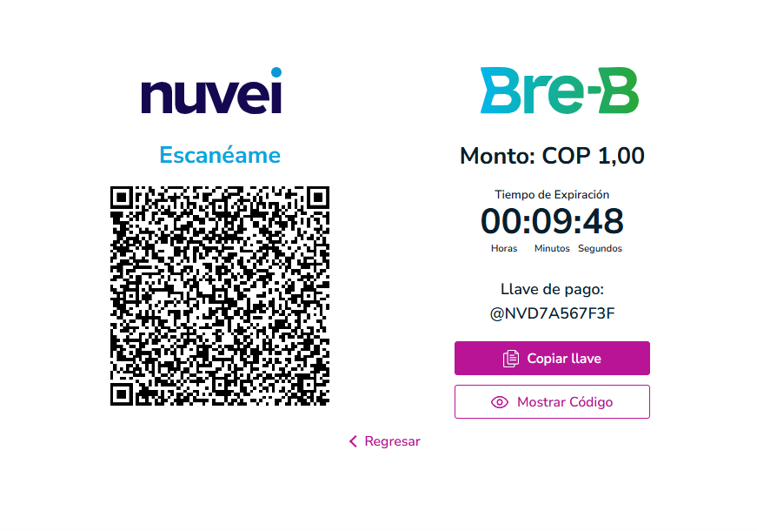
- Goes to the bank application (by opening the bank application or scanning the QR code).
- Completes the payment in the bank application.
The user receives payment confirmation from the banking application.
Payout (Withdrawal)
To perform a withdrawal, the user does the following:
- Selects ‘Bre-B’ on the cashier.
- In ‘Payment Details’, selects from the drop-down list.
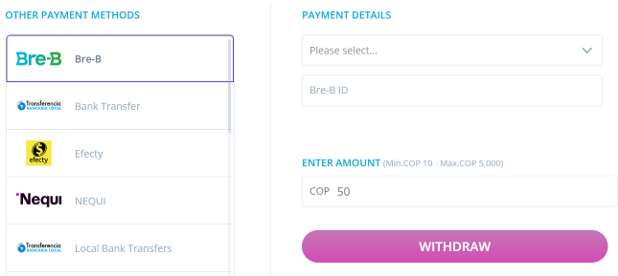
- Enters the ‘Bre-B ID’ value.
- Enters an amount.
- Presses the ‘Withdraw’ button to submit the payout request.
The payout is processed.
Testing
Transaction Result Testing
The transaction result depends on the configured payment-status endpoint.
- Approved scenario: Configure the endpoint to return
APPROVED. - Declined scenario: Configure the endpoint to return
DECLINED.
Withdrawal Testing
The following are examples for use in withdrawal testing.
- brebKeyValue = 3097770003
- brebKeyType = PHONE
- Alternative key type: ALPHANUMERIC
- Alternative key value: @CCO4566
 Last modified August 2026