

- METHOD TYPEE-wallet
- PAYMENTS

- PAYOUTS
- REFUNDS

- RECURRING
Introduction
Keepz is a regulated fintech company and digital payment platform available in Italy. The service provides enterprise-grade infrastructure to modernize payment operations for businesses of all sizes.
Supported Countries
Supported Currencies
REST 1.0 API
Payment (Deposit) Flow
To perform a payment using Nuvei REST 1.0 API integration:
1. Generate a sessionToken.
2. Perform the payment by sending a
/payment request with the following mandatory parameters:
paymentMethod: “apmgw_Keepz”currencycountryfiscalCodeamount
Example Payment (Deposit) Request
{
  "paymentMethod": "apmgw_Keepz",
  "currency": "EUR",
  "country": "IT",
  "fiscalCode": "RSSMRA85A01H501Z",
  "amount": "100.00"
}
Example Payment (Deposit) Request via UPO
{
    "sessionToken": "{{sessionTokenId}}",
    "merchantId": "{{merchantId}}",
    "merchantSiteId": "{{merchantSiteId}}",
    "userTokenId": "666355",
    "clientRequestId": "{{clientRequestId}}",
    "paymentOption": {
        "userPaymentOptionId": "230584918111"
    },
    "shippingAddress": {
        "firstName": "{{$randomFirstName}}",
        "lastName": "{{$randomLastName}}",
        "address": "{{$randomStreetAddress}}",
        "streetNumber": "2",
        "zip": "30033",
        "phone": "{{$randomPhoneNumber}}",
        "city": "{{$randomCity}}",
        "country": "IN",
        "state": "",
        "email": "{{$randomEmail}}",
        "salutation": "MR",
        "careOf": "CareOf CareOn",
        "addressMatch": null,
        "shipAddressLine2": null,
        "shipAddressLine3": null,
        "companyName": null
    },
    "currency": "EUR",
    "amount": "1",
    "timeStamp": "{{timestamp}}",
    "checksum": "{{checksum}}"
}
The response returns a redirect URL (redirectUrl) to redirect the customer to the payment page and a UPO (userPaymentOptionId) for use in future transactions.
Example Payment (Deposit) Response via UPO
{
    "internalRequestId": 460382111,
    "status": "SUCCESS",
    "errCode": 0,
    "reason": "",
    "merchantId": "1102398682906145682",
    "merchantSiteId": "228311",
    "version": "1.0",
    "clientRequestId": "20260310131521",
    "sessionToken": "2a4b3fc0e6a94ecaa57d8143f4f560030111",
    "orderId": "464361111",
    "userTokenId": "666355",
    "paymentOption": {
        "redirectUrl": https://dev.portal.keepz.me/payment-redirect?requestId=6281623589D0CC5C11C7443DA9F2E2BE,
        "userPaymentOptionId": "230584918111",
        "card": {}
    },
    "transactionStatus": "REDIRECT"
}
After the transaction is processed, Nuvei sends a Direct Merchant Notification (DMN) that includes the result of the transaction to the URL provided in urlDetails.notificationUrl, which Nuvei recommends including in the /payment request.
Example DMN Response – APPROVE
…action=APPROVE&merchantUniqueId=31fe9fe0-7db4-11ee-afa5-c3b45d3287f5&message=Deposit approved
Example DMN Response – DECLINE
…action=DECLINE&merchantUniqueId=N/A&message=Sorry, you have reached your deposit limit.&error_code=DEPOSIT_LIMIT_REACHED
Payout (Withdrawal) Flow
- Send a
/payoutrequest and include theuserPaymentOptionId, which contains the user’s previously stored APM account details.
After the transaction is processed, Nuvei sends a DMN that includes the result of the transaction to
urlDetails.notificationUrl, which Nuvei recommends including in the /payout request.
Example Payout (Withdrawal) Request
{
    "sessionToken": "{{sessionTokenId}}",
    "merchantId": "{{merchantId}}",
    "merchantSiteId": "{{merchantSiteId}}",
    "userTokenId": "666355",
    "paymentOption": {
        "alternativePaymentMethod": {
            "paymentMethod": "apmgw_Keepz",
            "keepzFiscalNumber": "RSSMRA85M01H501Q"
        }
    },
    "currency": "EUR",
    "amount": "10",
    "deviceDetails": {
        "ipAddress": "114.13.12.11",
        "deviceType": "desktop"
    },
    "billingAddress": {
        "firstName": "Ronald",
        "lastName": "Fielding",
        "email": [email protected],
        "phone": "3126979993",
        "dateOfBirth": "1985-01-01",
        "address": "Peachtree Dunwoody Rd",
        "city": "Atlanta",
        "zip": "30328",
        "state": "GA",
        "country": "IT",
        "language": "en"
    },
    "userDetails": {
        "firstName": "Ronald",
        "lastName": "Fielding",
        "email": [email protected],
        "phone": "3126979993",
        "dateOfBirth": "1985-01-01",
        "address": "Peachtree Dunwoody Rd",
        "city": "Atlanta",
        "zip": "30328",
        "state": "GA",
        "country": "IT",
        "language": "en"
    }
    "timeStamp": "{{timestamp}}",
    "checksum": "{{checksum}}"
}
The response returns a redirect URL (redirectUrl) to redirect the customer to the payment page and a UPO (userPaymentOptionId) for use in future transactions.
Example Payout (Withdrawal) Response
{
    "internalRequestId": 460364111,
    "status": "SUCCESS",
    "errCode": 0,
    "reason": "",
    "merchantId": "1102398682906145682",
    "merchantSiteId": "228311",
    "version": "1.0",
    "sessionToken": "5150b924f9d04a49920c4560a880e4880111",
    "orderId": "464356111",
    "userTokenId": "666355",
    "paymentOption": {
        "redirectUrl": https://dev.portal.keepz.me/payment-redirect?requestId=5F52D2ADB0A91F8449933B7E80C63542,
        "userPaymentOptionId": "230584918111",
        "card": {}
    },
    "transactionStatus": "REDIRECT"
}
Example Payout (Withdrawal) Response
{
    "internalRequestId": 460387111,
    "status": "SUCCESS",
    "errCode": 0,
    "reason": "",
    "merchantId": "1102398682906145682",
    "merchantSiteId": "228311",
    "version": "1.0",
    "userTokenId": "666355",
    "clientUniqueId": "12345",
    "transactionStatus": "APPROVED",
    "paymentMethodErrorCode": "0",
    "userPaymentOptionId": "230584918111",
    "externalTransactionId": "2610000000860955",
    "transactionId": "2610000000000532844",
    "orderId": "464368111"
}
Example Payout (Withdrawal) Request via UPO
{
    "merchantSiteId": "{{merchantSiteId}}",
    "merchantId": "{{merchantId}}",
    "userTokenId": "666355",
    "clientUniqueId": "12345",
    "amount": "1",
    "currency": "EUR",
    "userPaymentOption": {
        "userPaymentOptionId": "230584918111"
    },
    "deviceDetails": {
        "ipAddress": "192.168.100.53"
    },
    "timeStamp": "{{timestamp}}",
       "checksum": "{{checksum}}"
}
User Experience
Payment (Deposit)
Payment (Deposit) via Store
- User provides cash to the merchant.
- Merchant enters the amount and selects the gaming company.
An order is activated on the static QR code. - User scans the QR code from the Keepz application.
- User confirms data sharing and merchant connection.
- Merchant verifies the user identity.
- Merchant and user confirm transaction details.
- User completes Strong Customer Authentication (SCA).
Nuvei credits the gaming account after approval.
Payment (Deposit) via Cashier
- User selects Keepz.
- User enters the fiscal code.
- User enters an amount.
- User is redirected to the Keepz page to scan the QR code.
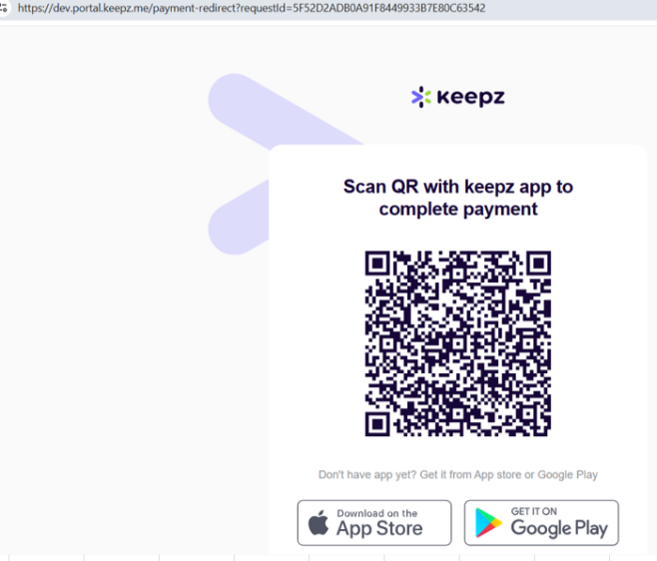 User completes payment in the Keepz application.
A success message appears.
Payout (Withdrawal)
- User selects Keepz on the Cashier page.
- User enters the fiscal code and amount.
A withdrawal request is created.
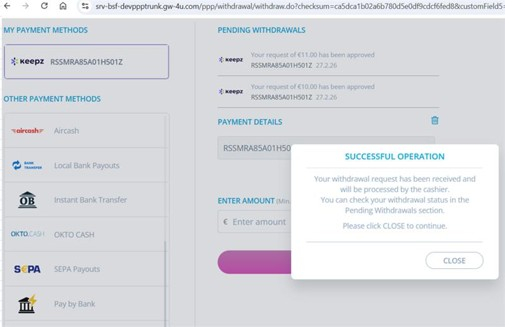
- The merchant processes the withdrawal.
Funds are delivered to the Keepz wallet.
Testing
Test Keepz transactions in the Nuvei sandbox environment using test accounts provided by Nuvei.
Test Users
- User ID: 393220001
- Password: provided by Nuvei
- User ID: 3888888880
- Password: provided by Nuvei
- Verification Code: 123456
Payout (Withdrawal) Testing
- Fiscal Number: RSSMRA85M01H501Q
- Automatic approval supported.
 Last modified September 2026