
Overview
Click to Pay is a global industry standard for secure, password-free online checkout, backed by major card networks such as Visa, Mastercard, American Express, and Discover. It replaces the manual task of entering card details (card number, expiry date, and CVV) with a streamlined, tokenized ‘one-click’ payment experience.
Click to Pay enables consumers to store their payment details in a secure profile and reuse them across participating merchants. Unlike device-specific wallets, Click to Pay works across all browsers and devices (desktop, tablet, and mobile) without requiring an application download, providing a consistent checkout experience.
By leveraging tokenization, Click to Pay protects sensitive card data and reduces the need for merchants to handle raw card details. This enhances security while improving checkout efficiency and overall payment performance.
Key Features
- Intelligent Recognition – Automatically identifies a returning user (for example, via browser recognition or user-provided identifiers such as email).
- Universal Compatibility – Supports multiple card schemes (Visa, Mastercard, American Express, Discover) within a single user profile.
- Tokenized Payments – Replaces sensitive card-data with a secure token to prevent exposure of card details to the merchant.
- Cross-device Experience – Works seamlessly across browsers and devices without dependency on a specific ecosystem.
Key Benefits for Merchants
- Reduced Cart Abandonment – Reduced friction at checkout due to elimination of any need for card-detail entry.
- Approval Rates – Increased issuer authorization rate compared to standard guest checkout, due to tokenization.
- Security – Minimized exposure to sensitive card data and reduced PCI scope.
- Checkout Experience – Seamless payment without re-entry of card details or creation of a merchant account.
Flows
High-level User Flow
The following is the high-level user flow for Click to Pay.
- Setup – The user links one or more cards to the Click to Pay profile (via issuer, network, or during checkout).
- Select – At checkout, the user selects the Click to Pay payment option.
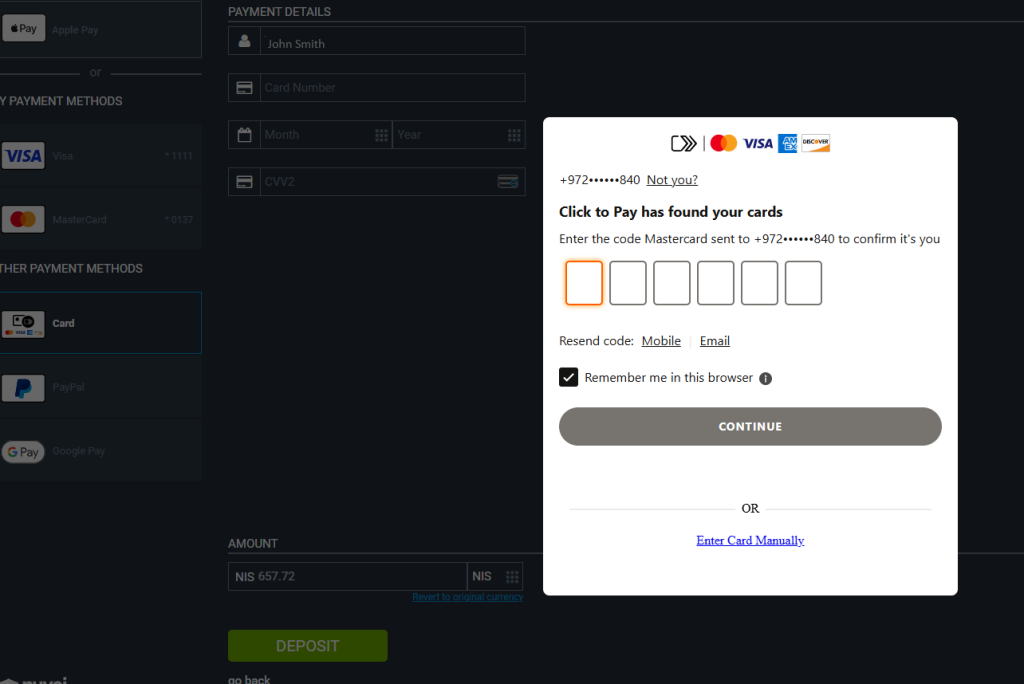
- Confirm – The user authenticates (for example, via OTP or device-based verification) and confirms the payment.
Transaction Flows
The transaction flow displayed to the customer depends on whether the customer has used Click to Pay before or is using a new device.
First-time User
The first-time user transaction flow is relevant for a customer who does not have an existing Click to Pay profile or is using a card brand that is not enrolled in the service.
- The first-time user (‘Guest’), manually enters payment credentials on a merchant page.
The user-interface flow includes the entering of email and/or mobile number, a one-time password validation, agreement to service terms, selection of a card, and confirmation of the CVV.
If payment is successful, an invitation to enroll in Click to Pay is displayed to the user. - The user enrolls.
The user card and shipping details are securely saved for future use globally by any merchant that supports Click to Pay.
Unrecognized Returning-user
The unrecognized returning user transaction flow is relevant for a user with a Click to Pay profile who has recently cleared cookies or is visiting a merchant site from a new device or a via a different browser than used for a previous session.
- If the system does not immediately recognize the user device, the user is prompted to enter the registered email address.
A ‘lookup’ is triggered - Identity verification is performed (usually via a one-time password sent to the user phone or user email).
Any saved cards are retrieved and displayed for possible selection. - The user confirms which card to use and completes the purchase with a single click (without having to provide a password or data).
Recognized Returning-user Based on Identifier from a Previous Session
The recognized user transaction is the ‘gold standard’ for the checkout experience because the flow provides minimal friction.
- The user is automatically recognized as a result of previous session (for example, via a device cookie or digital fingerprint).
Any saved cards of the user are displayed as masked in the payment section. - The user confirms which card to use and completes the purchase with a single click (without having to provide a password or data).
Recognized Returning-user Based on Email or Mobile Number Identifier
- If a user is not recognized via cookies or a previous session, a prompt is displayed to obtain an identifier (email or mobile number).
- The system checks if the identifier matches a Click to Pay profile.
- If an identifier for the user is found, the user is authenticated. One-time password validation may be required.
Any saved cards of the user are displayed as masked in the payment section. - The user confirms which card to use and completes the purchase with a single click (without having to provide a password or data).
Integration
Prerequisites
The merchant must be onboarded to Mastercard and have a Digital Payment Application (payments) identification (DPA ID) registered with Nuvei.
REST API 1.0
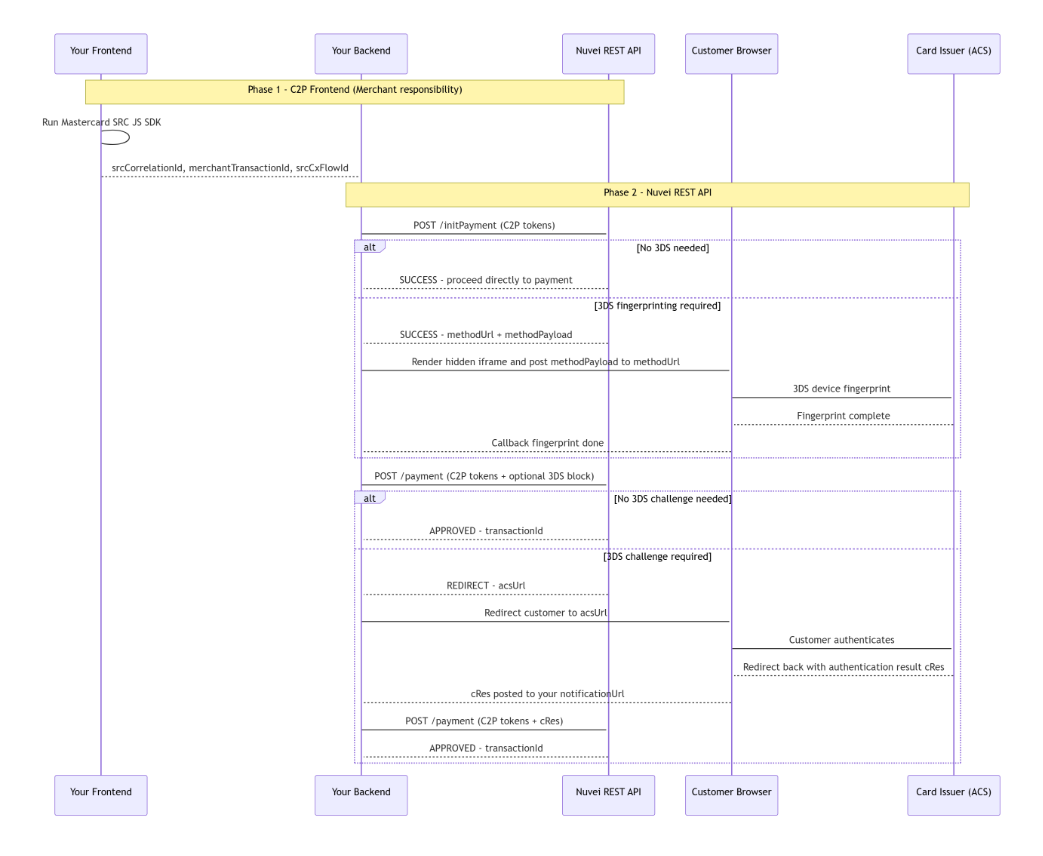
This section provides information about integration of Click to Pay using REST API 1.0 with 3DS. The integration includes frontend integration of Click to Pay checkout by the merchant and backend integration of Nuvei REST API 1.0 to initiate and complete the payment.
Frontend Integration of Click to Pay Checkout (Merchant)
- Merchant page loads the Mastercard Click to Pay SDK.
- Merchant completes the Click to Pay user flow (card recognition, card selection, and authentication).
- If the Click to Pay SDK flow completes successfully, the values for the following returned parameters must be captured and passed to the merchant backend in order to proceed with Nuvei REST API 1.0 calls.
srcCorrelationId– In the SDK response. Unique ID for a Click to Pay session.merchantTransactionId– Merchant value echoed by the SDK. The transaction ID the merchant provided when initializing the SDK session.srcCxFlowId– SDK response header/callback. Click to Pay flow ID for the session.
Backend Integration of Nuvei REST API 1.0 (Nuvei and Merchant)
The Merchant server calls Nuvei REST API 1.0 to initiate and complete the payment.
Step A: POST /initPayment
POST /initPaymentto enable Nuvei to retrieve the Click to Pay card data and to determine whether additional 3DS authentication is needed.
Key Payment Request Parameters
{
  "paymentOption": {
    "card": {
      "externalToken": {
        "externalTokenProvider": "Click2Pay",
        "providerCorrelationId": "<srcCorrelationId from SDK>",
        "providerTransactionId": "<merchantTransactionId>",
        "providerFlowId": "<srcCxFlowId from SDK>"
      }
    }
  }
}
Possible Responses
SUCCESS — no 3DS needed;threeD.v2supported="false"- Action to take: Call
POST /paymentdirectly.
- Action to take: Call
SUCCESS — 3DS fingerprinting required;threeD.v2supported = "true"- Action to take: Complete browser fingerprinting, then call
POST /payment.
- Action to take: Complete browser fingerprinting, then call
Step B: Browser Fingerprinting (only if 3DS is required)
If /initPayment returns methodUrl and methodPayload:
- Render a hidden iframe in the customer browser.
POSTthemethodPayloadto themethodUrlto perform a silent 3DS device fingerprint with the card issuer.
On completion of the fingerprint, the issuer posts back to yourmethodNotificationUrl.- If you receive the callback, proceed to
POST /payment.
Step C: POST /payment
- Call
/paymentwith the same Click to Pay token parameters as in/initPayment.
One of the following results occurs:
-
- Approved immediately – Nuvei either accepts the Click to Pay authentication or no 3DS is applicable. You receive
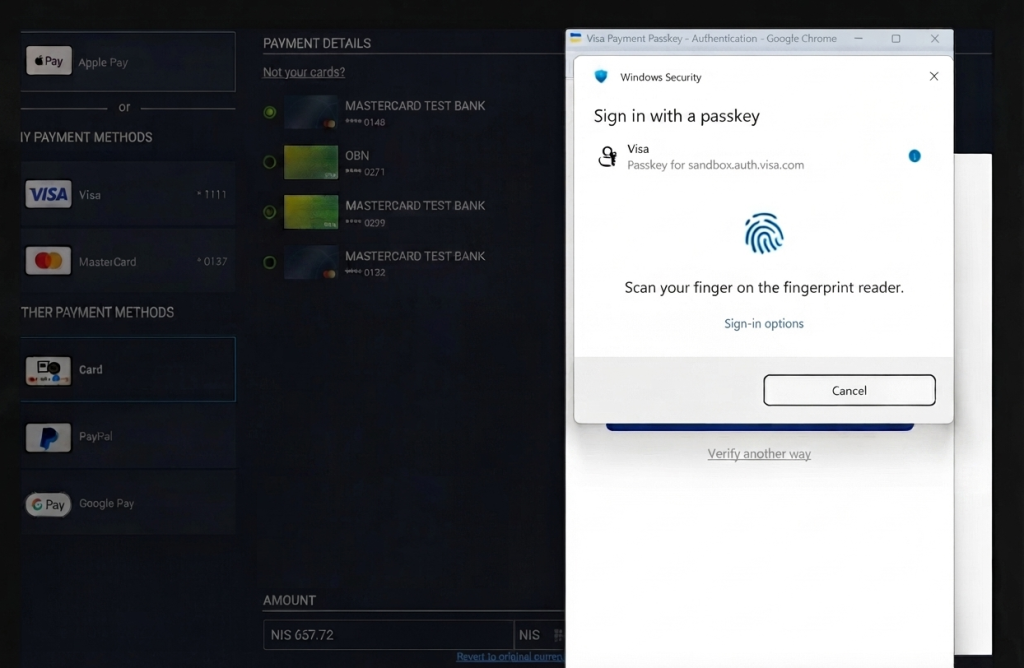
APPROVEDwith atransactionId. The payment is complete. - 3DS challenge required – If Nuvei determines that the Click to Pay authentication alone is not reliable (for example, if the Click to Pay session used a passkey that does not provide the required liability shift in the transaction region), then Nuvei returns
REDIRECTwith anacsUrl.
In this case, do the following:- Redirect the customer browser to the URL.
The issuer presents a challenge (such as OTP).
If the customer completes the transaction, the issuer redirects back to yournotificationUrlwith acResparameter. - Call
/paymentagain withthreeD.paResponse = <cRes>in the request.
Nuvei returnsAPPROVED.
- Redirect the customer browser to the URL.
- Approved via Click to Pay authentication (external MPI) – If Click to Pay returns a valid cryptogram with the card payload, Nuvei uses the cryptogram as direct proof of authentication and charges the card without an additional challenge.
Nuvei returnsAPPROVED.
- Approved immediately – Nuvei either accepts the Click to Pay authentication or no 3DS is applicable. You receive
REST API 2.0
This section provides information about integration of Click to Pay using REST API 2.0 .
Payment Request
payments Mandatory Parameters
amountcurrencynetworkTokenclass containing:providerproviderDatacorrelationIdas provided by MastercardmerchantTransactionIdas provided by Mastercard
threeDclass – Must include all mandatory fields under the block. Required because the authentication flow (Click to Pay vs. Nuvei) is not predetermined. The parametercontinueWithoutLiabilityShiftmust always be set totrueto allow the transaction to proceed when 3DS authentication is not performed by Nuvei or is not required.
Example /payments Request
{
  "processingEntityId": "< processingEntityId >",
  "amount": "30.74",
  "currency": "USD",
  "paymentOption": {
    "networkToken": {
      "provider": "Click2Pay",
      "providerData": {
        "correlationId": "34f4a04b-7df5-4184-8d33-dcd77b3cfd20",
        "merchantTransactionId": "txn-388f1066dc24b23daeb0b608e86d41d5",
        "threeD": {
          "continueWithoutLiabilityShift": true,
          "challenge": {
            "preference": "Challenge"
          },
          "userAccount": {
            "addCardAttempts24H": 2,
            "addressFirstUseDate": "2026-06-01",
            "addressFirstUseInd": true,
            "age": "02",
            "cardSavedDate": "2026-06-01",
            "cardSavedInd": true,
            "nameInd": true,
            "passwordChangeDate": "2026-05-20",
            "purchasesCount6M": 3,
            "registrationDate": "2025-12-10",
            "resetInd": false,
            "suspiciousActivityInd": false,
            "transactionsCount1Y": 12,
            "transactionsCount24H": 1
          },
          "giftCard": {
            "count": 1,
            "totalAmount": "3.80",
            "currency": "EUR"
          },
          "delivery": {
            "deliveryEmail": "[email protected]",
            "timeFrame": "01"
          },
          "preOrder": {
            "date": "2026-06-01",
            "purchaseId": "7690"
          },
          "reorderItemsIndicator": "01",
          "shippingIndicator": "01",
          "merchantUrl": "https://merchant-demo.com",
          "fingerprintNotificationUrl": "https://merchant-demo.com/fingerprint",
          "challengeNotificationUrl": "https://merchant-demo.com/challenge",
          "challengeWindowSize": "05",
          "platformType": "02",
          "externalRiskScore": 1
        }
      }
    }
  },
  "buyerDetails": {
    "billingAddress": {
      "countryCode": "US"
    }
  }
}
Example /payments Response
{
  "paymentId": "0f5718eadaa343db9a230a732e5c45c9",
  "transactionId": "2110000000028817868",
  "amount": 30.74,
  "currency": "USD",
  "transactionType": "InitAuth3D",
  "result": {
    "status": "fingerprint"
  },
  "partialApproval": {
    "requestedAmount": 30.74,
    "requestedCurrency": "USD"
  },
  "paymentOption": {
    "networkToken": {
      "provider": "Click2Pay",
      "expirationMonth": "12",
      "expirationYear": "30",
      "bin": "518600",
      "last4Digits": "8785",
      "acquirerId": "99",
      "cardType": "Debit",
      "cardBrand": "MASTERCARD",
      "threeD": {
        "version": "2.2.0",
        "fingerprintPayload": "eyJ0aHJlZURT...",
        "dsTransId": "d5e31077-dbe4-43ca-aee4-20ea4b975744"
      },
      "cardLast4Digits": "8785",
      "issuerBankName": "Demo Bank USA",
      "issuerCountry": "US"
    }
  }
}
Example /payments/{payment-id}/fingerprint Request
{
"processingEntityId": "<processingentityid>",
"fingerprintingIndicator": "Y"
}
Example /payments/{payment-id}/fingerprint Response (Frictionless Flow)
{
  "paymentId": "f6232057493340b2a3a9153d9facc67c",
  "transactionId": "2110000000028817879",
  "externalTransactionId": "211028817879",
  "amount": 30.74,
  "currency": "USD",
  "transactionType": "Auth",
  "result": {
    "status": "authorizedOnly"
  },
  "authCode": "516240",
  "partialApproval": {
    "requestedAmount": 30.74,
    "requestedCurrency": "USD"
  },
  "paymentOption": {
    "networkToken": {
      "provider": "Click2Pay",
      "expirationMonth": "12",
      "expirationYear": "30",
      "bin": "518600",
      "last4Digits": "8785",
      "acquirerId": "99",
      "cardType": "Debit",
      "cardBrand": "MASTERCARD",
      "threeD": {
        "version": "2.2.0",
        "dsTransId": "b165b653-89d4-402e-9523-a336976fb555",
        "eci": "2",
        "cavv": "kHI2RDVBQTRGREY5OTkzN0IzODI=",
        "acsChallengeMandate": "N",
        "authenticationResult": "Y",
        "flow": "Frictionless",
        "challengePreferenceReason": "NoPreference",
        "acquirerDecision": "ExemptionRequest",
        "isLiabilityOnIssuer": true
      },
      "cardLast4Digits": "8785",
      "issuerBankName": "Demo Bank USA",
      "issuerCountry": "US"
    }
  }
}
Retrieving an Identifier
Key Fields to Extract for Payment
merchantTransactionId(from response headers)correlationId(fromcheckoutResponseData)
Example Compare checkoutWithNewCard() Request
{
   "encryptedCard": "eyJraWQiOiIyMDIzMDIwNzIyMzUyMS1zYW5kYm94LWZwYW4tZW5jcnlwdGlvbi1zcmMtbWFzdGVyY2FyZC1pbnQiLCJpYXQiOiIxNzY2MzIwODA5IiwiYWxnIjoiUlNBLU9BRVAtMjU2IiwiZW5jIjoiQTI1NkdDTSJ9.Tz-SWa3NdkP8O7OA_1krXR1L-I6Vy3T0fLjk2zMGPRKziw70Wp71hKule98Rw3OtidJDYvOgFJFwAbBzZGDvgw_AN-GUwkGildO4dlqKdRDBzXUC9w07ZVIifBlif5wnDBChmweKOtS6W125Tc9JvoZY5OnmAVX-TZUU0fnTpstrTOT_17-lFAHj8bUZiHPgUe5Jtv8eFTeKyjoiePpgW54CxMs9cIMDVYtaZxPzgRapjUXNrWBTgoPemFuIropwIAYBPzsS3gHQXzRB7HLVyxKiWeVM5LtKmKNclzg-3Tg8sxh2mRORNCaM01I-rrNwWm7PyjttO95aJNc-IFH41g.T3-2k4DPbXf7ZYgv.B6jvt0v8ivPHtZ4YAo6hhWT98fFpgnPFc03enw0sHLkgrzEXQXCyqGz_s8gAI86nfIJLaN3OX4NZQJqkdWTorSCeA5t95hPnwpWVfAQfIeeefBkQMR5gevMP1_qrMkXuUI_chI6X4h_obzAkQ7nYKQfn3iWC4HQCcuDZCDDEmS_Sl7iN3t0df8P3CnyxCQNTxCe5RSAiVEQ4BaDK7iIw-3ZeJtWphOE1cZO84fSuRHMaZYv1Qt3eaLi0VBe4UZSLxJqvh11jRCpzE-5gV9kdCZg.DGlaHMCjkRg6m1AAKn9lpA",
   "cardBrand": "mastercard",
   "consumer": {
      "emailAddress": "[email protected]",
      "mobileNumber": {
         "phoneNumber": "5557771888",
         "countryCode": "1"
      },
      "firstName": "John",
      "lastName": "Doe"
   },
   "windowRef": "WindowREF",
   "checkoutExperience": "WITHIN_CHECKOUT",
   "complianceSettings": {
      "privacy": {
         "acceptedVersion": "LATEST",
         "latestVersion": "LATEST",
         "latestVersionUri": "https://www.mastercard.com/global/click-to-pay/country-listing/privacy.html"
      },
      "tnc": {
         "acceptedVersion": "LATEST",
         "latestVersion": "LATEST",
         "latestVersionUri": "https://www.mastercard.com/global/click-to-pay/country-listing/terms.html"
      }
   },
   "rememberMe": "true",
   "dpaTransactionOptions": {
      "paymentOptions": [
         {
            "dpaDynamicDataTtlMinutes": 15,
            "dynamicDataType": "CARD_APPLICATION_CRYPTOGRAM_SHORT_FORM"
         }
      ],
      "authenticationPreferences": {
         "payloadRequested": "AUTHENTICATED",
         "suppressChallenge": false
      },
      "merchantCategoryCode": "0001",
      "merchantCountryCode": "US",
      "acquirerMerchantId": "SRC3DS",
      "acquirerBIN": "545301"
   }
}
Example Compare checkoutWithNewCard Response
{
"checkoutActionCode": "COMPLETE",
"checkoutResponse": "eyJpc3MiOiJodHRwczpcL1wvbWFzdGVyY2FyZC5jb20iLCJpYXQiOjE3NjYzMjA4MzAsImFsZyI6IlJTMjU2IiwianRpIjoiMTliNjk3MzAtMGE5OS00MjUwLWJjNmUtNjVmMTIxMmQ0MjU5Iiwia2lkIjoiMjAyMzAyMDcxNjQ2MTMtc2FuZGJveC1wYXlsb2FkLXZlcmlmaWNhdGlvbi1zcmMtbWFzdGVyY2FyZC1pbnQifQ.eyJzcmNDb3JyZWxhdGlvbklkIjoiMzRmNGEwNGIuMTRiMzJhODctNjg2My00ZGEwLThhNTAtYjIxNDc5NjBmODk1Iiwic3JjaVRyYW5zYWN0aW9uSWQiOiI5MmFkYjQ5ZC0yN2RiLTRkNzItYTQ4MS04ODY1NTdkODYyZDkiLCJtYXNrZWRDYXJkIjp7InNyY0RpZ2l0YWxDYXJkSWQiOiJjRTlXaHpKMlRqT1I4bWZvbGZ4SkxnMDAwMDAwMDAwMDAwVVMiLCJwYW5CaW4iOiI1MTIwMzUiLCJwYW5MYXN0Rm91ciI6IjQ1MzciLCJkaWdpdGFsQ2FyZERhdGEiOnsic3RhdHVzIjoiQUNUSVZFIiwiZGVzY3JpcHRvck5hbWUiOiJNYXN0ZXJDYXJkIFRlc3QgQmFuayIsImFydFVyaSI6Imh0dHBzOi8vc2J4LmFzc2V0cy5tYXN0ZXJjYXJkLmNvbS9jYXJkLWFydC9jb21iaW5lZC1pbWFnZS1hc3NldC82NzEzZDczZC1hNzAxLTRiZDItYmM5Yi0yZTk4OTQwZGU5YzcucG5nIiwiY29CcmFuZGVkTmFtZSI6InRlc3QgY28tYnJhbmQiLCJpc0NvQnJhbmRlZCI6dHJ1ZSwibG9uZ0Rlc2NyaXB0aW9uIjoiVGVzdCBCYW5rIGZvciBNYXN0ZXJDYXJkIE1URiIsImZvcmVncm91bmRDb2xvciI6IjBGMEYwRiIsImlzc3Vlck5hbWUiOiJUZXN0IElzc3VlcsOCwq4ifSwicGFuRXhwaXJhdGlvbk1vbnRoIjoiMTIiLCJwYW5FeHBpcmF0aW9uWWVhciI6IjIwMzYiLCJwYXltZW50Q2FyZERlc2NyaXB0b3IiOiJtYXN0ZXJjYXJkIiwicGF5bWVudENhcmRUeXBlIjoiQ1JFRElUIiwic2VydmljZUlkIjoiU1JDIiwiZGF0ZU9mQ2FyZENyZWF0ZWQiOiIyMDI1LTEyLTIxVDEyOjQwOjExLjgwNVoifSwibWFza2VkQ29uc3VtZXIiOnsibWFza2VkQ29uc3VtZXJJZGVudGl0eSI6eyJpZGVudGl0eVByb3ZpZGVyIjoiU1JDIiwiaWRlbnRpdHlUeXBlIjoiRU1BSUxfQUREUkVTUyIsIm1hc2tlZElkZW50aXR5VmFsdWUiOiJqKioqKioyQG1haWxuYXRvci5jb20ifSwibWFza2VkRW1haWxBZGRyZXNzIjoiaioqKioqMkBtYWlsbmF0b3IuY29tIiwibWFza2VkTW9iaWxlTnVtYmVyIjp7ImNvdW50cnlDb2RlIjoiMSIsInBob25lTnVtYmVyIjoiKCoqKikgKioqLSo4ODgifSwiY291bnRyeUNvZGUiOiJVUyIsImxhbmd1YWdlQ29kZSI6ImVuIiwibWFza2VkRmlyc3ROYW1lIjoiSioqKiIsIm1hc2tlZExhc3ROYW1lIjoiRCoqIiwibWFza2VkRnVsbE5hbWUiOiJKKioqIEQqKiJ9LCJhc3N1cmFuY2VEYXRhIjp7ImNhcmRWZXJpZmljYXRpb25FbnRpdHkiOiIwMiIsImNhcmRWZXJpZmljYXRpb25NZXRob2QiOiIwMyIsImNhcmRWZXJpZmljYXRpb25SZXN1bHRzIjoiMDMifX0.Dr-ApjrHJbkRiht_Ntf7bkWhVh7-NPmOeAZSF_WpReuQP1bJOoPn-hXofR0t107RADG2fMfR_n1LXp-MqHVEb4f3QYThee7ebDzU2XbGr6kXU-o5auMEgAN4y0dL6NQJ7Py3yzfPDf-6idW9wkBsVVEwOuRBrep6VDT0YMl2-X3TjwelvP__5SHP6XnFHOyulB3zVS5EzkQLWYl42liiORz91OVCNt00RnbLM5GiiYoPkHJ2EqOSL7d484_a5me69iarbuGETfON7H9LRhhk_9lw37CpzbU5a8EFadhcy5BQSlnEsmxH-0m-f1G4FnXKKG-FLaSVc3iufOn3lGYsVA",
"headers": {
"merchant-transaction-id": "0a4e0d3.34f4a04b.6d5ddaf0827376d658af359d92ae5732f20d06ce",
"x-src-cx-flow-id": "34f4a04b.14b32a87-6863-4da0-8a50-b2147960f895.1766321731"
},
"network": "mastercard",
"checkoutResponseData": {
"srcCorrelationId": "34f4a04b.14b32a87-6863-4da0-8a50-b2147960f895",
"srciTransactionId": "92adb49d-27db-4d72-a481-886557d862d9",
"maskedCard": {
"srcDigitalCardId": "cE9WhzJ2TjOR8mfolfxJLg000000000000US",
"panBin": "512035",
"panLastFour": "4537",
"digitalCardData": {
"status": "ACTIVE",
"descriptorName": "MasterCard Test Bank",
"artUri": "https://sbx.assets.mastercard.com/card-art/combined-image-asset/6713d73d-a701-4bd2-bc9b-2e98940de9c7.png",
"coBrandedName": "test co-brand",
"isCoBranded": true,
"longDescription": "Test Bank for MasterCard MTF",
"foregroundColor": "0F0F0F",
"issuerName": "Test Issuer®"
},
"panExpirationMonth": "12",
"panExpirationYear": "2036",
"paymentCardDescriptor": "mastercard",
"paymentCardType": "CREDIT",
"serviceId": "SRC",
"dateOfCardCreated": "2025-12-21T12:40:11.805Z"
},
"maskedConsumer": {
"maskedConsumerIdentity": {
"identityProvider": "SRC",
"identityType": "EMAIL_ADDRESS",
"maskedIdentityValue": "j*****[email protected]"
},
"maskedEmailAddress": "j*****[email protected]",
"maskedMobileNumber": {
"countryCode": "1",
"phoneNumber": "(***) ***-*888"
},
"countryCode": "US",
"languageCode": "en",
"maskedFirstName": "J***",
"maskedLastName": "D**",
"maskedFullName": "J*** D**"
},
"assuranceData": {
"cardVerificationEntity": "02",
"cardVerificationMethod": "03",
"cardVerificationResults": "03"
}
}
}
Direct Merchant Integration Flow Diagram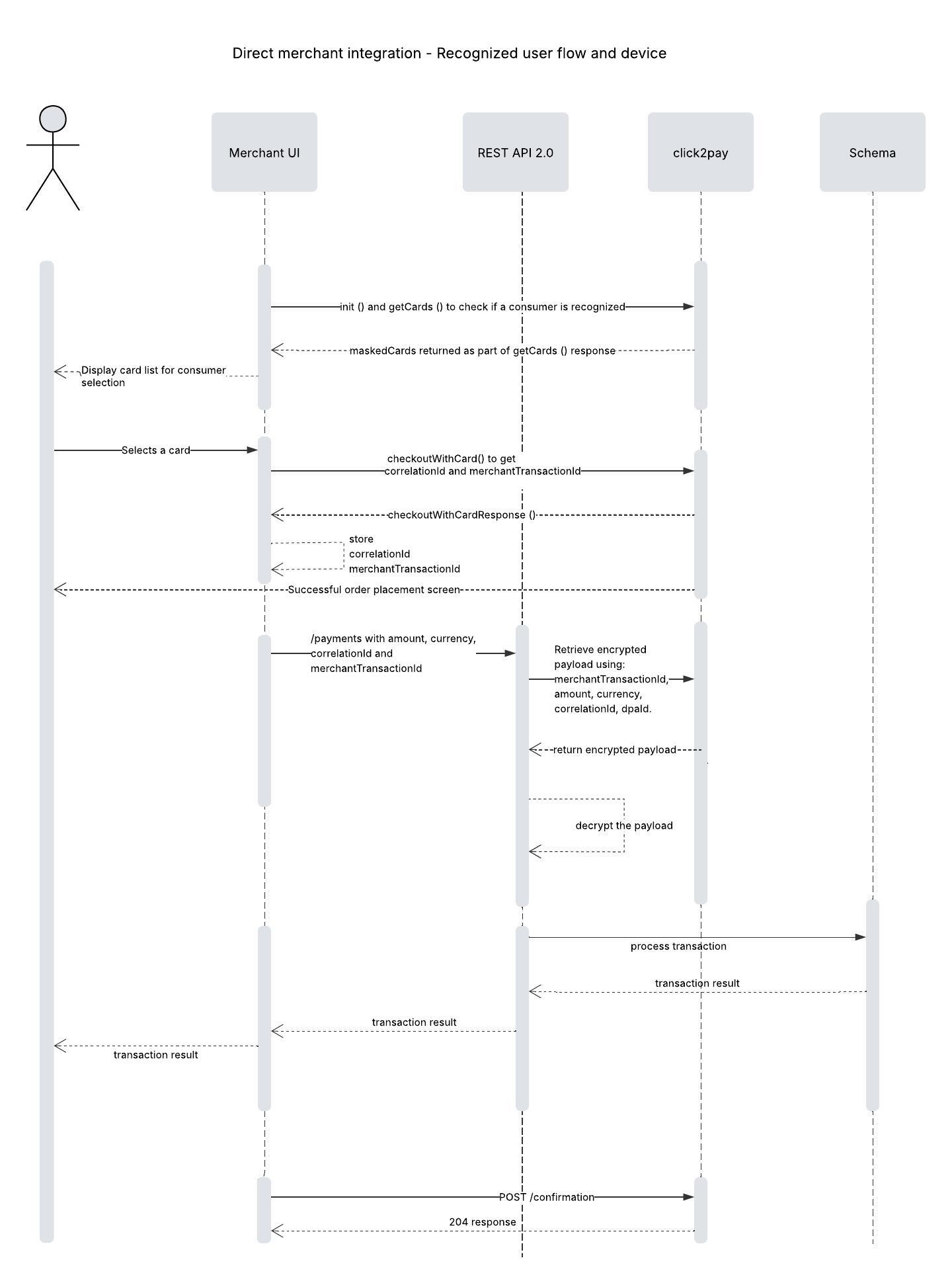
Payment Page (Cashier)
One-time Password (OTP)
Passkey
 Last modified September 2026