
Attributes 
- METHOD TYPEBank Transfer
- PAYMENTS

- PAYOUTS

- REFUNDS
- RECURRING
Introduction
VISA Direct to Account is a cross-border payment solution that enables a business to send a payout directly to a bank account using a global network. It partners with banking infrastructure to deliver funds to a recipient through a local transfer scheme.
Supported Countries
- Argentina
- Australia
- Brazil
- Canada
- Chile
- Colombia
- Costa Rica
- Egypt
- Ghana
- Hong Kong
- India
- Israel
- Japan
- Kenya
- Malaysia
- Mexico
- Morocco
- Nepal
- Pakistan
- Peru
- Philippines
- Poland
- Romania
- Singapore
- South Africa
- Sri Lanka
- Turkey
- Uganda
- Uruguay
- United Arab Emirates
- United Kingdom
- United States of America
- Vietnam
Supported Currencies
- AED
- ARD
- AUS
- BRL
- CAD
- CLP
- COP
- CRC
- EGP
- GBP
- GHS
- HKD
- ILS
- INR
- JPY
- KES
- LKR
- MAD
- MXN
- MYR
- NPR
- PEN
- PHP
- PKR
- PLN
- RON
- SGD
- TRY
- UGX
- USD
- UYU
- VND
- ZAR
REST API 1.0
Payout (Withdrawal) Flow
- Generate a
sessionToken.
- Send an
/accountCapturerequest that includes the following mandatory fields as shown in the example request.userTokenId– Unique customer identifier in merchant system.paymentMethod– “apmgw_International_Transfers“currencyCode– Three-letter ISO currency code for a supported currency.countryCode– Two-letter ISO country code for a supported country where the currency is used.languageCode– Two-letter code.
Example /accountCapture Request
{
    "sessionToken": "",
    "merchantId": "{{merchantId}}",
    "merchantSiteId": "{{merchantSiteId}}",
    "userTokenId": "DanielREST_6644777722235_Visa",
    "paymentMethod": "apmgw_International_Transfers",
    "currencyCode": "USD",
    "countryCode": "US",
    "languageCode": "EN"
}
Example /accountCapture Response
{
    "internalRequestId": 1766049986428,
    "status": "SUCCESS",
    "errCode": 0,
    "reason": "",
    "merchantId": "5634436935940029474",
    "merchantSiteId": "242181",
    "version": "1.0",
    "sessionToken": "2357e32599d240b4a0778c154838b1fc0111",
    "redirectUrl": "https://apmtest.gate2shop.com/ppp/resources/cdn/v1/payment-details-899217.html?payloadUrl=https%3A%2f%2fjumpbox.safecharge.com%2fapm%2fvisaearthport%2fv1%2fpayload%3FSignature%3D3GDqr1Mnz3yi3bzNF885weGA3ptoLDNl93VQb6iYKP4%253D%26EncryptedId%3DEDD5DCEC946B5B14543FADDB6FF09788&returnUrl=https%3A%2f%2fjumpbox.safecharge.com%2fdmz%2fSmartConnector%2fBankCapture%2fEDD5DCEC946B5B14543FADDB6FF09788",
    "userTokenId": "DanielREST_6644777722235_Visa"
}
- Use the
redirectUrlto redirect the customer to an account details capture interface for them to enter account details. - Once the information is captured, Nuvei stores the data in a
userPaymentOptionId(UPO) identifier and sends a DMN with the newly createduserPaymentOptionId. - Send a
/payoutrequest and include theuserPaymentOptionId.
After the transaction is processed, Nuvei sends a DMN that includes the result of the transaction to urlDetails.notificationUrl, which Nuvei recommends including in the /payout request.
Example Payout DMN with Status=Approved
...wdOrderId=36607111&wdRequestId=41684111&gwTrxId=2610000000000649983¬ificationType=WITHDRAW_ORDER_NOTIFICATION&merchantSiteId=554117&merchantGwId=5634436935940029474&merchantLocale=en_US&wdRequestState=Closed&wdRequestStatus=Approved&wdOrderStatus=Settled&settlementType=WITHDRAWAL&gwErrCode=0&gwExtendedErrorCode=0&apmTrxId=2610000001042814&externalTransactionId=281474992662866&apmReferenceId=CC991B3EC1C0393D859BD33E9C5DBA92&apmErrorCode=0&firstName=John&lastName=Doe&userTokenId=daniel_visaAuto_20260826142051787&zip=M6T+1J1&city=Ontario&country=TR&phone1=1234567890&email=john.doe%40nuvei.com&address=Test+Address&amount=50.00&approvedAmount=50.00¤cy=TRY&userId=UID&userPMId=230785693111&paymentMethod=apmgw_International_Transfers&version=1.0&pmDisplayName=TR190006200009112345678901&customField1=meccabingo.com&customField3=333&client_ip=172.30.42.150&wdOrderAmount=50.00&wdOrderCurrency=TRY&responseTimeStamp=2026-08-27.09%3A11%3A06&ExternalaccountID=TR190006200009112345678901&feeAmount=0.0&transactionAmount=50.0&merchantUniqueId=AT_CY_20260826_142051_45458361&upoRegistrationDate=20260826&apmPayerInfo=%5B%7B%22name%22%3A%22ExtraTransactionInfo%22%2C%22value%22%3A%22%7B%5C%22paymentRail%5C%22%3A%5C%22SWIFT%5C%22%7D%22%7D%5D&acquirerBank=Direct2AccountVisaMS+Direct&checksum=d17f5fec386482293c2dbfdde668da1d
Web SDK
For information about the Withdrawal flow for the Nuvei Web SDK, see Withdrawal.
User Experience
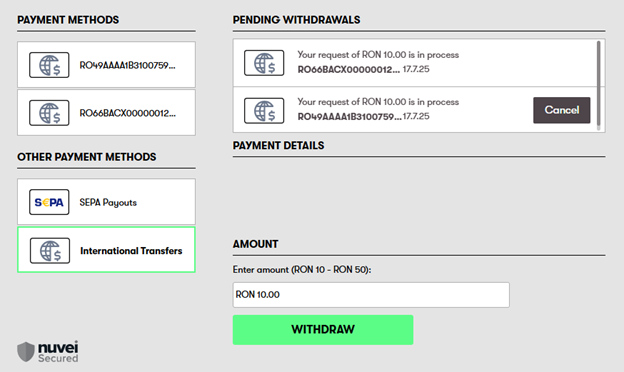
- The customer selects withdrawal on cashier page.
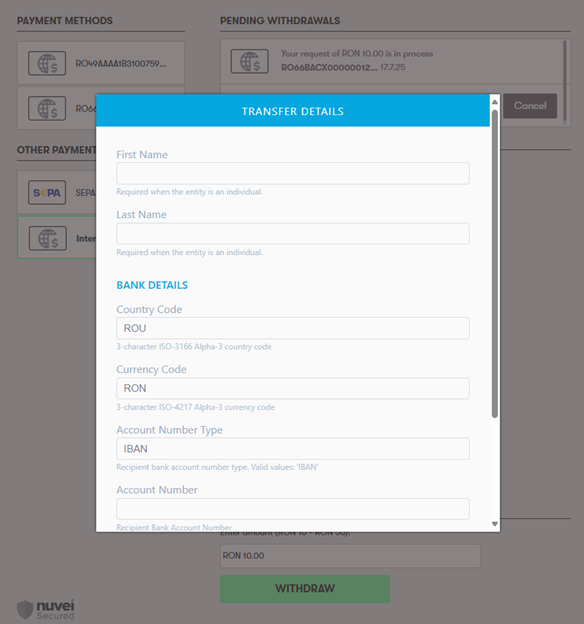
- The customer is redirected to the Account Capture page for collection of necessary details in ‘Transfer Details’.
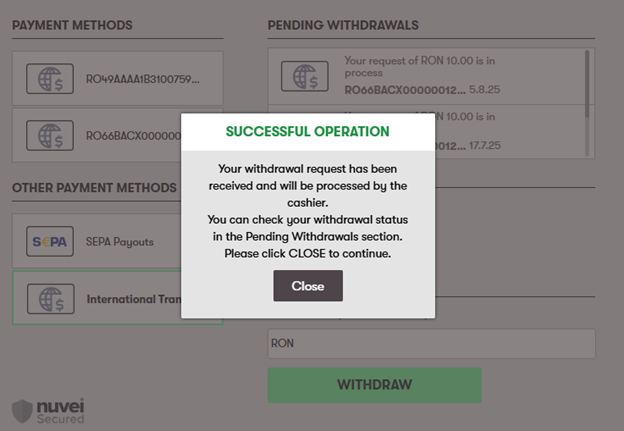
- If the operation is successful, the customer receives a message that the request is accepted.
Testing
For the Account Capture page, any data that is valid can be used; however, no final status of the Payout is provided.
 Last modified October 2026