
Overview
This topic provides information about specific functionality supported by a Web SDK 2.0 integration.
Dynamic Sizing of 3DS Challenge Window
In a Web SDK 2.0 integration, an end-user could perform payments via 3D Secure (3DS) on different devices with different screen sizes (resolutions). Dynamic adjustment of the size of the 3DS challenge window in relation to the type of user device significantly improves both user-experience and performance.
Parameter Mapping
Web SDK 2.0 automatically recognizes the width of a device screen via the innerWidth parameter value and determines a corresponding 3DS challengeWindowSize parameter value for inclusion in the payment request. The following table provides the deployed mapping of device screen innerWidth parameter values and 3DS challengeWindowSize parameter values.
| innerWidth parameter (screen width) | challengeWindowSize parameter |
|---|---|
| Not detected | Existing implementation (05) |
| x | 05 |
| 250 ≤ x | 01 |
| 390 ≤ x | 02 |
| 500 ≤ x | 03 |
| x ≥ 600 | 04 |
Examples
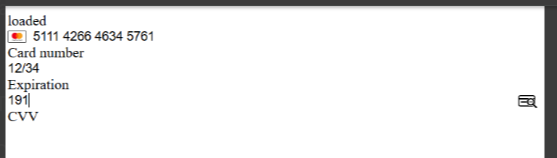
Example of challengeWindowSize = 04 and platformType = 02
{
"challengeWindowSize": "04",
"platformType": "02"
}
Example of Resulting Challenge Window for challengeWindowSize = 04 and platformType = 02
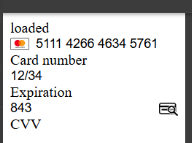
Example of challengeWindowSize = 05 and platformType = 02
{
    "challengeWindowSize": "05",
    "platformType": "02"
}
Example of Resulting Challenge Window for challengeWindowSize = 05 and platformType = 02
 Last modified May 2026