
Overview
This section provides an overview of the Documentation Assistant, including features, benefits, and privacy and security information. The Nuvei Documentation Assistant is an AI-powered tool that helps you find answers about Nuvei’s payment platform directly inside the AI coding assistant you already use.
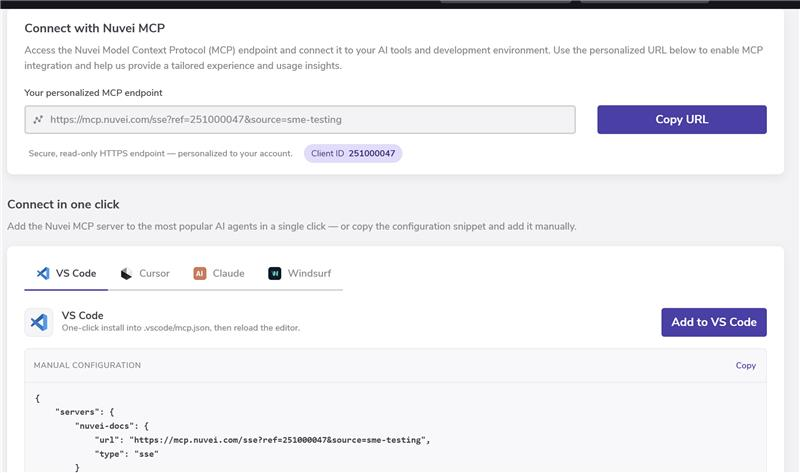
The Nuvei Documentation Assistant is exposed as a public Model Context Protocol (MCP) server. You can connect the MCP server to an AI-powered agent (such as GitHub Copilot, Claude Code, Cursor, or Windsurf). Once connected, you can ask questions or give directives in natural language and obtain accurate, up-to-date answers sourced from Nuvei’s official documentation.
The Control Panel provides the MCP endpoint, a connection wizard, and tools at: https://sandbox.nuvei.com/settings/my_account?tab=mcp_config
Features
- Instant answers – No more searching manually through long documentation pages. Ask a question and get a clear, focused answer in seconds.
- Source citations – Every answer includes links to Nuvei’s official documentation so you can verify information and dive deeper when needed.
- Always up to date – The Documentation Assistant uses the latest Nuvei docs, so you’re always working with current information.
- Context-aware help – The Documentation Assistant understands payment terminology and common integration flows, and can help with (for example):
- API integration steps
- Code examples
- Best practices
- Troubleshooting common issues
- SDK usage patterns
Benefits
This section outlines key benefits of using the Documentation Assistant.
- Save time – Find answers in seconds instead of searching through documentation manually.
- Reduce errors – Answers are grounded in Nuvei’s official docs, helping you implement features correctly.
- Learn faster – Explanations and examples help you understand payment concepts and Nuvei-specific flows quickly.
- Build confidently – You always have quick access to best practices, working examples, and verified information.
Privacy and Security
This section provides information about privacy and security in relation to the Documentation Assistant.
- Secure queries – Your questions are processed securely. The MCP server is read-only over HTTPS and only serves documentation content.
- No payment data required – You should never send real card data, credentials, or other sensitive information within your prompts. Use test data or describe the issue in abstract terms.
- No sensitive data stored – Nuvei does not store payment data or sensitive personal information from your prompts. Prompt content may be used in an aggregated/anonymized way to improve answer quality and documentation coverage.
- Enterprise-grade standards – The Documentation Assistant is built to align with Nuvei’s existing security and compliance standards. It is a safe, read-only companion to your integration work.
The Nuvei Documentation Assistant gives your existing AI coding tools deep knowledge of Nuvei’s platform. Connect the MCP server once and your agent becomes a Nuvei-aware copilot that helps you integrate faster, with fewer errors, and with much less time spent hunting through docs.
Using the Documentation Assistant
After your MCP server is configured and your agent recognizes nuvei-docs, the workflow is as follows:
- Open your AI chat panel in your IDE/agent.
- Ask a question or provide a directive in natural language, for example:
- “How do I integrate Nuvei’s payment SDK in Node.js?”
- “Show me how to process a credit card payment with Nuvei.”
- “What parameters does the Nuvei payment API accept?”
- “How do I handle webhook notifications for Nuvei?”
- The agent does the following:
- Calls the Nuvei MCP server.
- Retrieves relevant documentation sections.
- Generates an answer and usually includes inline explanations and documentation links.
Example Prompts
The following are examples of prompts you can use.
Integration
- “How do I initialize the Nuvei payment form?”
- “What’s the process for tokenizing a credit card?”
- “Show me how to implement Apple Pay with Nuvei.”
- “Show me how to process a credit card payment.”
- “How do I integrate Nuvei’s payment SDK?”
- “How do I handle webhook notifications?”
- “Give me an example of a 3D Secure transaction.”
Troubleshooting
- “Why is my payment failing with error code 1001?”
- “How do I test payments in sandbox mode?”
- “What should I do if a webhook isn’t received?”
API Reference
- “What are the required fields for a payment request?”
- “What parameters does the payment API accept?”
- “How do I refund a transaction?”
- “Which response codes should I handle for declines?”
 Last modified October 2026