

- METHOD TYPEBank Transfer
- PAYMENTS

- PAYOUTS

- REFUNDS
- RECURRING
Introduction
CoDi® is a payment method created by the Central Bank of Mexico (Banco de México) that enable real-time collections with QRs and push notification messages to the end user’s banking applications.
Supported Countries
- Mexico
Supported Currencies
- MXN
Payment (Deposit) Flow
Follow these steps to perform a payment using Nuvei REST API integration:
1. Generate a sessionToken
Press here for details.
2. Send a /payment Request
Perform the payment by sending a /payment request with its mandatory parameters including:
userTokenIdamountcurrencypaymentOption.alternativePaymentMethodclass containing:paymentMethod: “apmgw_CoDi“codi_method: <“qr” or “notification“>codi_phone_number
deviceDetailsclass containing:ipAddressbillingAddressclass containing:firstName,lastName,country,emailuserDetailsclass containing:firstName,lastName,country,email
Example /payment Request
{
  "sessionToken":"<sessionToken from /getSessionToken>",
  "merchantId":"<your merchantId>",
  "merchantSiteId":"<your merchantSiteId>",
  "clientRequestId":"<unique request ID in merchant system>",
  "amount":"200",
  "currency":"MXN",
  "userTokenId":"<unique customer identifier in merchant system>",
  "clientUniqueId":"<unique transaction ID in merchant system>",
  "paymentOption":{
    "alternativePaymentMethod":{
      "paymentMethod":"apmgw_CoDi",
      "codi_method": "notification",
      "codi_phone_number": "<mobile phone number>" //Mandatory only when codi_method is set to "notification"
    }
  },
  "deviceDetails":{
    "ipAddress":"<customer's IP address>"
  },
  "billingAddress": {
    "firstName": "John",
    "lastName": "Smith",
    "country": "MX",
    "email": "[email protected]"
  },
  "userDetails":{
    "firstName": "John",
    "lastName": "Smith",
    "country": "MX",
    "email": "[email protected]"
  },
  "timeStamp":"<YYYYMMDDHHmmss>",
  "checksum":"<calculated checksum>"
}
The response generates and returns a redirect URL (redirectUrl) to redirect the customer to the payment page, as well as a UPO (userPaymentOptionId) for use in future transactions.
Example /payment Response
{
"orderId":"341413598",
"userTokenId":"Usertoken01",
"paymentOption":{
"redirectUrl":"https://apmtest.gate2shop.com/ppp/resources/cdn/v1/qr-code-41205.html?reference=B6C271618CEEBA65BC04D81B31F549C5&amount=106.00¤cy=MXN&description=Deposit&qrCodeSource=%7b%22TYP%22%3a20%2c%22v%22%3a%7b%22DEV%22%3a%2200000161803561219721%2f2%22%7d%2c%22ic%22%3a%7b%22IDC%22%3a%222f5f4ae660%22%2c%22SER%22%3a57913613%2c%22ENC%22%3a%22b8OFHEq5wbFDLXUMPqCnKagl0GiEw2a2fq4jcgS%2bqMd5O9EZDVwB3LTGTmg5Z6UeVvy2IItB2Uow1yzAbgowMtF3SfcUCHHGJHM%2ff9%2fK5Hfzlr9EvQMzKCl7Piq31k0itEBAfEPDleE4nJKu1kS0OwN7Ymco8UkrQWNRyNVyqPCCvQBfaZowz2W8aAgiZZF0VsNCBYmPcDOqQxw3J1s2kY8%2b379unJeqbmXIlZSOYGl3h5gI4PkUHlbRJuJMiiy%2bHn9SiUmGX5NJSuZ3xfV0RbCcVMTsvCfSR%2bc4RRxqtcUpOokgoNEbP2416fDhtjvO3kX4VpizXCDk4L8OSLYSeWQk1Q0Hc5BpEXDYT%2bhDictNcga0yUJEfKBIJxGrGJyv%22%7d%2c%22CRY%22%3a%22OZG6sXk90VplY0Zov592jKa%2f%2bCddKgcT7CnhGm%2fV0Hw%3d%22%7d&expirationDate=31-10-2023&expirationTime=17%3a28%3a11",
"userPaymentOptionId":"83246818",
},
"transactionStatus":"REDIRECT",
"sessionToken":"f43d774a-a180-4935-bbc1-1315bb4dc203",
"internalRequestId":549917488,
"status":"SUCCESS",
"errCode":0,
"reason":"",
"merchantId":"2439523627382132721",
"merchantSiteId":"224428",
"version":"1.0",
"clientRequestId":"20221104131500"
}After the transaction is processed, Nuvei sends a Direct Merchant Notification (DMN) that includes the result of the transaction to the URL provided in urlDetails.notificationUrl, which Nuvei recommends including in the /payment request.
User Experience
QR Code
- The user is redirected to CoDi payment page, which displays a QR code and transaction details.
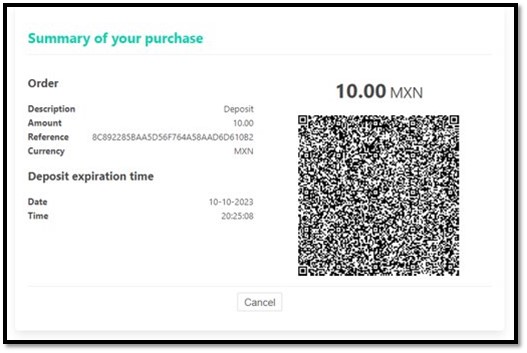
- The user scans the QR code using the CoDi mobile application on their smartphones and completes the payment.
Push Notification
- The user receives a push notification to the CoDi mobile application on their smartphones with transaction details.
- The user completes the payment on the application.
 Last modified February 2025