

- METHOD TYPECards
- PAYMENTS

- PAYOUTS
- REFUNDS
- RECURRING
Introduction
Nuvei’s Bancontact Mobile payment solution offers a merchant options for the initiation of payment, as described in the following table.
| Initiation Type | Initiation Flow | Same Device Used for Purchasing and Payment | Different Devices Used for Purchasing and Payment |
|---|---|---|---|
| Nuvei Hosted Payment Page | Merchant redirects the user to the Nuvei’s Bancontact payment page (see User Experience), which includes both a QR code and a payment app launch button. | Yes | Yes |
| QR code generation by merchant | Merchant generates a Bancontact payment QR code using the metadata received from Nuvei and presents it on their website, allowing the user to scan it with their mobile device. | No | Yes |
| Payment app redirect | Merchant uses a URL received from Nuvei to redirect the user to the Bancontact payment app installed on his mobile. | Yes | No |
Supported Countries
- Belgium
Supported Currencies
- EUR
Supported Transaction Types
The Bancontact Mobile solution allows merchants and customers to perform the transaction types described in the following table.
| Transaction Type | Description | Authentication Method |
|---|---|---|
| E-Commerce QR Code | A card-not-present (CNP) payment transaction initiated when the customer scans a QR code with their Bancontact mobile app (applicable for cases where different devices are used for shopping and paying). | In-app authentication (fingerprint, code, etc.) |
| E-Commerce URL Intent | A CNP payment transaction initiated when the customer presses the button for opening their Bancontact mobile app (applicable for cases where the same device is used for shopping and paying). | In-app authentication (fingerprint, code, etc.) |
| Refund | A full/partial credit transaction initiated using Bancontact card details or a token for product returns or purchase cancellations. | N/A |
| Payout | Original credit transaction (OCT) initiated using Bancontact card details or a token for customer funding cases such as gambling winnings, insurance payouts, etc. | N/A |
| MIT/Recurring | An MIT/Recurring payment transaction initiated using Bancontact details or a token. Via the Bancontact Wallet Initiated Payments (WIP) service, subsequent recurring or installment payments are initiated by the merchant using card credentials stored in the merchant wallet with no need for customer action. Upon initial registration of the card in the merchant wallet, the customer gives consent by performing Strong Customer Authentication (SCA). Currently limited to €1,500 per transaction. | N/A |
| One-click | A card-not-present (CNP) payment transaction initiated via the Bancontact Wallet Initiated Payments (WIP) service. The customer logs into the merchant wallet and confirms the stored card credentials at checkout. Upon initial registration of the card in the merchant wallet, the customer gives consent by performing Strong Customer Authentication (SCA). Currently limited to €500 per transaction. | N/A |
Payment (Deposit) Flow Diagram
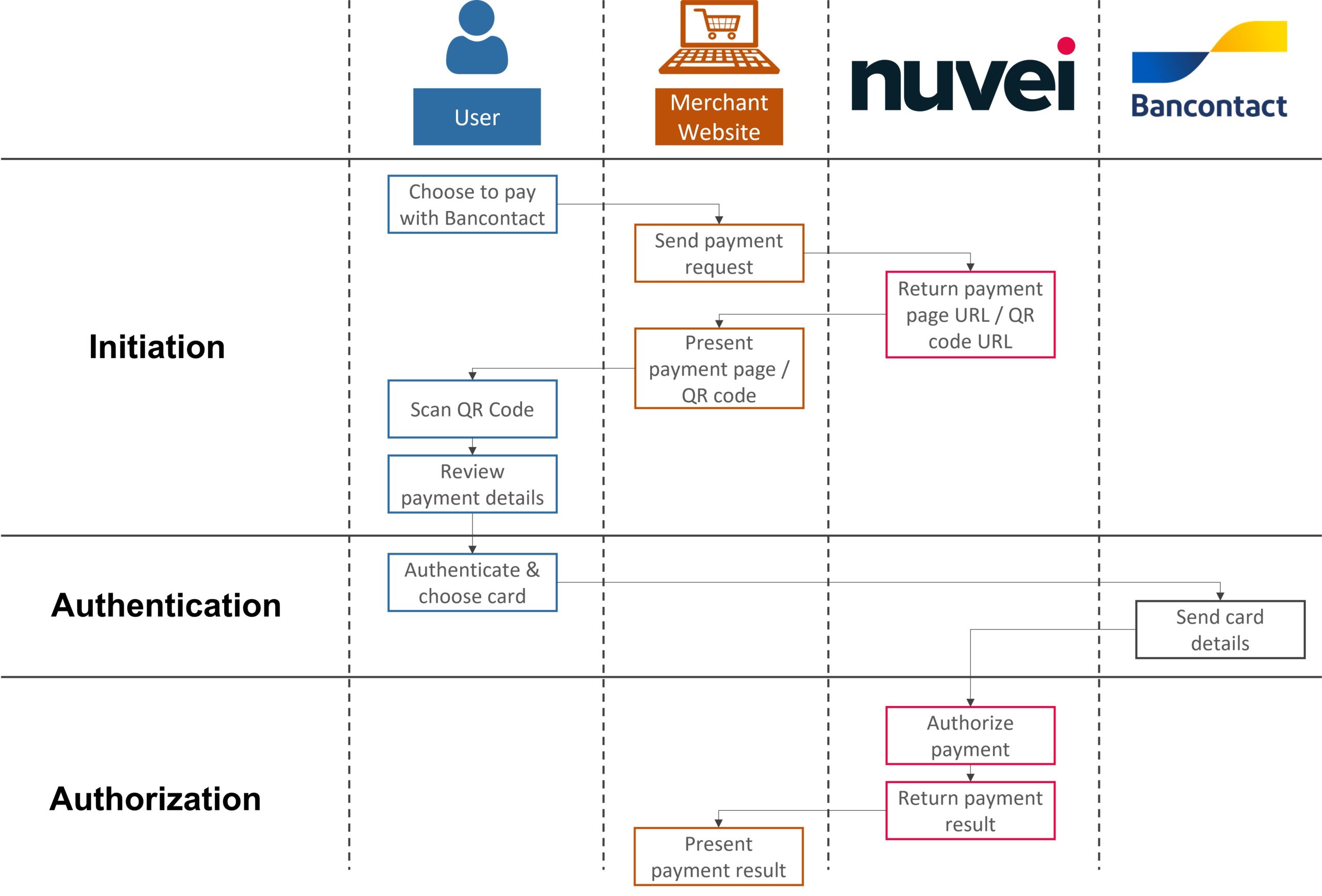
REST API 1.0
Payment (Deposit) Flow
Follow these steps to perform a payment using Nuvei REST API integration:
1. Generate a sessionToken
Press here for details.
2. Send a /payment Request
Perform the payment by sending a /payment request with its mandatory parameters, including:
userTokenIdamountcurrencypaymentOption.alternativePaymentMethodclass containing:paymentMethod: “apmgw_Bancontact_DI“
deviceDetailsclass containing:ipAddressbillingAddressclass containing:firstName,lastName,country,emailuserDetailsclass containing:firstName,lastName,country,emailurlDetailsclass containing:successUrl,failureUrl,pendingUrl,appUrl
Example /payment Request
{
  "sessionToken": "<sessionToken from /getSessionToken>",
  "merchantId": "<your merchantId>",
  "merchantSiteId": "<your merchantSiteId>",
  "clientRequestId": "<unique request ID in merchant system>",
  "amount": "100",
  "currency": "EUR",
  "userTokenId": "<unique customer identifier in merchant system>",
  "clientUniqueId": "<unique transaction ID in merchant system>",
  "paymentOption": {
    "alternativePaymentMethod": {
      "paymentMethod": "apmgw_Bancontact_DI"
    }
  },
  "deviceDetails": {
    "ipAddress": "<customer's IP address>"
  },
  "billingAddress": {
    "firstName": "John",
    "lastName": "Smith",
    "address": "22 Main Street",
    "city": "Brussels",
    "country": "BE",
    "email": "[email protected]",
    "phone": "323094526617",
    "zip": "1000"
  },
  "userDetails": {
    "firstName": "John",
    "lastName": "Smith",
    "address": "22 Main Street",
    "city": "Brussels",
    "country": "BE",
    "email": "[email protected]",
    "phone": "323094526617",
    "zip": "1000",
    "dateOfBirth": "2000-06-30",
    "gender": "Male"
  },
  "urlDetails": {
    "successUrl": "<URL the customer is directed to after a successful transaction>",
    "failureUrl": "<URL the customer is directed to after an unsuccessful transaction>",
    "pendingUrl": "<URL the customer is directed to when the transaction response is pending>",
    "notificationUrl": "<URL to which DMNs are sent>",
    "appUrl": "<link to which the provider redirects the user at the end of the payment process>"
  },
  "timeStamp": "YYYYMMDDHHmmss>",
  "checksum": "<calculated checksum>"
}
Example /payment Response – Nuvei Hosted Payment Page
{
"internalRequestId": 51672978106,
"status": "SUCCESS",
"errCode": 0,
"reason": "",
"merchantId": "427583496191624621",
"merchantSiteId": "142033",
"version": "1.0",
"clientRequestId": "1C6CT7V1L",
"sessionToken": "9e568da7-e5f7-437f-a400-848309c51e23",
"clientUniqueId": "12345",
"orderId": "47472448966",
"userTokenId": "230811147",
"paymentOption": {
"redirectUrl": "https://cdn.safecharge.com/safecharge_resources/v1/qr-code-21382.html?qrCode=BEP://1BANCONTACTTMA.NUVEI.COM%2FBC%2FIPN%2FC478553BB431DACCEB6F8609D0F58AAD%2475B482599428AD3AC6D59E6B&requestDate=2023-10-03 14:18:19.850&merchantName=ProdTest&amount=1.00¤cy=EUR&orderReference=2130000314658071&orderId=47472448966&wss=wss://ws.nuvei.com&sessionid=542a20fd51ca60c8bdf8ddcb14a7",
"userPaymentOptionId": "3144614656",
"card": {}
},
"transactionStatus": "REDIRECT"
}
Example /payment Response – QR Code Generation by Merchant
{
    "internalRequestId": 51379590866,
    "status": "SUCCESS",
    "errCode": 0,
    "reason": "",
    "merchantId": "427583496191624621",
    "merchantSiteId": "142033",
    "version": "1.0",
    "clientRequestId": "1C6CT7V1L",
    "sessionToken": "e8baa991-9cdc-407c-841e-44597da42bd9",
    "clientUniqueId": "12345",
    "orderId": "47263813886",
    "userTokenId": "230811147",
    "paymentOption": {
        "redirectUrl": "BEP://1BANCONTACTTMA.NUVEI.COM/BC/IPN/757D9C02EE6B8EB2DA5928CBA0767D0C$77A8335CDBB8CC57C47CEE54",
        "userPaymentOptionId": "3126116956",
        "card": {}
    },
    "transactionStatus": "REDIRECT"
}
Example /payment Response – Payment App Redirect
{
"internalRequestId": 51206450946,
"status": "SUCCESS",
"errCode": 0,
"reason": "",
"merchantId": "427583496191624621",
"merchantSiteId": "142033",
"version": "1.0",
"clientRequestId": "1C6CT7V1L",
"sessionToken": "de3a397b-7cd2-44d7-9533-36d58f19b2d1",
"clientUniqueId": "12345",
"orderId": "47141663766",
"userTokenId": "230811147",
"paymentOption": {
"redirectUrl": "{\"QRCode\":\"BEP://1BANCONTACTTMA.NUVEI.COM/BC/IPN/00E155D5174EEB7799956416E468AAB0$F1C0ADCDFBC4D4507F1C27CA\",\"APPLink\":\"BEPGenApp://DoTx?TransId=1BANCONTACTTMA.NUVEI.COM/BC/IPN/00E155D5174EEB7799956416E468AAB0$F1C0ADCDFBC4D4507F1C27CA\",\"RedirectUrl\":\"https://cdn.safecharge.com/safecharge_resources/v1/qr-code-21382.html?qrCode=BEP://1BANCONTACTTMA.NUVEI.COM%2FBC%2FIPN%2F00E155D5174EEB7799956416E468AAB0%24F1C0ADCDFBC4D4507F1C27CA&requestDate=2023-09-26 16:08:26.620&merchantName=ProdTest&amount=1.00¤cy=EUR&orderReference=1120000008046520&orderId=47141663766&wss=wss://ws.nuvei.com&sessionid=19aedeab3edfc1d8369c94f5e3f3\"}",
"userPaymentOptionId": "3115389756",
"card": {}
},
"transactionStatus": "REDIRECT"
}
After the transaction is processed, Nuvei sends a Direct Merchant Notification (DMN) that includes the result of the transaction to urlDetails.notificationUrl, which Nuvei recommends including in the /payment request.
Web SDK
Follow these steps to perform a payment using Nuvei Web SDK integration.
1. Initiate a Session
Before you can submit payment using the client-side Nuvei Web SDK, you need to send the /openOrder API call.
2. Initialize the Web SDK
Instantiate the Web SDK with the sessionToken received from the server call to /openOrder.
3. Create an APM Payment
Send a createPayment() request with its mandatory parameters including:
paymentOption.alternativePaymentMethodclass containing:paymentMethod:“apmgw_Bancontact_DI“
deviceDetailsclass containing:ipAddressbillingAddressclass containing:firstName,lastName,country,email,address,phone,city,zipuserDetailsclass containing:firstName,lastName,country,email,address,phone,city,zipurlDetailsclass containing:successUrl,failureUrl,pendingUrl,appUrl
Example createPayment() Request
sfc.createPayment({
  sessionToken: "<sessiontoken>",
  paymentOption : {
    alternativePaymentMethod: {
      paymentMethod: "apmgw_Bancontact_DI"
  }},
  deviceDetails:{
    ipAddress:"<customer's IP address>"
  },
  billingAddress: {
    firstName: "John",
    lastName: "Smith",
    country: "BE",
    email:"[email protected]",
    phone: "323094526617",
    address: "22 Main Street",
    city: "Brussels",
    zip: "1000"
  },
  userDetails: {
    firstName: "John",
    lastName: "Smith",
    country: "BE",
    email:"[email protected]",
    phone: "323094526617",
    address: "22 Main Street",
    city: "Brussels",
    zip: "1000"
  },
  urlDetails: {
    successUrl: "<URL the customer is directed to after a successful transaction>",
    failureUrl: "<URL the customer is directed to after an unsuccessful transaction>",
    pendingUrl: "<URL the customer is directed to when the transaction response is pending>",
    notificationUrl: "<URL to which DMNs are sent>",
    appUrl: "<link to which the provider redirects the user at the end of the payment process>"
  },
}, function(res) {
      console.log(res);
});
Example createPayment() Response
{
"internalRequestId": 50704983196,
"status": "SUCCESS",
"errCode": 0,
"reason": "",
"merchantId": "5555385017539610145",
"merchantSiteId": "171738",
"version": "1.0",
"clientRequestId": null,
"hint": null,
"resultStatus": null,
"resultCode": null,
"resultDescription": null,
"sessionToken": "9f3caa1b-eb03-459e-a8ef-e31d8470a7af",
"clientUniqueId": "12345",
"orderId": "46784400856",
"userTokenId": "testUserToken1234",
"paymentOption": {
"redirectUrl": "https://cdn.safecharge.com/safecharge_resources/v1/qr-code-21382.html?qrCode=BEP://1BANCONTACTTMA.NUVEI.COM%2FBC%2FIPN%2FC478553BB431DACCEB6F8609D0F58AAD%2475B482599428AD3AC6D59E6B&requestDate=2023-10-03 14:18:19.850&merchantName=ProdTest&amount=1.00¤cy=EUR&orderReference=2130000314658071&orderId=47472448966&wss=wss://ws.nuvei.com&sessionid=542a20fd51ca60c8bdf8ddcb14a7",
"userPaymentOptionId": ""
"card": {}
},
"transactionStatus": "REDIRECT",
}
After the transaction is processed, Nuvei sends a Direct Merchant Notification (DMN) that includes the result of the transaction to urlDetails.notificationUrl, which Nuvei recommends including in the /openOrder request.
Payout (Withdrawal) Flow
Payout Using UPO
Send a
/payout request with its mandatory parameters including:
userTokenId- A previously generated
userPaymentOptionId
Example /payout Request with UPO
{
  "merchantId": "<your merchantId>",
  "merchantSiteId": "<your merchantSiteId>",
  "userTokenId": "<unique user identifier in merchant system>",
  "clientUniqueId": "<unique transaction ID in merchant system>",
  "clientRequestId": "<unique request ID in merchant system>",
  "amount": "200",
  "currency": "EUR",
  "userPaymentOption": {
    "userPaymentOptionId": "<UPO received from a previous request>"
  },
  "deviceDetails": {
    "ipAddress": "<customer's IP address>"
  },
  "timeStamp": "<YYYYMMDDHHmmss>",
  "checksum": "<calculated checksum>"
}
Example /payout Response with UPO
{
  "userTokenId":"EV013",
  "clientUniqueId":"20230329125742",
  "transactionStatus":"APPROVED",
  "gwErrorCode":0,
  "gwExtendedErrorCode":0,
  "userPaymentOptionId":"80244118",
  "externalTransactionId":"",
  "transactionId":"711000000021780909",
  "cardData":{
    "acquirerId":"19",
    "visaDirect":"NO"
  },
  "internalRequestId":639118498,
  "status":"SUCCESS",
  "errCode":0,
  "reason":"",
  "merchantId":"979047831696752006",
  "merchantSiteId":"217268",
  "version":"1.0"
}
After the transaction is processed, Nuvei sends a DMN that includes the result of the transaction to urlDetails.notificationUrl, which Nuvei recommends including in the /payout request.
Wallet Initiated Payments (WIP) Flow
MIT/Recurring and One-click transactions under the Bancontact Wallet Initiated Payments (WIP) flow are sent as /payment requests. The initial request is a standard Bancontact payment authenticated with SCA, which stores the card as a UPO. Subsequent requests use the UPO and are processed without SCA. WIP requires pre-approval of the merchant by Bancontact.
API Requirements for WIP
The following table describes the /payment parameters that must be sent for WIP in addition to the mandatory parameters described in Payment (Deposit) Flow).
| Transaction Type | Stored Credentials Mode | Subscription Step | Initial Transaction Reference |
|---|---|---|---|
| MIT/Recurring – Initial | 0 | I (initial) | Not sent |
| MIT/Recurring – Subsequent | 1 | S (subsequent) | Transaction ID of the initial transaction. |
| One-click – Initial | 0 | Not sent | Not sent |
| One-click – Subsequent | 1 | Not sent | Transaction ID of the initial transaction. |
Example Initial Transaction Request – One-click
{
    "sessionToken": "f6fc496f754d4da2977cb59261dd327f0121",
    "merchantId": "5555385017539610145",
    "merchantSiteId": "288139",
    "clientRequestId": "20260917183257",
    "timeStamp": "20260917183257",
    "checksum": "6dcb60cb6e784a3ec54d2acfd8412b7f7470232cc40af00f7fb8762771c343c3",
    "clientUniqueId": "DASOOM6L5B9C0",
    "paymentOption": {
        "alternativePaymentMethod": {
            "paymentMethod": "apmgw_Bancontact_DI"
        },
        "subMethod": {
            "subMethod": "oneClick"
        }
    },
    "currency": "EUR",
    "amount": "1",
    "deviceDetails": {
        "ipAddress": "1.1.1.1"
    },
    "userDetails": {

        "email": "[email protected]",
        "phone": "323094526618",
        "address": "23 Main Street",
        "city": "Brussels",
        "country": "BE",
        "zip": "1000",
        "dateOfBirth": "2000-06-30",
        "empty": false
    },
    "shippingAddress": null,
    "billingAddress": {

        "email": "[email protected]",
        "phone": "323094536611",
        "address": "23 Main Street",
        "city": "Brussels",
        "country": "BE",
        "zip": "1000",
        "allEmpty": false,
        "empty": false
    }
}
Example Initial Transaction Response – One-click
{
    "internalRequestId": 1789659178205,
    "status": "SUCCESS",
    "errCode": 0,
    "reason": "",
    "merchantId": "5555385017539610145",
    "merchantSiteId": "288139",
    "version": "1.0",
    "clientRequestId": "20260917183257",
    "sessionToken": "f6fc496f754d4da2977cb59261dd327f0121",
    "clientUniqueId": "DASOOM6L5B9C0",
    "orderId": "3990738216111",
    "paymentOption": {
        "redirectUrl": "https://secure.safecharge.com/ppp/bancontact.html?qrCode=BEP://1BANCONTACTTMA.NUVEI.COM....",
        "userPaymentOptionId": "123123233",
        "card": {}
    },
    "transactionStatus": "REDIRECT"
}
Example of Transaction Code Request – One-click
{
  "sessionToken": "f6fc496f754d4da2977cb59261dd327f0121",
    "merchantId": "5555385017539610145",
    "merchantSiteId": "288139",
    "clientRequestId": "20260917183257",
    "clientUniqueId" : "123123123",
    "timeStamp": "20260917183257",
    "checksum": "6dcb60cb6e784a3ec54d2acfd8412b7f7470232cc40af00f7fb8762771c343c3",
    "currency":"EUR",
    "amount":"1",
    "transactionType" : "Sale",
    "relatedTransactionId" : "2130000008030231733",
    "paymentOption":{

      "card":{
            "storedCredentials": {
        "storedCredentialsMode": "1"
    },

           "cardNumber": "5111111111111111",
            "cardHolderName": "John Smith",
            "expirationMonth": "02",
            "expirationYear": "30"

        }
    },
    "billingAddress":{
      "firstName":"John",
      "lastName":"Smith",
      "address":"340689 main St.",
      "city":"London",
      "country":"GB",
      "email":"[email protected]"
    },
    "deviceDetails":{
      "ipAddress":"93.146.254.172"
    }

}
User Experience
Nuvei-Hosted Payment Page
- The user is redirected to a payment page.
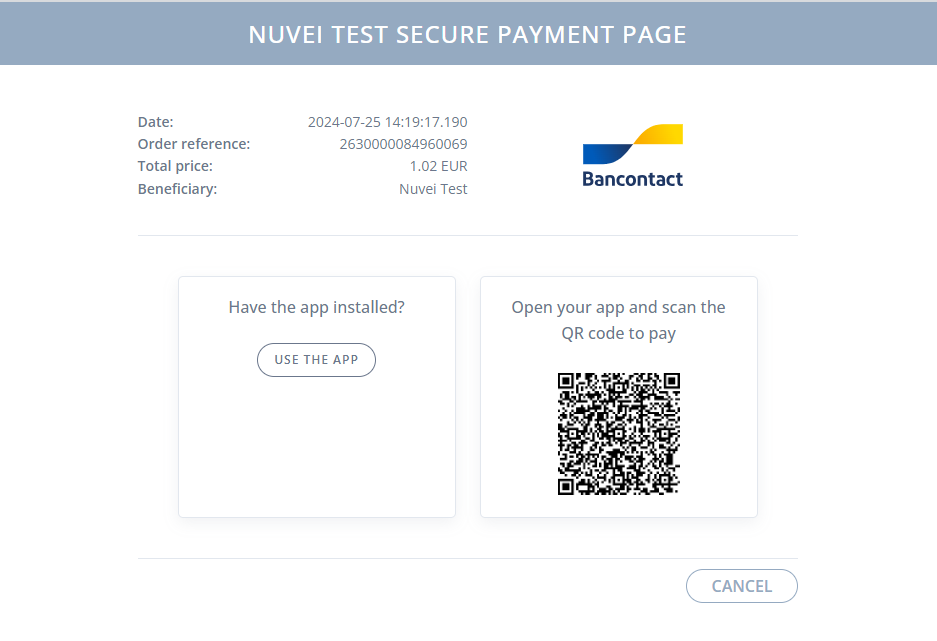
- The user either presses ‘Use the app’ or scans the QR code with the Bancontact mobile app to proceed to payment.
- In the app, the user:
-
- Reviews and confirms the transaction and merchant details.
- Performs in-app authentication (PIN code, fingerprint, and so on).
- Chooses a card for payment.
A successful/failed transaction message is displayed.
 Last modified September 2026