
- METHOD TYPEE-commerce
- PAYMENTS

- PAYOUTS

- REFUNDS
- RECURRING
Introduction
Zip is a global Buy Now Pay Later (BNPL) provider that offers flexible payment solutions to consumers and businesses by enabling the split of purchases into installments.
Zip supports partial refunds.
Supported Countries
- Australia
- United States
Supported Currencies
- AUD
- USD
Payment (Deposit) Flow
Press tab to open…
Follow these steps to perform a payment using Nuvei REST API integration:
1. Generate a sessionToken
Press here for details.
2. Send a /payment Request
Perform the payment by sending a /payment request with its mandatory parameters including:
userTokenIdamountcurrencypaymentOption.alternativePaymentMethodclass containing:paymentMethod:"apmgw_zip"account_id
deviceDetailsclass containing:ipAddressbillingAddressclass containing:firstName,lastName,country,emailuserDetailsclass containing:firstName,lastName,country,email
Example /payment Request
{
    "sessionToken": "b51e6cfcc1884cb595acfe878e62d1fa0111",
    "merchantId": "{{merchantId}}",
    "merchantSiteId": "{{merchantSiteId}}",
    "userTokenId": "SiltokenRO4021322rrr43tttt41",
    "clientUniqueId": "{{clientRequestId}}",
    "clientRequestId": "{{clientRequestId}}",
    "amount": "7",
    "currency": "AUD",
    "paymentOption": {
        "alternativePaymentMethod": {
            "paymentMethod": "apmgw_ZIP"
        }

},
    "billingAddress": {
        "firstName": "John",
        "lastName": "Doe",
        "country": "AU"
    },

"deviceDetails": {
        "ipAddress": "192.168.2.38"
    },
    "urlDetails": {
        "successUrl": "https://apmtest.gate2shop.com/ppp/defaultSuccess.do" ,
        "pendingUrl": "https://apmtest.gate2shop.com/ppp/defaultPending.do" ,
        "failureUrl": "https://apmtest.gate2shop.com/ppp/defaultCancel.do" ,
        "notificationUrl": "https://apmtest.gate2shop.com/ppptest/NotifyMerchantTest"
    },
    "timeStamp": "{{timestamp}}",
    "checksum": "{{checksum}}"
}
After the transaction is processed, Nuvei sends a Direct Merchant Notification (DMN) that includes the result of the transaction to the URL provided in urlDetails.notificationUrl, which Nuvei recommends including in the /payment request.
Follow these steps to perform a payment using Nuvei Web SDK integration.
1. Initiate a Session
Before you can submit payment using the client-side Nuvei Web SDK, you need to send the /openOrder API call.
2. Initialize the Web SDK
Instantiate the Web SDK with the sessionToken received from the server call to /openOrder.
3. Create an APM Payment
Send a createPayment() request with its mandatory parameters including:
paymentOption.alternativePaymentMethodclass containing:paymentMethod: “apmgw_zip“account_id
deviceDetailsclass containing:ipAddressbillingAddressclass containing:firstName,lastName,country,emailuserDetailsclass containing:firstName,lastName,country,email
After the transaction is processed, Nuvei sends a Direct Merchant Notification (DMN) that includes the result of the transaction to the URL provided in urlDetails.notificationUrl, which Nuvei recommends including in the /openOrder request.
- REST API
-
Follow these steps to perform a payment using Nuvei REST API integration:
1. Generate a
sessionTokenPress here for details.
2. Send a
/paymentRequestPerform the payment by sending a
/paymentrequest with its mandatory parameters including:userTokenIdamountcurrencypaymentOption.alternativePaymentMethodclass containing:paymentMethod:"apmgw_zip"account_id
deviceDetailsclass containing:ipAddressbillingAddressclass containing:firstName,lastName,country,emailuserDetailsclass containing:firstName,lastName,country,email
Example /payment Request
{
    "sessionToken": "b51e6cfcc1884cb595acfe878e62d1fa0111",
    "merchantId": "{{merchantId}}",
    "merchantSiteId": "{{merchantSiteId}}",
    "userTokenId": "SiltokenRO4021322rrr43tttt41",
    "clientUniqueId": "{{clientRequestId}}",
    "clientRequestId": "{{clientRequestId}}",
    "amount": "7",
    "currency": "AUD",
    "paymentOption": {
        "alternativePaymentMethod": {
            "paymentMethod": "apmgw_ZIP"
        }

},
    "billingAddress": {
        "firstName": "John",
        "lastName": "Doe",
        "country": "AU"
    },

"deviceDetails": {
        "ipAddress": "192.168.2.38"
    },
    "urlDetails": {
        "successUrl": "https://apmtest.gate2shop.com/ppp/defaultSuccess.do" ,
        "pendingUrl": "https://apmtest.gate2shop.com/ppp/defaultPending.do" ,
        "failureUrl": "https://apmtest.gate2shop.com/ppp/defaultCancel.do" ,
        "notificationUrl": "https://apmtest.gate2shop.com/ppptest/NotifyMerchantTest"
    },
    "timeStamp": "{{timestamp}}",
    "checksum": "{{checksum}}"
}
After the transaction is processed, Nuvei sends a Direct Merchant Notification (DMN) that includes the result of the transaction to the URL provided in
urlDetails.notificationUrl, which Nuvei recommends including in the/paymentrequest. - Web SDK
-
Follow these steps to perform a payment using Nuvei Web SDK integration.
1. Initiate a Session
Before you can submit payment using the client-side Nuvei Web SDK, you need to send the
/openOrderAPI call.2. Initialize the Web SDK
Instantiate the Web SDK with the
sessionTokenreceived from the server call to/openOrder.3. Create an APM Payment
Send a
createPayment()request with its mandatory parameters including:paymentOption.alternativePaymentMethodclass containing:paymentMethod: “apmgw_zip“account_id
deviceDetailsclass containing:ipAddressbillingAddressclass containing:firstName,lastName,country,emailuserDetailsclass containing:firstName,lastName,country,email
After the transaction is processed, Nuvei sends a Direct Merchant Notification (DMN) that includes the result of the transaction to the URL provided in
urlDetails.notificationUrl, which Nuvei recommends including in the/openOrderrequest.
User Experience
Deposit
- The customer selects the Zip payment method.
- The customer is redirected to a Zip screen to log into the Zip account.
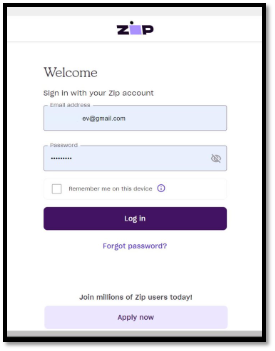
- The customer selects a payment method via Zip Pay or Zip Money.
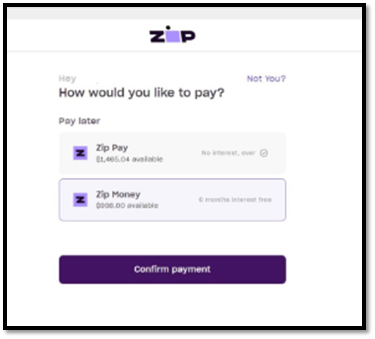
If successful, purchase completion is confirmed.
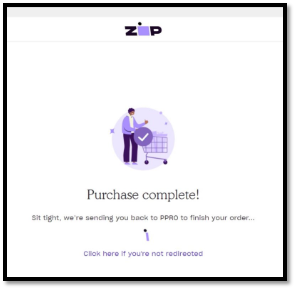
Testing
Australia
- user – [email protected]
- password – test1234
- Verification code: 123456
 Last modified December 2025