
- METHOD TYPEBank Transfer
- PAYMENTS

- PAYOUTS

- REFUNDS
- RECURRING
Introduction
Poland Instant Payout is used in Poland for withdrawals.
Supported Countries
- Poland
Supported Currencies
- PLN
Payout (Withdrawal) Flow
Follow these steps to perform a payout:
1. Register a userTokenId
A userTokenId is a field in the Nuvei system containing the user’s identifier in the merchant system.
If you do not have a userTokenId registered in the Nuvei system for this user, then register one by sending a /createUser request, including firstName, lastName, address, city, postalCode, dateOfBirth.
The following parameters are mandatory to minimize transactions held by the RFI process:
dateOfBirthaddress(for example: 1 Ząbkowska Street)citypostalCode
Example /createUser Request
{
  "merchantId":"<your merchantId>",
  "merchantSiteId":"<your merchantSiteId>",
  "clientRequestId":"<unique request ID in merchant system>",
  "userTokenId":"<unique user identifier in merchant system>",
  "countryCode":"PL",
  "email":"[email protected]",
  "firstName":"John",
  "lastName":"Smith",
  "dateOfBirth":"2000-06-30",
  "address":"1 Ząbkowska Street",
  "city":"Warsaw",
  "postalCode":"03-735"
  "timeStamp":"<YYYYMMDDHHmmss>",
  "checksum":"<calculated checksum>"
}
The request registers the userTokenId in the Nuvei system, which is then used to generate a UPO in the next step
Example /createUser Response
{
  "userId":78403498,
  "internalRequestId":552360538,
  "status":"SUCCESS",
  "errCode":0,
  "reason":"",
  "merchantId":"2439523627382132721",
  "merchantSiteId":"224428",
  "version":"1.0",
  "clientRequestId":"20221108130736"
}
After the transaction is processed, Nuvei sends a Direct Merchant Notification (DMN) that includes the result of the transaction to the URL provided in urlDetails.notification, which Nuvei recommends including in the /createUser request.
2. Create the UPO
Create a UPO by sending an /addUPOAPM request and include:
userTokenId– The unique user identifier in your system.paymentMethodName:"apmgw_Poland_Instant_Payout"apmDataclass containing:poland_instant_payout_iban– User’s IBAN
OR
-
poland_instant_payout_nrb– User’s NRB
billingAddressclass containing:countryandemail
Example /addUPOAPM Request (with IBAN)
{
  "merchantId":"<your merchantId>",
  "merchantSiteId":"<your merchantSiteId>",
  "userTokenId":"<unique customer identifier in merchant system>",
  "clientRequestId":"<unique request ID in merchant system>",
  "paymentMethodName":"apmgw_Poland_Instant_Payout",
  "apmData": {
        "poland_instant_payout_iban": "GB75CLRB04066800000871"
        },
  "billingAddress":{
  "country":"PL",
  "email":"[email protected]"
  },
  "timeStamp":"<YYYYMMDDHHmmss>",
  "checksum":"<calculated checksum>"
  }
Example /addUPOAPM Request (with NRB)
{
  "merchantId":"<your merchantId>",
  "merchantSiteId":"<your merchantSiteId>",
  "userTokenId":"<unique customer identifier in merchant system>",
  "clientRequestId":"<unique request ID in merchant system>",
  "paymentMethodName":"apmgw_Poland_Instant_Payout",
  "apmData": {
        "poland_instant_payout_nrb": "10109019260000000122661401"
        },
  "billingAddress":{
  "country":"PL",
  "email":"[email protected]"
  },
  "timeStamp":"<YYYYMMDDHHmmss>",
  "checksum":"<calculated checksum>"
  }
The request returns an encrypted userPaymentOptionId (UPO) representing the user’s APM account details.
Example /addUPOAPM Response
{
  "reason":"",
  "merchantId":"2502136204546424962",
  "errCode":0,
  "clientRequestId":"HWMTWQ2RT",
  "userPaymentOptionId":8119601,
  "internalRequestId":17817221,
  "version":"1.0",
  "status":"SUCCESS",
  "merchantSiteId":"126006"
}
3. Send a /payout Request
Send a /payout request and include the userPaymentOptionId, which contains the user’s previously stored APM account details. Press here for an example.
After the transaction is processed, Nuvei sends a DMN that includes the result of the transaction to the URL provided in urlDetails.notification, which Nuvei recommends including in the /payout request.
User Experience
Payout for First-time User
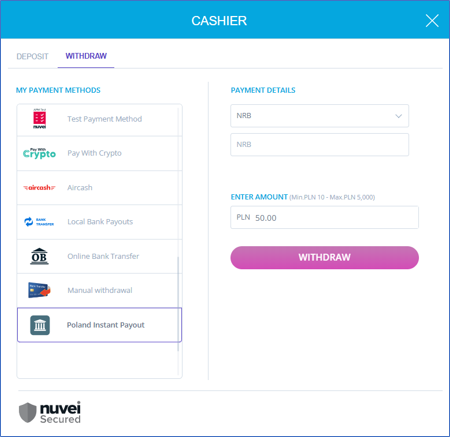
1. The user selects the payment method, enters an IBAN/NRB, and a withdrawal amount, then clicks ‘Withdraw’.
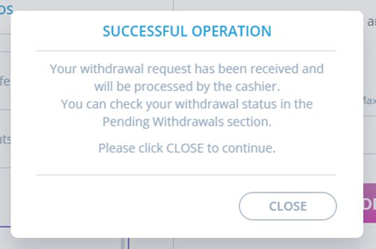
If the withdrawal request is completed successfully, the ‘Successful Operation’ message is displayed at payout.
Payout UPO for Returning User
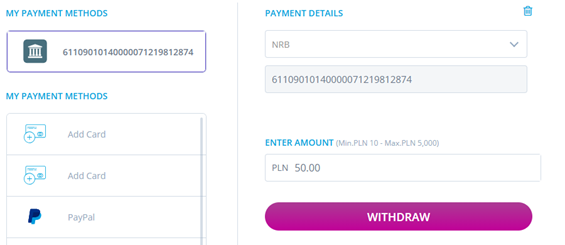
- The user selects the payment method from the UPO, enters a withdrawal amount, then clicks ‘Withdraw’.
If the withdrawal request is completed successfully, the ‘Successful Operation’ message is displayed at payout.
 Last modified January 2026