
- METHOD TYPEBank Transfer
- PAYMENTS

- PAYOUTS

- REFUNDS
- RECURRING
Introduction
Faster Payments is a banking initiative in the United Kingdom that enables near-instantaneous money transfers, reducing payment times between different banks’ customer accounts. If the receiving bank or building society also uses Faster Payments, payments arrive almost immediately (although sometimes it can take up to two hours).
Supported Countries
- UK
Supported Currencies
- GBP
Payout (Withdrawal) Flow
REST API 1.0
Follow these steps to perform a payout:
1. Register a userTokenId
A userTokenId is a field in the Nuvei system containing the user’s identifier in the merchant system.
If you do not have a userTokenId registered in the Nuvei system for this user, then register one by sending a /createUser request, including email, countryCode, firstName, and lastName.
In addition, the following parameters are mandatory to minimize transactions held by the RFI process:
dateOfBirthaddress(for example: 1 Hardwick Street)cityzip
Example /createUser Request
{
  "merchantId":"<your merchantId>",
  "merchantSiteId":"<your merchantSiteId>",
  "clientRequestId":"<unique request ID in merchant system>",
  "userTokenId":"<unique user identifier in merchant system>",
  "countryCode":"GB",
  "email":"[email protected]",
  "firstName":"John",
  "lastName":"Smith",
  "dateOfBirth":"2000-06-30",
  "address":"1 Hardwick Street",
  "city":"London",
  "zip":"EC1R",
  "timeStamp":"<YYYYMMDDHHmmss>",
  "checksum":"<calculated checksum>"
}
The request registers the userTokenId in the Nuvei system, which is then used to generate a UPO in the next step.
Example /createUser Response
{
  "userId":78403498,
  "internalRequestId":552360538,
  "status":"SUCCESS",
  "errCode":0,
  "reason":"",
  "merchantId":"2439523627382132721",
  "merchantSiteId":"224428",
  "version":"1.0",
  "clientRequestId":"20221108130736"
}
After the transaction is processed, Nuvei sends a Direct Merchant Notification (DMN) that includes the result of the transaction to the URL provided in urlDetails.notification, which Nuvei recommends including in the /createUser request.
2. Create the UPO
Create a UPO by sending an /addUPOAPM request and include:
userTokenId– The unique user identifier in your system.paymentMethodName: “apmgw_Faster_Payments“apmDataclass containing:fasterPayments_iban
ORfasterPayments_account_numberfasterPayments_sort_code
billingAddressclass containing:countryandemail
Example /addUPOAPM Request
{
  "merchantId":"<your merchantId>",
  "merchantSiteId":"<your merchantSiteId>",
  "userTokenId":"<unique customer identifier in merchant system>",
  "clientRequestId":"<unique request ID in merchant system>",
  "paymentMethodName":"apmgw_Faster_Payments",
  "apmData":{
    "fasterPayments_iban":"GB10CLRB04066800015427"
  },
  "billingAddress":{
    "country":"GB",
    "email":"[email protected]"
  },
  "timeStamp":"<YYYYMMDDHHmmss>",
  "checksum":"<calculated checksum>"
}
The request returns an encrypted userPaymentOptionId (UPO) representing the user’s APM account details.
Example /addUPOAPM Response
{
  "reason":"",
  "merchantId":"2502136204546424962",
  "errCode":0,
  "clientRequestId":"HWMTWQ2RT",
  "userPaymentOptionId":8119601,
  "internalRequestId":17817221,
  "version":"1.0",
  "status":"SUCCESS",
  "merchantSiteId":"126006"
}
3. Send a /payout Request
Send a /payout request and include the userPaymentOptionId, which contains the user’s previously stored APM account details. Press here for an example.
After the transaction is processed, Nuvei sends a DMN that includes the result of the transaction to the URL provided in urlDetails.notification, which Nuvei recommends including in the /payout request.
REST API 2.0
Overview
Merchants can perform Faster Payments payouts in REST API 2.0 using the /payouts endpoint. The following methods are supported:
- Use direct Alternative Payment Method (APM) parameters in
paymentOption.alternativePaymentMethod. - Use a previously stored
paymentTokenId.
Method: Using Alternative Payment Method Parameters
To initiate a Faster Payments payout, send a /payouts request containing the following mandatory fields:
buyerDetails.buyerIdamountcurrencypaymentOption.alternativePaymentMethodcontaining:name: “fasterPayments”dataobject containing:accountNumberANDsortCode
ORiban
buyerDetailscontaining:firstName,lastName,email,dateOfBirth
buyerDetails.billingAddressclass containing:countryCode
Example /payouts Request
{
  "processingEntityId": "<processingEntityId>",
  "amount": 10,
  "currency": "GBP",
  "urlDetails": {
    "webhookUrl": "webhookUrl",
    "successUrl": "successUrl",
    "failureUrl": "failureUrl",
    "pendingUrl": "pendingUrl"
  },
  "paymentOption": {
    "alternativePaymentMethod": {
      "name": "fasterPayments",
      "data": {
        "iban": "GB10CLRB04066800015427"
      }
    }
  },
  "buyerDetails": {
    "buyerId": "Testing123",
    "firstName": "John",
    "lastName": "Gomez",
    "companyName": "string",
    "dateOfBirth": "1998-03-02",
    "email": "[email protected]",
    "phone": "123456789",
    "billingAddress": {
      "address": "Cra fake 123",
      "addressLine2": "Fake 123",
      "addressLine3": "string",
      "street": "Fake 123",
      "state": "string",
      "zip": "87203",
      "city": "London",
      "countryCode": "GB",
      "phone": "string",
      "addressMatch": true
    },
    "shippingAddress": {
      "sameAsBilling": true
    }
  }
}
Example /payouts Response
{
  "payoutId": "390d85152fda4d09be974fc3ea8e632a",
  "transactionId": "7110000000020238469",
  "amount": 10,
  "currency": "GBP",
  "additionalTransactionInfo": {
    "referenceId": "639E9082112A15383C008EB149CD3206"
  },
  "paymentOption": {
    "alternativePaymentMethod": {
      "name": "fasterPayments",
      "data": {
        "iban": "GB10CLRB04066800015427"
      },
      "merchantReference": "f967f6a6-77b1-42c2-a573-0d759a3b07bf",
      "paymentTokenId": "3b7c90b428544337bc7d090ff9d62bc3"
    }
  },
  "result": {
    "status": "pending"
  }
}
Webhook Handling
Nuvei sends a webhook notification to the urlDetails.webhookUrl after the payout is processed. Merchants are strongly recommended to include this URL in the /payouts request to track payout outcomes.
Method: Using paymentTokenId
A merchant can perform a payout using a previously stored APM account through paymentTokenId.
Example /payouts Request Using paymentTokenId
{
  "processingEntityId": "<processingEntityId>",
  "amount": 10,
  "currency": "GBP",
  "urlDetails": {
    "webhookUrl": "webhookUrl",
    "successUrl": "successUrl",
    "failureUrl": "failureUrl",
    "pendingUrl": "pendingUrl"
  },
  "paymentOption": {
    "paymentToken": {
      "paymentTokenId": "abc123def456ghi789jkl012mno345pq"
    }
  },
  "buyerDetails": {
    "buyerId": "Testing123",
    "firstName": "santiago",
    "lastName": "Gomez",
    "companyName": "string",
    "dateOfBirth": "1998-03-02",
    "email": "[email protected]",
    "phone": "123456789",
    "billingAddress": {
      "address": "Cra fake 123",
      "addressLine2": "Fake 123",
      "addressLine3": "string",
      "street": "Fake 123",
      "state": "string",
      "zip": "87203",
      "city": "Bogotá",
      "countryCode": "GB",
      "phone": "string",
      "addressMatch": true
    },
    "shippingAddress": {
      "sameAsBilling": true
    }
  }
}
User Experience – Withdrawal
- On the ‘Payment Details’ screen, the user selects ‘Bank Account’ or ‘IBAN’.
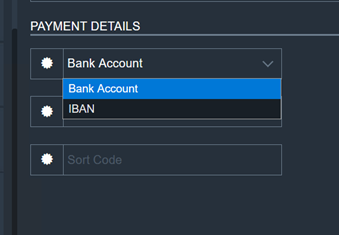
- The user enters the details for the selection. A withdrawal request is created and processed.
 Last modified February 2026