Attributes 
- METHOD TYPEBank Transfer
- PAYMENTS

- PAYOUTS

- REFUNDS
- RECURRING
Introduction
VISA Direct to Account is a cross-border payment solution that enables businesses to send payouts directly to bank accounts using a global network. It partners banking infrastructure to deliver funds to recipients through local transfer schemes.
Supported Countries
- Canada
- Hong Kong
- India
- Japan
- Philippines
- Poland
- Romania
- Singapore
- South Africa
- USA
Supported Currencies
- CAD
- HKD
- INR
- JPY
- PHP
- PLN
- RON
- SGD
- ZAR
- USD
Payout (Withdrawal) Flow
Press tab to open…
- Generate a
sessionToken. Press here for details. - Send an
/accountCapturerequest that includes the following mandatory fields as shown in the example request.userTokenId– Unique customer identifier in merchant system.paymentMethod– “apmgw_International_Transfers“currencyCode– Three-letter ISO currency code for a supported currency.countryCode– Two-letter ISO country code for a supported country. The country must be where the currency is used.languageCode– Two-letter code.
Example /accountCapture Request
{
    "sessionToken": "",
    "merchantId": "{{merchantId}}",
    "merchantSiteId": "{{merchantSiteId}}",
    "userTokenId": "DanielREST_6644777722235_Visa",
    "paymentMethod": "apmgw_International_Transfers",
    "currencyCode": "USD",
    "countryCode": "US",
    "languageCode": "EN"
}
Example /accountCapture Response
{
    "internalRequestId": 1766049986428,
    "status": "SUCCESS",
    "errCode": 0,
    "reason": "",
    "merchantId": "5634436935940029474",
    "merchantSiteId": "242181",
    "version": "1.0",
    "sessionToken": "2357e32599d240b4a0778c154838b1fc0111",
    "redirectUrl": "https://apmtest.gate2shop.com/ppp/resources/cdn/v1/payment-details-899217.html?payloadUrl=https%3A%2f%2fjumpbox.safecharge.com%2fapm%2fvisaearthport%2fv1%2fpayload%3FSignature%3D3GDqr1Mnz3yi3bzNF885weGA3ptoLDNl93VQb6iYKP4%253D%26EncryptedId%3DEDD5DCEC946B5B14543FADDB6FF09788&returnUrl=https%3A%2f%2fjumpbox.safecharge.com%2fdmz%2fSmartConnector%2fBankCapture%2fEDD5DCEC946B5B14543FADDB6FF09788",
    "userTokenId": "DanielREST_6644777722235_Visa"
}
- Use the
redirectUrlto redirect the customer to an account details capture interface for them to enter account details. - Once the information is captured, Nuvei stores the data in a
userPaymentOptionId(UPO) identifier, and sends a DMN with the newly createduserPaymentOptionId. - Send a
/payoutrequest and include theuserPaymentOptionId. Press here for an example.
After the transaction is processed, Nuvei sends a DMN that includes the result of the transaction tourlDetails.notificationUrl, which Nuvei recommends including in the/payoutrequest.
Example Payout DMN with Status=APPROVED
...wdOrderId=97733680121&wdRequestId=110593870121&gwTrxId=1620000000544219339¬ificationType=WITHDRAW_ORDER_NOTIFICATION&merchantSiteId=305718&merchantGwId=3173458726623426926&merchantLocale=en_US&wdRequestState=Closed&wdRequestStatus=Approved&wdOrderStatus=Settled&settlementType=WITHDRAWAL&gwErrCode=0&gwExtendedErrorCode=0&apmTrxId=1620000578317484&externalTransactionId=281475417188817&apmReferenceId=45C5C92E7489151FD0EDBA8A5259B543&apmErrorCode=0&firstName=Test&lastName=Test&userTokenId=TestWD2025092204&zip=AB1234&city=Test&country=JP&email=test%40test.com&address=Test&amount=20.00&approvedAmount=20.00¤cy=JPY&userId=JPN-Negative-Apptest&userPMId=151496206121&paymentMethod=apmgw_International_Transfers&version=1.0&pmDisplayName=2302854&operatorName=Amir.BenChetrit&client_ip=172.226.56.42&wdOrderAmount=20.00&wdOrderCurrency=JPY&responseTimeStamp=2025-10-06.06%3A13%3A01&ExternalaccountID=2302854&feeAmount=0.0&transactionAmount=20.0&upoRegistrationDate=20251004&apmPayerInfo=%5B%7B%22name%22%3A%22ExtraTransactionInfo%22%2C%22value%22%3A%22%7B%5C%22paymentRail%5C%22%3A%5C%22ACH%5C%22%7D%22%7D%5D&acquirerBank=Direct2AccountVisaMS-PI&checksum=ff0e8466e96e96e99bbe21a9721d1ceb
For information about the Withdrawal flow for WebSDK, see Withdrawal.
- REST API
-
- Generate a
sessionToken. Press here for details. - Send an
/accountCapturerequest that includes the following mandatory fields as shown in the example request.userTokenId– Unique customer identifier in merchant system.paymentMethod– “apmgw_International_Transfers“currencyCode– Three-letter ISO currency code for a supported currency.countryCode– Two-letter ISO country code for a supported country. The country must be where the currency is used.languageCode– Two-letter code.
Example
/accountCaptureRequest{ "sessionToken": "", "merchantId": "{{merchantId}}", "merchantSiteId": "{{merchantSiteId}}", "userTokenId": "DanielREST_6644777722235_Visa", "paymentMethod": "apmgw_International_Transfers", "currencyCode": "USD", "countryCode": "US", "languageCode": "EN" }Example
/accountCaptureResponse{ "internalRequestId": 1766049986428, "status": "SUCCESS", "errCode": 0, "reason": "", "merchantId": "5634436935940029474", "merchantSiteId": "242181", "version": "1.0", "sessionToken": "2357e32599d240b4a0778c154838b1fc0111", "redirectUrl": "https://apmtest.gate2shop.com/ppp/resources/cdn/v1/payment-details-899217.html?payloadUrl=https%3A%2f%2fjumpbox.safecharge.com%2fapm%2fvisaearthport%2fv1%2fpayload%3FSignature%3D3GDqr1Mnz3yi3bzNF885weGA3ptoLDNl93VQb6iYKP4%253D%26EncryptedId%3DEDD5DCEC946B5B14543FADDB6FF09788&returnUrl=https%3A%2f%2fjumpbox.safecharge.com%2fdmz%2fSmartConnector%2fBankCapture%2fEDD5DCEC946B5B14543FADDB6FF09788", "userTokenId": "DanielREST_6644777722235_Visa" }- Use the
redirectUrlto redirect the customer to an account details capture interface for them to enter account details. - Once the information is captured, Nuvei stores the data in a
userPaymentOptionId(UPO) identifier, and sends a DMN with the newly createduserPaymentOptionId. - Send a
/payoutrequest and include theuserPaymentOptionId. Press here for an example.
After the transaction is processed, Nuvei sends a DMN that includes the result of the transaction tourlDetails.notificationUrl, which Nuvei recommends including in the/payoutrequest.
Example Payout DMN with Status=
APPROVED...wdOrderId=97733680121&wdRequestId=110593870121&gwTrxId=1620000000544219339¬ificationType=WITHDRAW_ORDER_NOTIFICATION&merchantSiteId=305718&merchantGwId=3173458726623426926&merchantLocale=en_US&wdRequestState=Closed&wdRequestStatus=Approved&wdOrderStatus=Settled&settlementType=WITHDRAWAL&gwErrCode=0&gwExtendedErrorCode=0&apmTrxId=1620000578317484&externalTransactionId=281475417188817&apmReferenceId=45C5C92E7489151FD0EDBA8A5259B543&apmErrorCode=0&firstName=Test&lastName=Test&userTokenId=TestWD2025092204&zip=AB1234&city=Test&country=JP&email=test%40test.com&address=Test&amount=20.00&approvedAmount=20.00¤cy=JPY&userId=JPN-Negative-Apptest&userPMId=151496206121&paymentMethod=apmgw_International_Transfers&version=1.0&pmDisplayName=2302854&operatorName=Amir.BenChetrit&client_ip=172.226.56.42&wdOrderAmount=20.00&wdOrderCurrency=JPY&responseTimeStamp=2025-10-06.06%3A13%3A01&ExternalaccountID=2302854&feeAmount=0.0&transactionAmount=20.0&upoRegistrationDate=20251004&apmPayerInfo=%5B%7B%22name%22%3A%22ExtraTransactionInfo%22%2C%22value%22%3A%22%7B%5C%22paymentRail%5C%22%3A%5C%22ACH%5C%22%7D%22%7D%5D&acquirerBank=Direct2AccountVisaMS-PI&checksum=ff0e8466e96e96e99bbe21a9721d1ceb - Generate a
- Web SDK
-
For information about the Withdrawal flow for WebSDK, see Withdrawal.
User Experience
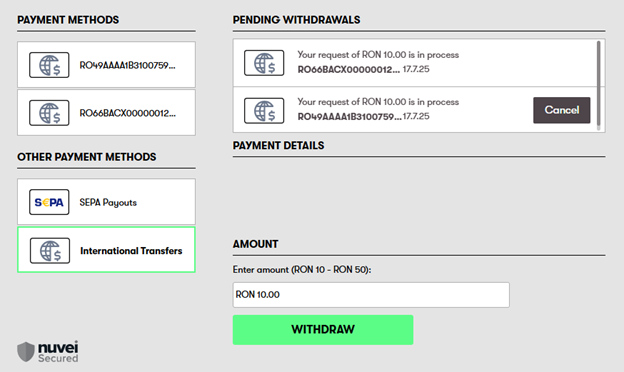
- The customer selects withdrawal on cashier page.
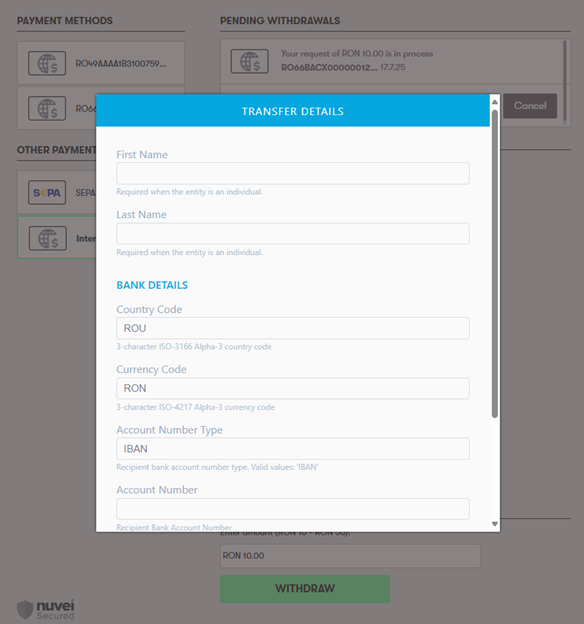
- The customer is redirected to the Account Capture page for collection of necessary details in ‘Transfer Details’.
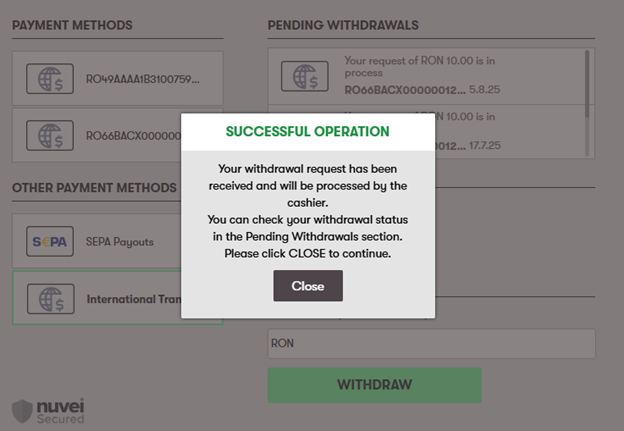
- If the operation is successful, the customer receives a message that the request is accepted.
Testing
For the Account Capture page, any data that is valid can be used; however, no final status of the Payout is provided.
 Last modified January 2026