

- METHOD TYPEE-wallet
- PAYMENTS

- PAYOUTS
- REFUNDS

- RECURRING
Introduction
Neteller is an online wallet (e-money service) that allows the merchant to deposit, withdraw, and transfer funds. In addition to this service, merchants can see their personal transactions history and control their account balance. Neteller provides same-day payments and instant cash transfers to and from affiliated merchant sites and between Neteller account holders. Neteller was acquired by the British global payments company PaySafe Group in 2015.
Supported Countries
- Algeria
- Andorra
- Angola
- Anguilla
- Antarctica
- Argentina
- Aruba
- Australia
- Austria
- Bahamas
- Bahrain
- Bangladesh
- Barbados
- Belarus
- Belgium
- Benin
- Bermuda
- Bolivia
- Bosnia-Herzegovina
- Botswana
- Brazil
- Saint Pierre and Miquelon
- Brunei
- Bulgaria
- Burkina Faso
- Burundi
- Cameroon
- Canada
- Cape Verde
- Cayman Islands
- Central African Republic
- Chad
- Christmas Island
- Colombia
- Costa Rica
- Croatia
- Cuba
- Cyprus
- Chile
- Denmark
- Djibouti
- Dominica
- Dominican Republic
- Ecuador
- Egypt
- El Salvador
- Equatorial Guinea
- Estonia
- Ethiopia
- Falkland Islands
- Faroe Islands
- Fiji
- Finland
- France
- French Guiana
- French Polynesia
- Gabon
- Gambia
- Georgia
- Germany
- Gibraltar
- Greece
- Greenland
- Grenada
- Guadeloupe
- Guatemala
- Guernsey
- Guinea-Bissau
- Guyana
- Honduras
- Hong Kong
- Hungary
- Iceland
- India
- Czech Republic
- Ireland
- Isle of Man
- Israel
- Italy
- Jamaica
- Jersey
- Jordan
- Kenya
- Kiribati
- Kuwait
- Latvia
- Lesotho
- Liechtenstein
- Lithuania
- Luxembourg
- Macau
- Macedonia
- Madagascar
- Malawi
- Malaysia
- Maldives
- Mali
- Malta
- Martinique
- Mauritania
- Mauritius
- Mexico
- Monaco
- Montenegro
- Montserrat
- Morocco
- Mozambique
- Namibia
- Nepal
- Netherlands
- New Caledonia
- New Zealand
- Nicaragua
- Niger
- Nigeria
- Niue
- Niue
- Norfolk Island
- North Korea
- Norway
- Oman
- Panama
- Papua New Guinea
- Paraguay
- Peru
- Philippines
- Poland
- Portugal
- Qatar
- Réunion
- Indonesia
- Romania
- Russia
- Saint Kitts and Nevis
- Samoa
- San Marino
- Saudi Arabia
- Senegal
- Serbia
- Seychelles
- Sierra Leone
- Singapore
- Slovakia
- Slovenia
- Solomon Islands
- South Africa
- South Korea
- Spain
- Sri Lanka
- Suriname
- Svalbard and Jan Mayen Islands
- Swaziland
- Sweden
- Switzerland
- Taiwan
- Tanzania
- Thailand
- Togo
- Trinidad and Tobago
- Tunisia
- Turkey
- Ukraine
- United Arab Emirates
- United Kingdom
- Uruguay
- Vanuatu
- Vietnam
- Virgin Islands
- Western Sahara
- Zambia
Supported Currencies
- AUD
- CAD
- DKK
- EEK
- EUR
- GBP
- HUF
- INR
- JPY
- LTL
- LVL
- MXN
- NOK
- PLN
- RON
- RUB
- SEK
- USD
REST 1.0 API
Payment (Deposit) Flow
To perform a payment using Nuvei REST API integration:
- Generate a
sessionToken.
Press here for details. - Perform the payment by sending a
/paymentrequest with its mandatory parameters including: userTokenId
amountcurrencypaymentOption.alternativePaymentMethodclass containing:paymentMethod: “apmgw_Neteller“nettelerAccount– account email
deviceDetailsclass containing:ipAddressbillingAddressclass containing:firstName,lastName,country,emailuserDetailsclass containing:firstName,lastName,country,email
Example /payment Request
{
  "sessionToken":"<sessionToken from /getSessionToken>",
  "merchantId":"<your merchantId>",
  "merchantSiteId":"<your merchantSiteId>",
  "clientRequestId":"<unique request ID in merchant system>",
  "amount":"200",
  "currency":"USD",
  "userTokenId":"<unique customer identifier in merchant system>",
  "clientUniqueId":"<unique transaction ID in merchant system>",
  "paymentOption":{
    "alternativePaymentMethod":{
      "paymentMethod":"apmgw_Neteller",
      "nettelerAccount":"<account email>"
    }
  },
  "deviceDetails":{
    "ipAddress":"<customer's IP address>"
  },
  "billingAddress":{
    "firstName": "John",
    "lastName": "Smith",
    "country":"US",
    "email":"[email protected]"
  },
  "userDetails":{
    "firstName": "John",
    "lastName": "Smith",
    "country":"US",
    "email":"[email protected]"
  },
  "timeStamp":"<YYYYMMDDHHmmss>",
  "checksum":"<calculated checksum>"
}
After the transaction is processed, Nuvei sends a Direct Merchant Notification (DMN) that includes the result of the transaction to the URL provided in urlDetails.notificationUrl, which Nuvei recommends including in the /payment request.
Payout (Withdrawal) Flow
- Send a
/payoutrequest and include theuserPaymentOptionId, which contains the user’s previously stored APM account details.
Press here for an example.
After the transaction is processed, Nuvei sends a DMN that includes the result of the transaction to the URL provided in urlDetails.notificationUrl, which Nuvei recommends including in the /payout request.
REST API 2.0
Payment (Deposit) Flow
Perform the payment by sending a POST /payments request with the following mandatory fields:
buyerDetails.buyerIdamountcurrencypaymentOption.alternativePaymentMethod.name="neteller"paymentOption.alternativePaymentMethod.dataclass containing:account– Neteller account identifier (for example, email)
deviceDetails.ipAddressbuyerDetailsclass containing:firstNamelastNameemaildateOfBirth
buyerDetails.billingAddress.countryCode
Example POST /payments Request
{
  "processingEntityId": "<processingEntityId>",
  "amount": "10",
  "currency": "EUR",
  "urlDetails": {
    "webhookUrl": "<webhookUrl>",
    "successUrl": "<successUrl>",
    "failureUrl": "<failureUrl>",
    "pendingUrl": "<pendingUrl>"
  },
  "paymentOption": {
    "alternativePaymentMethod": {
      "name": "neteller",
      "data": {
        "account": "[email protected]"
      }
    }
  },
  "deviceDetails": {
    "ipAddress": "192.168.2.38"
  },
  "buyerDetails": {
    "buyerId": "<buyerId>",
    "firstName": "Karen",
    "middleName": "Tromp",
    "lastName": "McClure",
    "companyName": "Morissette",
    "dateOfBirth": "2006-01-26",
    "email": "[email protected]",
    "workPhone": "116057343670121488",
    "billingAddress": {
      "countryCode": "ES"
    }
  }
}
Example Response
{
  "paymentId": "dfc19969ea914d9eb3daab7467ba6bbb",
  "amount": 10,
  "currency": "EUR",
  "transactionType": "Sale",
  "result": {
    "status": "redirect"
  },
  "redirectUrl": "https://api.test.paysafe.com/alternatepayments/v1/redirect?...",
  "paymentOption": {
    "alternativePaymentMethod": {
      "name": "neteller",
      "data": {
        "account": "[email protected]"
      },
      "paymentTokenId": "33e9900e1d2e44e98bc3ac28f837b1e1"
    }
  }
}
After the transaction is processed, Nuvei sends a webhook that includes the result of the transaction to the URL provided in urlDetails.webhookUrl, which Nuvei recommends including in the POST /payments request.
Payout (Withdrawal) Flow
You can initiate a payout in the following ways:
- By providing Neteller details in
paymentOption.alternativePaymentMethod. - By providing a previously created payment token in
paymentOption.paymentToken.
Using Alternative Payment Method Class
- Send a
POST /payoutsrequest with the following mandatory fields:
-
buyerDetails.buyerIdamountcurrencypaymentOption.alternativePaymentMethod.name="neteller"paymentOption.alternativePaymentMethod.dataclass containing:account– Neteller account identifier (for example, email)
deviceDetails.ipAddressbuyerDetailsclass containing:firstNamelastNameemaildateOfBirth
buyerDetails.billingAddress.countryCode
Example POST /payouts Request – Using Alternative Payment Method Class
{
  "processingEntityId": "<processingEntityId>",
  "amount": "10",
  "currency": "EUR",
  "urlDetails": {
    "webhookUrl": "<webhookUrl>",
    "successUrl": "<successUrl>",
    "failureUrl": "<failureUrl>",
    "pendingUrl": "<pendingUrl>"
  },
  "paymentOption": {
    "alternativePaymentMethod": {
      "name": "neteller",
      "data": {
        "account": "[email protected]"
      }
    }
  },
  "deviceDetails": {
    "ipAddress": "192.168.2.38"
  },
  "buyerDetails": {
    "buyerId": "<buyerId>",
    "firstName": "Karen",
    "middleName": "Tromp",
    "lastName": "McClure",
    "companyName": "Morissette",
    "dateOfBirth": "2006-01-26",
    "email": "[email protected]",
    "workPhone": "116057343670121488",
    "billingAddress": {
      "countryCode": "ES"
    }
  }
}
After the payout is processed, Nuvei sends a webhook that includes the result of the transaction to the URL provided in urlDetails.webhookUrl, which Nuvei recommends including in the POST /payouts request.
Using a Payment Token
Instead of providing the Neteller account details again, you can use a previously created payment token by sending a POST /payouts request with paymentOption.paymentToken.paymentTokenId.
Example POST /payouts Request – Using a Payment Token
{
  "processingEntityId": "<processingEntityId>",
  "amount": "10",
  "currency": "EUR",
  "urlDetails": {
    "webhookUrl": "<webhookUrl>",
    "successUrl": "<successUrl>",
    "failureUrl": "<failureUrl>",
    "pendingUrl": "<pendingUrl>"
  },
  "paymentOption": {
    "paymentToken": {
      "paymentTokenId": "abc123def456ghi789jkl012mno345pq"
    }
  },
  "deviceDetails": {
    "ipAddress": "192.168.2.38"
  },
  "buyerDetails": {
    "buyerId": "<buyerId>",
    "firstName": "Karen",
    "middleName": "Tromp",
    "lastName": "McClure",
    "companyName": "Morissette",
    "dateOfBirth": "2006-01-26",
    "email": "[email protected]",
    "workPhone": "116057343670121488",
    "billingAddress": {
      "countryCode": "ES"
    }
  }
}
Web SDK
Payment Flow
Follow these steps to perform a payment using Nuvei Web SDK integration.
Before you can submit payment using the client-side Nuvei Web SDK, you need to send the /openOrder API call.
Instantiate the Web SDK with the sessionToken received from the server call to /openOrder.
Send a createPayment() request with its mandatory parameters including:
paymentOption.alternativePaymentMethodclass containing:paymentMethod: “apmgw_Neteller“nettelerAccount– account email
deviceDetailsclass containing:ipAddressbillingAddressclass containing:firstName,lastName,country,emailuserDetailsclass containing:firstName,lastName,country,email
Example createPayment() Request
sfc.createPayment({

  sessionToken: "<sessiontoken>",
  paymentOption: {
    alternativePaymentMethod: {
      paymentMethod: "apmgw_Neteller",
      nettelerAccount: "<Neteller account>"
      }
  },
  deviceDetails:{
    ipAddress:"<customer's IP address>"
  },
  billingAddress: {
    firstName: "John",
    lastName: "Smith",
    country: "US",
    email: "[email protected]"
  },
  userDetails: {
    firstName: "John",
    lastName: "Smith",
    country: "US",
    email: "[email protected]"
  },
}, function (res) {
    console.log(res);
});
After the transaction is processed, Nuvei sends a Direct Merchant Notification (DMN) that includes the result of the transaction to the URL provided in urlDetails.notificationUrl, which Nuvei recommends including in the /openOrder request.
Withdrawal Flow
Payment Page
Example Payment Page Request
After the transaction is processed, Nuvei sends a Direct Merchant Notification (DMN) that includes the result of the transaction to notify_url, which Nuvei recommends including in the request.
User Experience
Payment
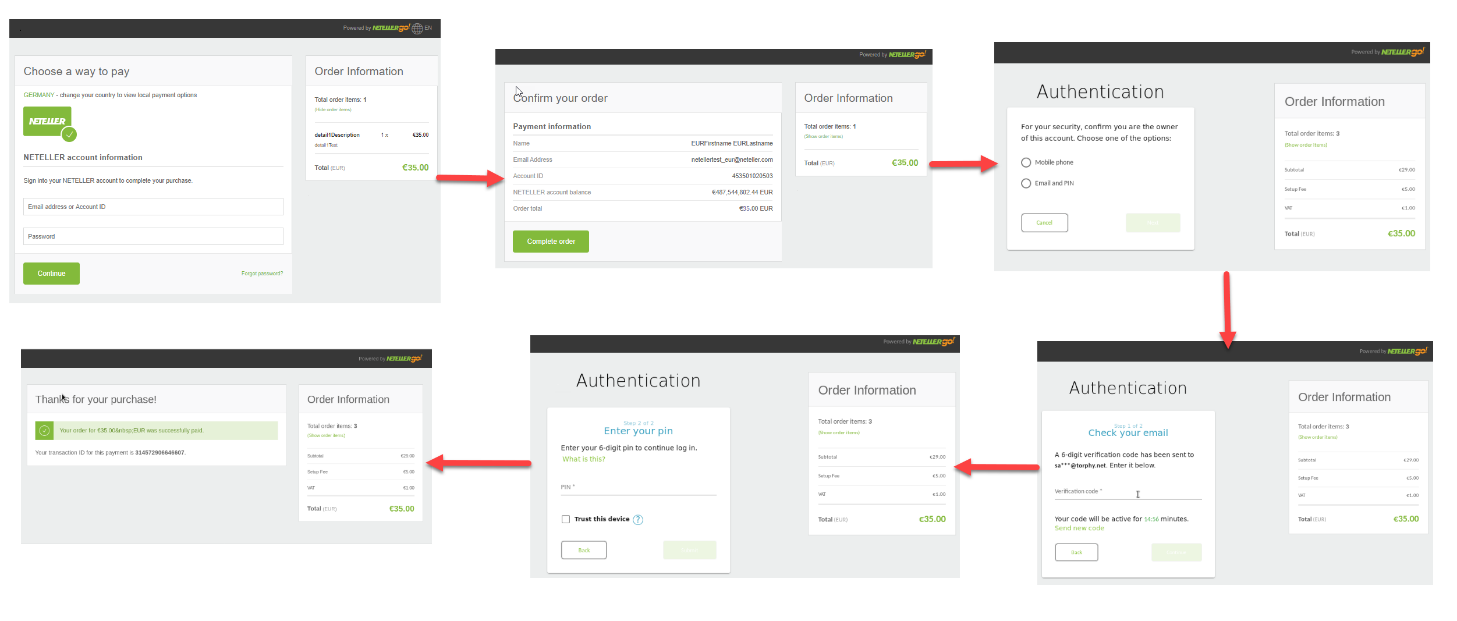
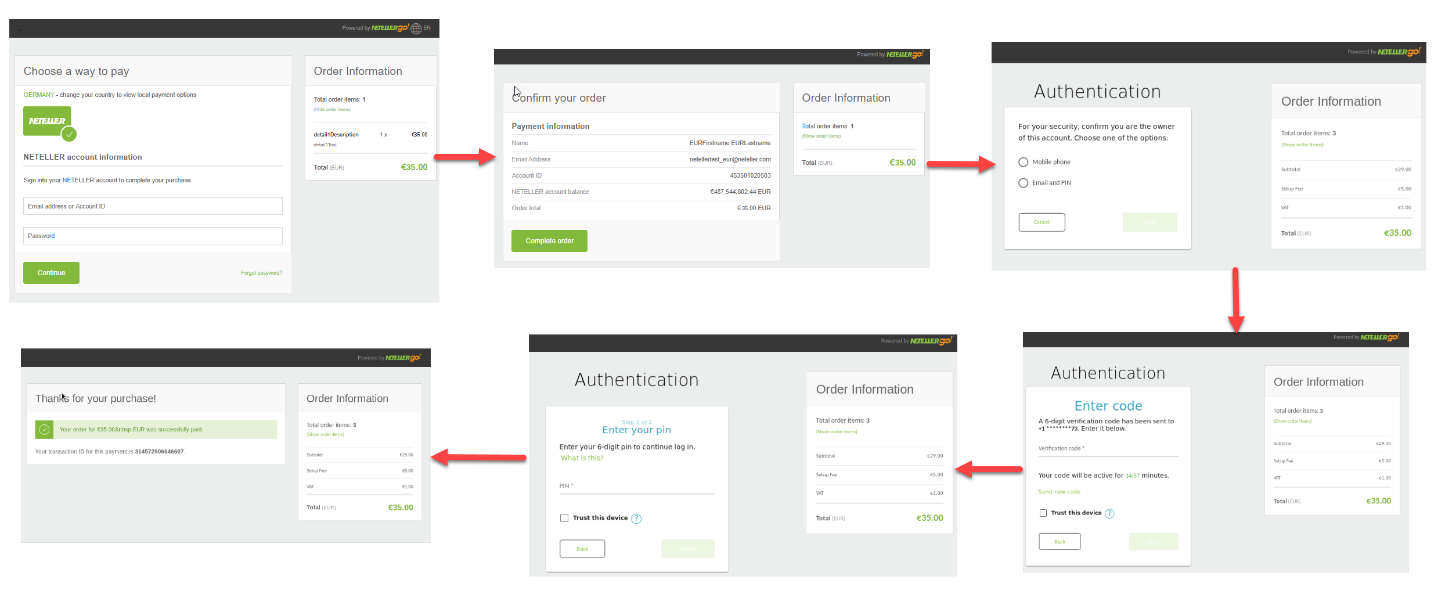
- The user is redirected to the Neteller page.
- The user enters the user password.
- After logging in, the user confirms the payment, either via email or via mobile.
Email Payment Confirmation
Mobile Payment Confirmation
Configuration Requirements
To fully configure the Neteller account:
- Add the Nuvei IP to your Neteller back office by having the merchant log into its account.
- Press the ‘Settings’ > ‘Developer Settings’ tab in the NETELLER Merchant Account.
- Select the ‘API IP Whitelisting’ section.
- Enable secure IPs and add the following IP addresses:
- 194.247.167.0/24 (production)
- 195.28.166.0/24 (production)
- 195.28.167.0/24 (production)
- 87.120.10.1/24 (production)
- 87.120.11.1/24 (production)
- 91.220.189.1/24 (production)
- 52.16.211.57 (integration)
- 52.17.110.204 (integration)
- 52.112.39.133 (integration)
- 54.242.232.64 (integration)
Required Details for Neteller MID Setup
The credentials can be found by navigating to the ‘Settings’ > ’Developer Settings’ > ‘API Keys’ page in the ‘Paysafe REST API keys’ section. Select the credentials from the second row of the credentials table, marked as ‘private key’.
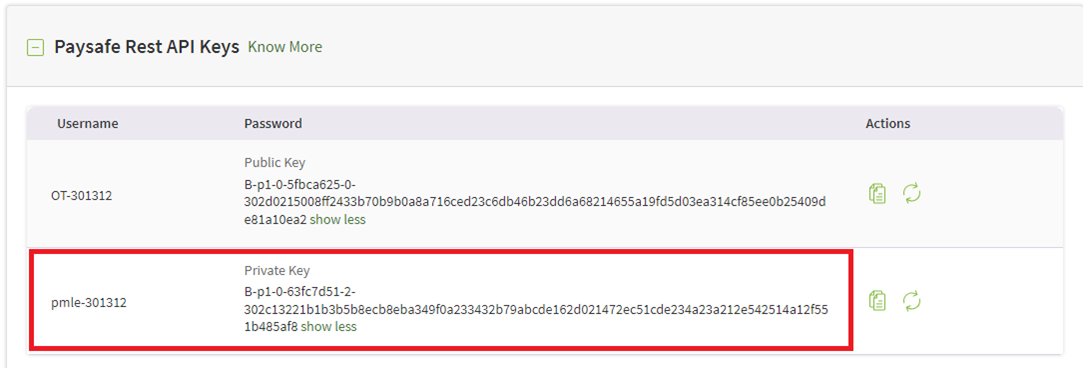 The names of the credentials are:
- Username
- Password
A merchant needs to configure the following webhook on the Neteller side: https://apm.safecharge.com/Neteller/NetellerNotification.ashx
The confirmation can be done by asking Neteller to configure and setup or by navigating to ‘Settings’ > ‘Developer Settings’ > ‘Webhooks’ in the merchant portal.
Required Details for Neteller Verification Flow Setup
The credentials can be found by navigating to the ‘Settings’ > ‘Developer Settings’ > ‘API Keys’ page in the ‘NETELLER REST API keys’ section. The names of the credentials are:
- Client ID
- Client Secret
 Last modified March 2026