

- METHOD TYPEReal-Time Bank Transfer
- PAYMENTS

- PAYOUTS
- REFUNDS

- RECURRING
Introduction
Interac Combined merges all of Interac deposits options into one method. Users can choose if they wish to use the online or e-Transfer options according to the banks support.
Interac Combined allows your customers to link any number of their Canadian bank accounts to their email address. The Nuvei platform encrypts your customer’s bank account details securely, and provides a userPaymentOptionId (UPO) representing the account, for you to use in transactions.
Prerequisites and Notes
- This guide assumes you have completed all account setup prerequisites, and are ready to integrate Interac Combined into your payment flow.
- Interac Combined only supports Canadian based IPs.
- Payment (deposit) transactions are conducted in Canadian Dollars between Canadian bank accounts.
- Nuvei handles Interac Combined transactions in “redirection mode”.
- A UPO (user payment option) is an encrypted customer payment method record stored in the Nuvei system, representing a customer bank account or other payment method.
- Test credentials and testing scenarios can be provided by Nuvei if necessary. You can contact Nuvei support for assistance.
Supported Countries
- Canada
Supported Currencies
- CAD
Payment (Deposit) Flow
1. Generate a sessionToken
Press here for details.
2. Send a /payment Request
Send a /payment request with its mandatory parameters, including the following:
userTokenIdamountcurrencypaymentOption.alternativePaymentMethodclass containing:paymentMethod: “apmgw_Interac_Combined“emailmobilePhone
billingAddressclass containing:firstName,lastName,phone,country,email,address,city,statedeviceDetailsclass containing:ipAddress
Example /payment Request
{
  "sessionToken": "<sessionToken from /getSessionToken>",
  "merchantId": "<your merchantId>",
  "merchantSiteId": "<your merchantSiteId>",
  "userTokenId": "<unique customer identifier in merchant system>",
  "clientRequestId": "<unique request ID in merchant system>",
  "clientUniqueId": "<unique transaction ID in merchant system>",
  "currency": "CAD",
  "amount": "100",
  "paymentOption": {
    "alternativePaymentMethod": {
      "paymentMethod": "apmgw_Interac_Combined"
      "email": "[email protected]"
      "mobilePhone": "4162477671"
    }
  },
  "billingAddress": {
    "firstName": "John",
    "lastName": "Smith",
    "phone": "4162477671",
    "address": "2 Eireann Quay",
    "city": "Toronto",
    "state": "ON"
    "country": "CA",
    "email": "[email protected]"
  },
  "deviceDetails": {
    "ipAddress": "<customer's IP address>"
  },
  "urlDetails": {
    "notificationUrl": "<URL to which DMNs are sent>"
  },
  "timeStamp": "<YYYYMMDDHHmmss>",
  "checksum": "<calculated checksum>"
}
The response generates and returns a redirect URL (redirectUrl) to redirect the customer to the payment page, as well as a UPO (userPaymentOptionId) for use in future transactions.
Example /payment Response
{
  "internalRequestId":712597608,
  "status":"SUCCESS",
  "errCode":0,
  "reason":"",
  "merchantId":"8860255768659021142",
  "merchantSiteId":"119823",
  "version":"1.0",
  "clientRequestId":"20230707165257",
  "sessionToken":"44922e4a-20bd-4137-a937-8deb53e4c8c2",
  "clientUniqueId":"20180327175242",
  "orderId":"375620058",
  "userTokenId":"6fa38ea2-6f1a-4620-85ae-7deaf0d5f8f1",
  "paymentOption":{
    "redirectUrl":"https"://interac.express-connect.com/webflow?transaction=C5C51E99607D4F151EF9345EC94D91C2&token=eyJhbGciOiJIUzI1NiIsInR5cCI6IkpXVCJ9.eyJzaXRlIjoiSUNFIERlbW8gVGVzdCIsImFtb3VudCI6NTAsInNhbmRib3giOnRydWUsIm5hbWUiOiJKb2huIFNtaXRoIiwibW9iaWxlIjoiNDE2MjQ3NzY3MSIsInVzZXJJcCI6IjEyNy4wLjAuMSIsImN1cnJlbmN5IjoiQ0FEIiwibGFuZyI6ImVuIiwidHlwZSI6IkNQSSIsInVzZXJJZCI6IlRlc3RUb2tlbiIsInRyYW5zYWN0aW9uaWQiOiJDNUM1MUU5OTYwN0Q0RjE1MUVGOTM0NUVDOTREOTFDMiIsImVtYWlsIjoidGVzdEBudXZlaS5jb20iLCJ1c2VyIjoiYmYwZGE4NWJmODI5MzJlZWYyMWFjZmE3MzRiNmY2MDUiLCJjYW1wYWlnbiI6IjM3NzJjMzU5MGY5NWRmYzJjYTAyZWU2YjU1MDBmNzhlIiwiZW50aXR5SWQiOjEsImlhdCI6MTY4ODczNzk3NywiZXhwIjoxNjg4ODI0Mzc3fQ.VTCu38L_SLYbWJ6iEhmHB2D3Ke57o1mL89X5NcNo8iA,
    "userPaymentOptionId":"92469538",
    "card":{

    }
  },
  "transactionStatus":"REDIRECT"
}
After the transaction is processed, Nuvei sends a Direct Merchant Notification (DMN) that includes the result of the transaction to the URL provided in urlDetails.notificationUrl, which Nuvei recommends including in the /payment request.
Example /payment DMN with status=PENDING
...'ppp_status=PENDING&Status=PENDING&ExErrCode=0&ErrCode=0&errApmCode=0&errApmDescription=&errScCode=0&errScDescription=&Reason=&ReasonCode=0&PPP_TransactionID=363154478&userid=140156&merchant_unique_id=S-56723-1681971437199&customData=&productId=&first_name=Alex&last_name=Smith&email=alex.smith%40example.com¤cy=CAD&clientUniqueId=S-56723-1681971437199&customField1=&customField2=&customField3=&customField4=&customField5=&customField6=&customField7=&customField8=&customField9=&customField10=&customField11=&customField12=&customField13=&customField14=&customField15=&invoice_id=&address1=&address2=&country=Canada&state=&city=&zip=&phone1=&phone2=&phone3=&client_ip=127.0.0.1&nameOnCard=&cardNumber=&bin=&noCVV=&acquirerId=&acquirerBank=Interac-Bitfy-PI&expMonth=&expYear=&Token=&tokenId=&AuthCode=alex.smith%40example.com&AvsCode=&Cvv2Reply=&shippingCountry=&shippingState=&shippingCity=&shippingAddress=&shippingZip=&shippingFirstName=&shippingLastName=&shippingPhone=&shippingCell=&shippingMail=&total_discount=0.00&total_handling=0.00&total_shipping=0.00&total_tax=0.00&buyButtonProductBundleId=&merchant_site_id=163463&merchant_status=&action=&requestVersion=&message=PENDING&merchantLocale=&unknownParameters=&payment_method=apmgw_Interac_Combined&ID=&merchant_id=6055410168012883829&responseTimeStamp=2023-04-20.06%3A17%3A23&buyButtonProductId=&webMasterId=&appliedPromotions=&uniqueCC=&transactionType=Sale&externalEmail=&cardCompany=&eci=&user_token_id=140156&userPaymentOptionId=87654498&TransactionID=711000000022595017&externalTransactionId=1681971439&APMReferenceID=1543DD2BD63C61BB0B9618DC2091DB6B&orderTransactionId=1192889948&totalAmount=528.00&dynamicDescriptor=BDSwiss+Holding+PLC+Test&item_name_1=NA&item_number_1=&item_amount_1=528.00&item_quantity_1=1&item_discount_1=0.00&item_handling_1=0.00&item_shipping_1=0.00&feeAmount=&amountWithoutFee=&houseNumber=&customCurrency=&upoRegistrationDate=20230307&type=DEPOSIT&clientRequestId=S-56723-1681971437199&relatedTransactionId=&apmPayerInfo=ETI%3DInterac+Combined&sessionId=d4f6482f6d44156c51b8e1036a72&responsechecksum=f8fdfebcf403e9ba2a743cf9c8992e4520acb36c400b2e58941263e1d05cf0f2&advanceResponseChecksum=9cfcfa595f6fa123aa3c557c112e0029e0d900174bd2b24dfe88a0654d4c5649',Example /payment DMN with status=APPROVED
...'ppp_status=OK&Status=APPROVED&ExErrCode=0&ErrCode=0&errApmCode=0&errApmDescription=&errScCode=0&errScDescription=&Reason=&ReasonCode=0&PPP_TransactionID=363154478&userid=140156&merchant_unique_id=S-56723-1681971437199&customData=&productId=&first_name=Alex&last_name=Smith&email=alex.smith%40example.com¤cy=CAD&clientUniqueId=S-56723-1681971437199&customField1=&customField2=&customField3=&customField4=&customField5=&customField6=&customField7=&customField8=&customField9=&customField10=&customField11=&customField12=&customField13=&customField14=&customField15=&invoice_id=&address1=&address2=&country=Canada&state=&city=&zip=&phone1=&phone2=&phone3=&client_ip=127.0.0.1&nameOnCard=&cardNumber=&bin=&noCVV=&acquirerId=&acquirerBank=Interac-Bitfy-PI&expMonth=&expYear=&Token=&tokenId=&AuthCode=alex.smith%40example.com&AvsCode=&Cvv2Reply=&shippingCountry=&shippingState=&shippingCity=&shippingAddress=&shippingZip=&shippingFirstName=&shippingLastName=&shippingPhone=&shippingCell=&shippingMail=&total_discount=0.00&total_handling=0.00&total_shipping=0.00&total_tax=0.00&buyButtonProductBundleId=&merchant_site_id=163463&merchant_status=&action=&requestVersion=&message=APPROVED&merchantLocale=&unknownParameters=&payment_method=apmgw_Interac_Combined&ID=&merchant_id=6055410168012883829&responseTimeStamp=2023-04-20.06%3A17%3A30&buyButtonProductId=&webMasterId=&appliedPromotions=&uniqueCC=&transactionType=Sale&externalEmail=&cardCompany=&eci=&user_token_id=140156&userPaymentOptionId=87654498&TransactionID=711000000022595017&externalTransactionId=1681971439&APMReferenceID=1543DD2BD63C61BB0B9618DC2091DB6B&orderTransactionId=1192889948&totalAmount=528.00&dynamicDescriptor=BDSwiss+Holding+PLC+Test&item_name_1=NA&item_number_1=&item_amount_1=528.00&item_quantity_1=1&item_discount_1=0.00&item_handling_1=0.00&item_shipping_1=0.00&feeAmount=&amountWithoutFee=&houseNumber=&customCurrency=&upoRegistrationDate=20230307&type=DEPOSIT&clientRequestId=S-56723-1681971437199&relatedTransactionId=&apmPayerInfo=IDP%3DInterac+Online&sessionId=d4f6482f6d44156c51b8e1036a72&responsechecksum=02ed67c8acbbbec3a61e5328a145f19911c85a1d4c349c1ad1b9d28441ef0ba4&advanceResponseChecksum=dbbf46c50a410fa56e85b3d272d65c0995ff9ac6cad609a9068acaa2a0b97c88',Example /payment DMN with status=DECLINED
...'ppp_status=FAIL&Status=DECLINED&ExErrCode=0&ErrCode=0&errApmCode=0&errApmDescription=STATUS_EXPIRED&errScCode=2022&errScDescription=Transaction+expired.&Reason=Transaction+expired.&ReasonCode=2022&PPP_TransactionID=362987768&userid=147279&merchant_unique_id=S-66687&customData=&productId=&first_name=tkyhmmblpi&last_name=tkyhmmblpi&email=tkyhmmblpi%40bdswiss.com¤cy=CAD&clientUniqueId=S-66687&customField1=&customField2=&customField3=&customField4=&customField5=&customField6=&customField7=&customField8=&customField9=&customField10=&customField11=&customField12=&customField13=&customField14=&customField15=&invoice_id=&address1=&address2=&country=Canada&state=&city=&zip=&phone1=&phone2=&phone3=&client_ip=10.1.101.31&nameOnCard=&cardNumber=&bin=&noCVV=&acquirerId=&acquirerBank=Interac-Bitfy-PI&expMonth=&expYear=&Token=&tokenId=&AuthCode=tkyhmmblpi%40bdswiss.com&AvsCode=&Cvv2Reply=&shippingCountry=&shippingState=&shippingCity=&shippingAddress=&shippingZip=&shippingFirstName=&shippingLastName=&shippingPhone=&shippingCell=&shippingMail=&total_discount=0.00&total_handling=0.00&total_shipping=0.00&total_tax=0.00&buyButtonProductBundleId=&merchant_site_id=163463&merchant_status=&action=&requestVersion=&message=DECLINED&merchantLocale=&unknownParameters=&payment_method=apmgw_Interac_Combined&ID=&merchant_id=6055410168012883829&responseTimeStamp=2023-04-20.05%3A10%3A04&buyButtonProductId=&webMasterId=&appliedPromotions=&uniqueCC=&transactionType=Sale&externalEmail=&cardCompany=&eci=&user_token_id=147279&userPaymentOptionId=89241118&TransactionID=711000000022550465&externalTransactionId=1681880975&APMReferenceID=4192ACE1EA9068C9EDDC71D20CA87319&orderTransactionId=1192697458&totalAmount=268.00&dynamicDescriptor=BDSwiss+Holding+PLC+Test&item_name_1=NA&item_number_1=&item_amount_1=268.00&item_quantity_1=1&item_discount_1=0.00&item_handling_1=0.00&item_shipping_1=0.00&feeAmount=&amountWithoutFee=&houseNumber=&customCurrency=&upoRegistrationDate=20230419&type=DEPOSIT&clientRequestId=S-66687&relatedTransactionId=&apmPayerInfo=ETI%3DInterac+Combined&sessionId=7eb04f79483b1ca75ef81bd17f9b&responsechecksum=3b2713b6c82353a244105f133d2a8828c606194e8f95f9983c9fb9bdc524ecc7&advanceResponseChecksum=2cf68e93f9f5e0ca53e6de4ba5d4e81bcfb986c3dc2e52bf9f13e56c76297445',Payout (Withdrawal) Flow
Follow these steps to perform a payout:
1. Register a userTokenId
A userTokenId is a field in the Nuvei system containing the user’s identifier in the merchant system.
If you do not have a userTokenId registered in the Nuvei system for this user, then register one by sending a /createUser request, including email, countryCode, firstName, and lastName.
Example /createUser Request
{
  "merchantId": "<your merchantId>",
  "merchantSiteId": "<your merchantSiteId>",
  "userTokenId": "<unique customer identifier in merchant system>",
  "clientUniqueId": "<unique transaction ID in merchant system>",
  "clientRequestId": "<unique request ID in merchant system>",
  "currency": "CAD",
  "amount": "100",
  "userPaymentOption": {
    "userPaymentOptionId": "<UPO received from previous deposit>"
  },
  "deviceDetails": {
    "ipAddress": "<customer's IP address>"
  },
  "urlDetails": {
    "notificationUrl": "<URL to which DMNs are sent>"
  },
  "timeStamp": "<YYYYMMDDHHmmss>",
  "checksum": "<calculated checksum>"
}
Example /createUser Response
{
  "transactionStatus": "APPROVED",
  "clientRequestId": "W1Q3SBGE4",
  "internalRequestId": 17817071,
  "version": "1.0",
  "transactionId": "2110000000004333013",
  "merchantSiteId": "126006",
  "merchantId": "2502136204546424962",
  "clientUniqueId": "695701003",
  "errCode": 0,
  "userPaymentOptionId": "8054521",
  "paymentMethodErrorCode": 0,
  "userTokenId": "CEBQK9OVSLJA",
  "externalTransactionId": "2110000000068709",
  "status": "SUCCESS"
}
2. Create the UPO
Create a UPO by sending an /addUPOAPM request and include:
userTokenId– The unique user identifier in your system."paymentMethodName":"apmgw_Interac_Combined"apmDataclass containing:"personal_id"billingAddressclass containing:country,state, andemail
Example /addUPOAPM Request
{
  "merchantSiteId":"<your merchantSiteId>",
  "merchantId":"<your merchantId>",
  "userTokenId":"<unique customer identifier in merchant system>",
  "clientRequestId":"<unique request ID in merchant system>",
  "paymentMethodName":"apmgw_Interac_Combined",
  "apmData":{
    "personal_id":"<personal ID>"
  },
  "billingAddress":{
    "country":"CA",
    "state": "ON"
    "email":"[email protected]"
  },
  "timeStamp":"<YYYYMMDDHHmmss>",
  "checksum":"<calculated checksum>"
}
Example /addUPOAPM Response
{
  "userPaymentOptionId":2152829771,
  "internalRequestId":25129841,
  "status":"SUCCESS",
  "errCode":0,
  "reason":"",
  "merchantId":"1102398682906145682",
  "merchantSiteId":"228311",
  "version":"1.0",
  "clientRequestId":"20230228133537"
}
3. Send a /payout Request
Send a /payout request and include the userPaymentOptionId, which contains the user’s previously stored APM account details. Press here for an example.
After the transaction is processed, Nuvei sends a DMN that includes the result of the transaction to the URL provided in urlDetails.notification, which Nuvei recommends including in the /payout request.
User Experience
- The user is redirected to the Gigadat’s hosted payment page.
- The user presses OTHER INTERAC PAYMENT OPTIONS.
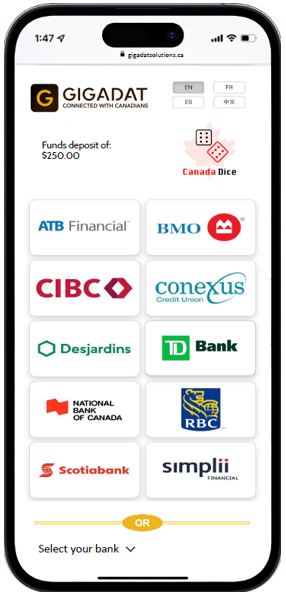
- The user selects the bank (TD Bank in this scenario).
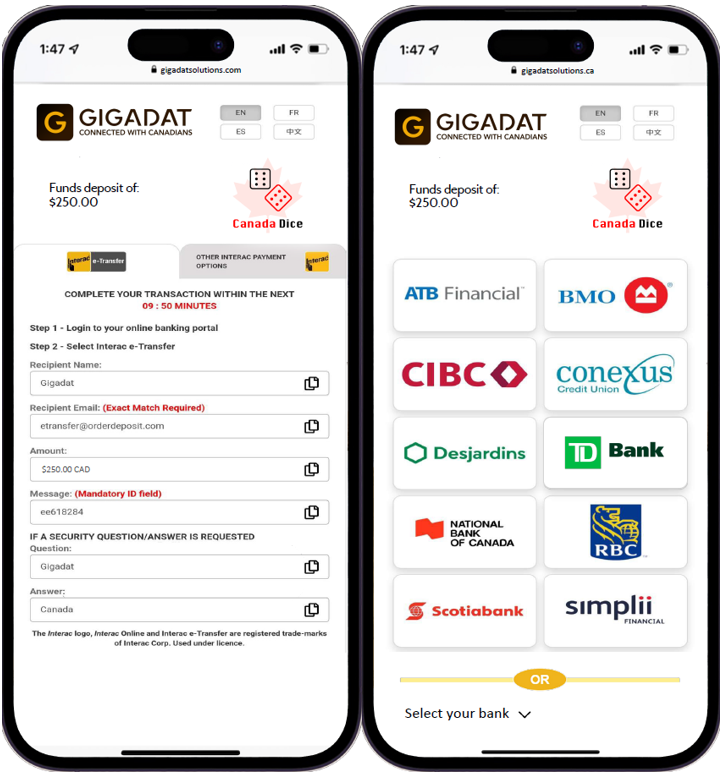
- The user is offered all Interac solutions.
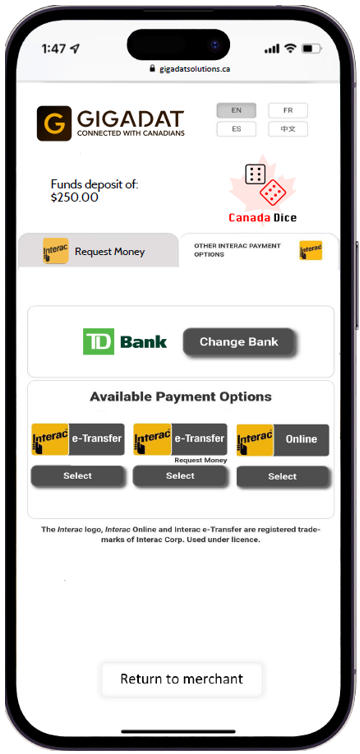
- The user selects the bank (RBC in this scenario).
- The user presses Select under e-Transfer.
- The user logs into their bank.
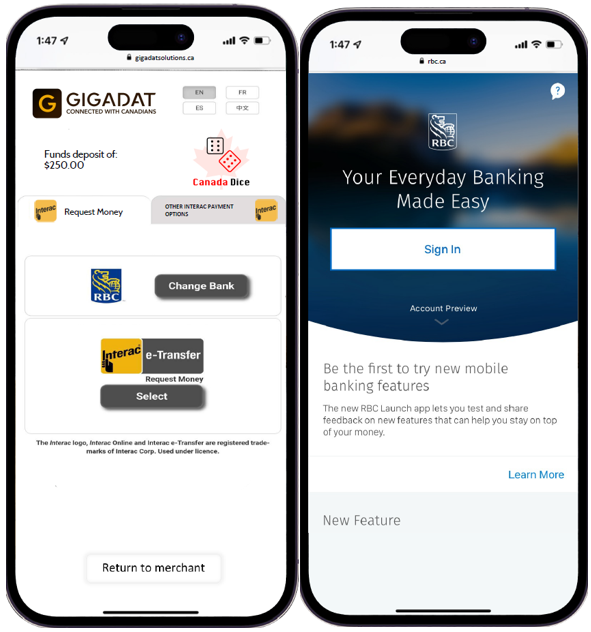
- The user confirms the RFM by pressing Send Now.
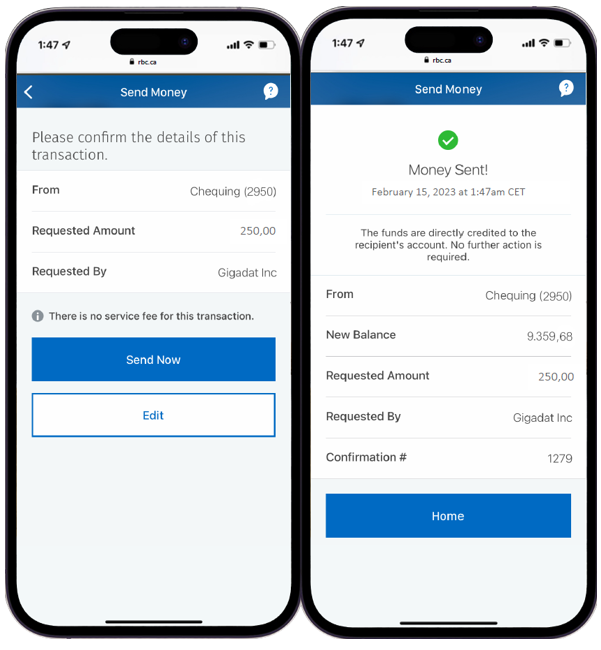
- The transaction is completed.
Testing
Deposit and Withdrawal need to be approved manually by Interac.
 Last modified December 2025