

- METHOD TYPEPrepaid
- PAYMENTS

- PAYOUTS
- REFUNDS
- RECURRING

Introduction
PaySafeCard is a prepaid payment method that users can use to make payment when they want to store multiple PaySafeCard PINs in their E-wallet called “My PaySafeCard”.
Supported Countries
- Australia
- Austria
- Belgium
- Bulgaria
- Canada
- Croatia
- Cyprus
- Czech Republic
- Denmark
- Estonia
- Finland
- France
- Georgia
- Germany
- Gibraltar
- Greece
- Hungary
- Ireland
- Italy
- Kuwait
- Latvia
- Liechtenstein
- Lithuania
- Luxembourg
- Malta
- Mexico
- Netherlands
- Norway
- Peru
- Poland
- Portugal
- Romania
- Saudi Arabia
- Slovakia
- Slovenia
- Spain
- Sweden
- Switzerland
- United Kingdom
- Uruguay
Supported Currencies
- AED
- ARS
- AUD
- BRL
- CAD
- CHF
- CZK
- DKK
- EGP
- EUR
- GBP
- GEL
- HRK
- HUF
- ISK
- KWD
- MXN
- NOK
- NZD
- PEN
- PLN
- RON
- RSD
- SAR
- SEK
- TRY
- USD
- UYU
REST API 1.0
Payment (Deposit) Flow
- Generate a
sessionToken.
- Perform the payment by sending a
/paymentrequest with the following mandatory parameters:
userTokenIdamountcurrencypaymentOption.alternativePaymentMethodclass containing:paymentMethod: “apmgw_PaySafeCard“
deviceDetailsclass containing:ipAddress
billingAddressclass containing:firstNamelastNamecountryemail
userDetailsclass containing:firstNamelastNamecountryemail
Example /payment Request
{
  "sessionToken":"<sessionToken from /getSessionToken>",
  "merchantId":"<your merchantId>",
  "merchantSiteId":"<your merchantSiteId>",
  "clientRequestId":"<unique request ID in merchant system>",
  "amount":"100",
  "currency":"EUR",
  "userTokenId":"<unique customer identifier in merchant system>",
  "clientUniqueId":"<unique transaction ID in merchant system>",
  "paymentOption":{
    "alternativePaymentMethod":{
      "paymentMethod":"apmgw_PaySafeCard"
    }
  },
  "deviceDetails":{
    "ipAddress":"<customer's IP address>"
  },
  "billingAddress":{
    "firstName": "John",
    "lastName": "Smith",
    "country":"FR",
    "email":"[email protected]"
  },
  "userDetails":{
    "firstName": "John",
    "lastName": "Smith",
    "country":"FR",
    "email":"[email protected]"
  },
  "timeStamp":"<YYYYMMDDHHmmss>",
  "checksum":"<calculated checksum>"
}
The response returns a redirect URL (redirectUrl) to redirect the customer to the payment page and a UPO (userPaymentOptionId) for use in future transactions.
Example /payment Response
{
  "orderId":"350866838",
  "userTokenId":"Johnsmith02",
  "paymentOption":{
    "redirectUrl":"https://stage-frame.paysafecard.eu/56af2066-6bad-4076-b440-7882aad2179f",
    "userPaymentOptionId":"86087958",
  },
  "transactionStatus":"REDIRECT",
  "sessionToken":"9df79d89-b5e1-43f5-9743-b77a3633286c",
  "clientUniqueId":"20180327175242",
  "internalRequestId":594576168,
  "status":"SUCCESS",
  "errCode":0,
  "reason":"",
  "merchantId":"2439523627382132721",
  "merchantSiteId":"224428",
  "version":"1.0",
  "clientRequestId":"20230118060805"
}
After the transaction is processed, Nuvei sends a Direct Merchant Notification (DMN) that includes the result of the transaction to the URL provided in urlDetails.notificationUrl, which Nuvei recommends including in the /payment request.
Example /payment DMN with status=APPROVED
...'ppp_status=OK&Status=APPROVED&ExErrCode=0&ErrCode=0&errApmCode=0&errApmDescription=&errScCode=0&errScDescription=&Reason=&ReasonCode=0&PPP_TransactionID=372039178&userid=&merchant_unique_id=d787a78c-0188-1000-b9e3-83615b01c632&customData=Test+Limited&productId=deposit&first_name=Edi&last_name=Bar&email=Melvin18%40test.com¤cy=EUR&customField1=&customField2=&customField3=&customField4=&customField5=&customField6=&customField7=&customField8=&customField9=&customField10=&customField11=&customField12=&customField13=&customField14=&customField15=&invoice_id=&address1=array&address2=&country=Germany&state=&city=transmitter&zip=952&phone1=%2B4930161044526&phone2=&phone3=&client_ip=95.67.116.78&nameOnCard=&cardNumber=&bin=&noCVV=&acquirerId=&acquirerBank=PaySafeCard-PI&expMonth=&expYear=&Token=&tokenId=&AuthCode=&AvsCode=&Cvv2Reply=&shippingCountry=&shippingState=&shippingCity=&shippingAddress=&shippingZip=&shippingFirstName=&shippingLastName=&shippingPhone=&shippingCell=&shippingMail=&total_discount=0.00&total_handling=0.00&total_shipping=0.00&total_tax=0.00&buyButtonProductBundleId=&merchant_site_id=237138&merchant_status=&action=&requestVersion=&message=APPROVED&merchantLocale=en_US&unknownParameters=&payment_method=apmgw_PaySafeCard&ID=&merchant_id=7940440082813863767&responseTimeStamp=2023-06-20.06%3A40%3A38&buyButtonProductId=&webMasterId=&appliedPromotions=&uniqueCC=&transactionType=Sale&externalEmail=&cardCompany=&eci=&user_token_id=3984&userPaymentOptionId=91654598&TransactionID=711000000024225758&externalTransactionId=D7F9FBF2F4D5722ED3CCE2A0D7AB538A&APMReferenceID=D7F9FBF2F4D5722ED3CCE2A0D7AB538A&orderTransactionId=1203513078&totalAmount=10.00&dynamicDescriptor=test&item_name_1=deposit&item_number_1=&item_amount_1=10.00&item_quantity_1=1&item_discount_1=0.00&item_handling_1=0.00&item_shipping_1=0.00&feeAmount=&amountWithoutFee=&houseNumber=&customCurrency=&upoRegistrationDate=20230620&type=DEPOSIT&clientRequestId=&relatedTransactionId=&sessionId=78122a63e91163db80bbac982f1f&responsechecksum=1d00660410d24da66b49692a63caa03e568eb97fbe61e017209e0a2f4072335a&advanceResponseChecksum=f155b29675ac0a5065a5c918c571fbc267668b105dc72521ac637597cc6e6801',
'REQUEST_SENDER' => 0,
'ORDER_ID' => 372039178,
'HTTP_REQUEST_DECODED' => undef,
'RETRY_COUNT' => undef,
'SENT_DATE' => '2023-06-20 09:40:39'
};
Example /payment DMN with status=DECLINED
...'ppp_status=FAIL&Status=DECLINED&ExErrCode=0&ErrCode=0&errApmCode=0&errApmDescription=User+Cancelation&errScCode=9999&errScDescription=Default&Reason=Default&ReasonCode=9999&PPP_TransactionID=368991158&userid=4177071995501000&merchant_unique_id=OES2ADILKLGBTDCN4510&customData=Test+Test+Multi&productId=deposit&first_name=MARVIN&last_name=INGRAM&email=ingram%40testmail.com¤cy=EUR&customField1=&customField2=&customField3=&customField4=&customField5=&customField6=&customField7=&customField8=&customField9=&customField10=&customField11=&customField12=&customField13=&customField14=&customField15=&invoice_id=&address1=VIA+ROCLA+12+n.null&address2=&country=Italy&state=&city=MILANO&zip=20100&phone1=%2B393382316113&phone2=&phone3=&client_ip=217.61.39.42&nameOnCard=&cardNumber=&bin=&noCVV=&acquirerId=&acquirerBank=PaySafeCard-PI&expMonth=&expYear=&Token=&tokenId=&AuthCode=&AvsCode=&Cvv2Reply=&shippingCountry=&shippingState=&shippingCity=&shippingAddress=&shippingZip=&shippingFirstName=&shippingLastName=&shippingPhone=&shippingCell=&shippingMail=&total_discount=0.00&total_handling=0.00&total_shipping=0.00&total_tax=0.00&buyButtonProductBundleId=&merchant_site_id=115073&merchant_status=&action=&requestVersion=&message=DECLINED&merchantLocale=it_IT&unknownParameters=&payment_method=apmgw_PaySafeCard&ID=&merchant_id=8069142418212900166&responseTimeStamp=2023-06-01.15%3A15%3A49&buyButtonProductId=&webMasterId=&appliedPromotions=&uniqueCC=&transactionType=Sale&externalEmail=&cardCompany=&eci=&user_token_id=4177071995501000&user_token=auto&userPaymentOptionId=88299968&TransactionID=711000000023406096&externalTransactionId=92E13AEBD66D8F4EDF1A392FAD7C1381&APMReferenceID=92E13AEBD66D8F4EDF1A392FAD7C1381&orderTransactionId=1199860918&totalAmount=10.00&dynamicDescriptor=test&item_name_1=deposit&item_number_1=&item_amount_1=10.00&item_quantity_1=1&item_discount_1=0.00&item_handling_1=0.00&item_shipping_1=0.00&feeAmount=&amountWithoutFee=&houseNumber=&customCurrency=&upoRegistrationDate=20230324&type=DEPOSIT&clientRequestId=&relatedTransactionId=&sessionId=786fc36f829fc8b27428e682b782&responsechecksum=af7f3536e9d6de48fe837563dfa66b34&advanceResponseChecksum=9eaaff2aa93041c1149663af5437db06', 'STATE' => 2, 'TRANSACTION_ID' => '711000000023406096', 'DMN_TYPE' => 0, 'HTTP_RESPONSE_URL' => undef, 'RETRY_TEMPLATE' => undef, 'USE_POST' => 1, 'MERCHANT_ID' => 101701, 'HEADERS' => undef, 'REQUEST_SENDER' => 0 };
Payout (Withdrawal) Flow
Follow these steps to perform a payout:
1. Register a userTokenId
A userTokenId is a field in the Nuvei system containing the user’s identifier in the merchant system.
If you do not have a userTokenId registered in the Nuvei system for this user, then register one by sending a /createUser request, including:
emailcountryCodefirstNamelastName
Example /createUser Request
{
  "merchantId":"<your merchantId>",
  "merchantSiteId":"<your merchantSiteId>",
  "clientRequestId":"<unique request ID in merchant system>",
  "userTokenId":"<unique user identifier in merchant system>",
  "email":"[email protected]",
  "countryCode":"<2-letter ISO country code>",
  "firstName":"John",
  "lastName":"Smith",
  "timeStamp":"<YYYYMMDDHHmmss>",
  "checksum":"<calculated checksum>"
}
Example /createUser Response
{
  "userId":78403498,
  "internalRequestId":552360538,
  "status":"SUCCESS",
  "errCode":0,
  "reason":"",
  "merchantId":"2439523627382132721",
  "merchantSiteId":"224428",
  "version":"1.0",
  "clientRequestId":"20221108130736"
}
The request registers the userTokenId (userId) in the Nuvei system, which is needed to generate a UPO in the next step.
2. Create the UPO
Create a UPO by sending an
/addUPOAPM request and include:
"userTokenId"– The unique user identifier in your system."paymentMethodName“:”apmgw_PaySafeCard“apmDataclass containing:account_idwd_pay_safe_first_namewd_pay_safe_last_namewd_pay_safe_birthdate
billingAddressclass containing:email
Example /addUPOAPM Request
{
  "merchantId":"<your merchantId>",
  "merchantSiteId":"<your merchantSiteId>",
  "clientRequestId":"<unique request ID in merchant system>",
  "userTokenId":"<unique customer identifier in merchant system>",
  "paymentMethodName":"apmgw_PaySafeCard",
  "apmData":{
     "account_id":"2233678"
     "wd_pay_safe_first_name": "John",
     "wd_pay_safe_last_name": "Smith",
     "wd_pay_safe_birthdate": 1995-11-15
},
  "billingAddress":{
    "email":"[email protected]",
  },
  "timeStamp":"<YYYYMMDDHHmmss>",
  "checksum":"<calculated checksum>"
}
The request returns an encrypted userPaymentOptionId (UPO) representing the user’s APM account details.
Example /addUPOAPM Response
{
  "userPaymentOptionId":83458468,
  "internalRequestId":553078068,
  "status":"SUCCESS",
  "errCode":0,
  "reason":"",
  "merchantId":"2439523627382132721",
  "merchantSiteId":"224428",
  "version":"1.0",
  "clientRequestId":"20221109154215"
}
3. Send a /payout Request
Send a /payout request and include the userPaymentOptionId, which contains the user’s previously stored APM account details. Press here for an example.
After the transaction is processed, Nuvei sends a DMN that includes the result of the transaction to the URL provided in urlDetails.notificationUrl, which Nuvei recommends including in the /payout request.
REST API 2.0
Payment (Deposit) Flow
- Generate a
sessionToken.
- Perform the payment by sending a
POST/paymentsrequest with the following mandatory parameters:
amountcurrencypaymentOption.alternativePaymentMethodclass containing:name: “paySafeCard“
deviceDetailsclass containing:ipAddress
billingAddressclass containing:countryCode
buyerDetailsclass containing:buyerIdfirstNamelastNameemaildateOfBirth
Example POST/payments Request
{
  "processingEntityId": "<<processingEntityId>>",
  "amount": "10",
  "currency": "EUR",
  "urlDetails": {
    "webhookUrl": "<webhookUrl>",
    "successUrl": "<successUrl>",
    "failureUrl": "<failureUrl>",
    "pendingUrl": "<pendingUrl>"
  },
  "paymentOption": {
    "alternativePaymentMethod": {
            "name": "paySafeCard"
        }
    },
  "deviceDetails": {
    "ipAddress": "192.168.2.38"
  },
  "buyerDetails": {
    "buyerId": "<buyerId>",
    "firstName": "Karen",
    "middleName": "Tromp",
    "lastName": "McClure",
    "companyName": "Morissette",
    "dateOfBirth": "2006-01-26",
    "email": "[email protected]",
    "workPhone": "116057343670121488",
    "billingAddress": {
      "countryCode": "ES"
    }
  }
}
The POST/payments response returns the data required to redirect the customer to the PaySafeCard payment page and includes a paymentTokenId for use in future operations where applicable.
Example POST/payments Response
{
"paymentId": "4f705b39e7234f77b0c45db4ce192a89",
"amount": 10,
"currency": "EUR",
"transactionType": "Sale",
"result": {
"status": "redirect"
},
"redirectUrl": "https://customer.test.at.paysafecard.com/psccustomer/GetCustomerPanelServlet?mid=1000004317&mtid=01BA0928EA064F4C7763FF99CFFF6732&amount=10.50¤cy=EUR",
"paymentOption": {
"alternativePaymentMethod": {
"name": "paySafeCard",
"paymentTokenId": "b6a65fa559d24294b5f7086be16b17bd"
}
}
}
After the transaction is processed, Nuvei sends a webhook that includes the result of the transaction to the URL specified in paymentOption.urlDetails.webhookUrl. The webhook notifies the merchant backend of the final transaction status.
Payout (Withdrawal) Flow
A user initiates payout by providing one of the following:
- PaySafeCard details in
paymentOption.alternativePaymentMethod. - Previously created payment token in
paymentOption.paymentToken.
Initiating Payout via alternativePaymentMethod
- Send a
POST /payoutsrequest with the following mandatory fields:
-
amountcurrencypaymentOption.alternativePaymentMethodclass containing:name="paySafeCard"
deviceDetailsclass containing:ipAddress
buyerDetailsclass containing:buyerIdfirstNamelastNameemaildateOfBirth
billingAddressclass containing:countryCode
Example POST/payments Request with alternativePaymentMethod
{
  "processingEntityId": "<<processingEntityId>>",
  "amount": "10",
  "currency": "EUR",
  "urlDetails": {
    "webhookUrl": "<webhookUrl>",
    "successUrl": "<successUrl>",
    "failureUrl": "<failureUrl>",
    "pendingUrl": "<pendingUrl>"
  },
  "paymentOption": {
    "alternativePaymentMethod": {
            "name": "paySafeCard"
        }
    },
  "deviceDetails": {
    "ipAddress": "192.168.2.38"
  },
  "buyerDetails": {
    "buyerId": "<buyerId>",
    "firstName": "Karen",
    "middleName": "Tromp",
    "lastName": "McClure",
    "companyName": "Morissette",
    "dateOfBirth": "2006-01-26",
    "email": "[email protected]",
    "workPhone": "116057343670121488",
    "billingAddress": {
      "countryCode": "ES"
    }
  }
}
After the payout is processed, Nuvei sends a webhook that includes the result of the transaction to the URL provided in urlDetails.webhookUrl, which Nuvei recommends including in the POST /payouts request.
Initiating Payout via paymentTokenId
Instead of providing the PaySafeCard account details again, a user can provide a previously created payment token by sending a /payouts request with paymentOption.paymentToken.paymentTokenId and the associated buyerDetails.buyerId for the payment token.
Example POST/payments Request with Payment Token
{
  "processingEntityId": "<processingEntityId>",
  "amount": "10",
  "currency": "EUR",
  "urlDetails": {
    "webhookUrl": "<webhookUrl>",
    "successUrl": "<successUrl>",
    "failureUrl": "<failureUrl>",
    "pendingUrl": "<pendingUrl>"
  },
  "paymentOption": {
    "paymentToken": {
      "paymentTokenId": "abc123def456ghi789jkl012mno345pq"
    }
  },
  "deviceDetails": {
    "ipAddress": "192.168.2.38"
  },
  "buyerDetails": {
    "buyerId": "<buyerId>",
    "firstName": "Karen",
    "middleName": "Tromp",
    "lastName": "McClure",
    "companyName": "Morissette",
    "dateOfBirth": "2006-01-26",
    "email": "[email protected]",
    "workPhone": "116057343670121488",
    "billingAddress": {
      "countryCode": "ES"
    }
  }
}
User Experience
- The user is redirected to the PaySafeCard website.
- The user either enters their 16-digit PaySafeCard PIN or their “My PaySafeCard” username and password to log in to the E-wallet.
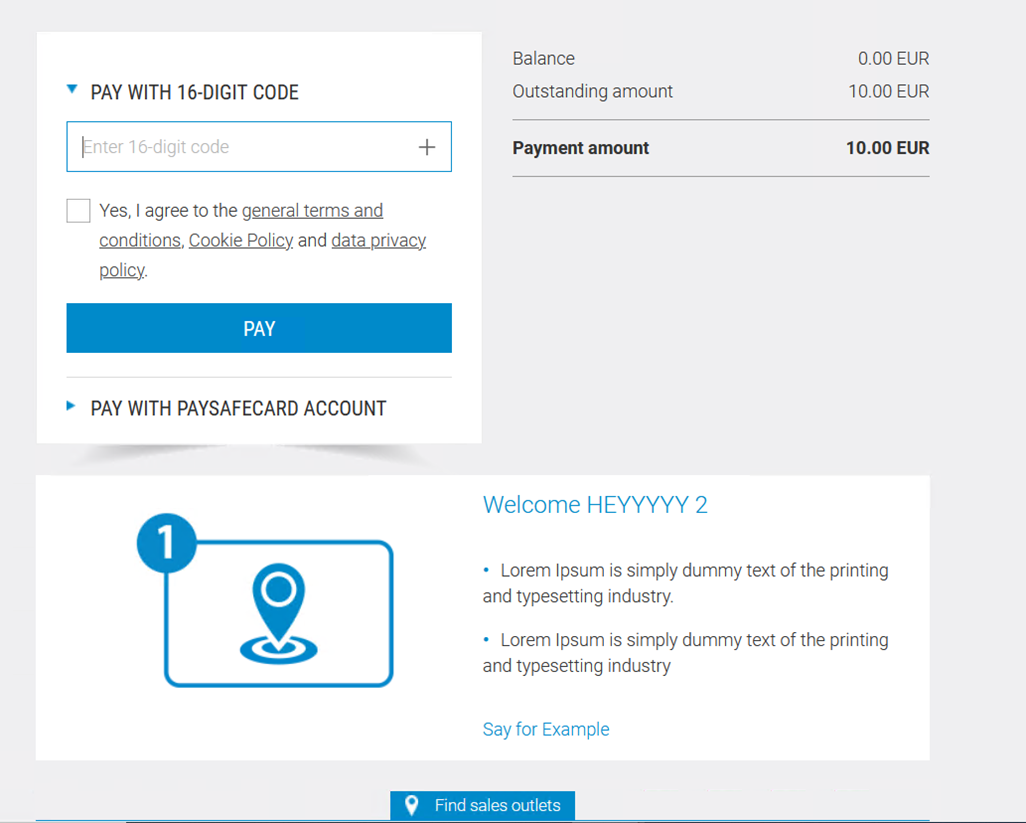
- The user follows the onscreen instructions and completes the payment. By default, the user has 30 minutes to complete the process.
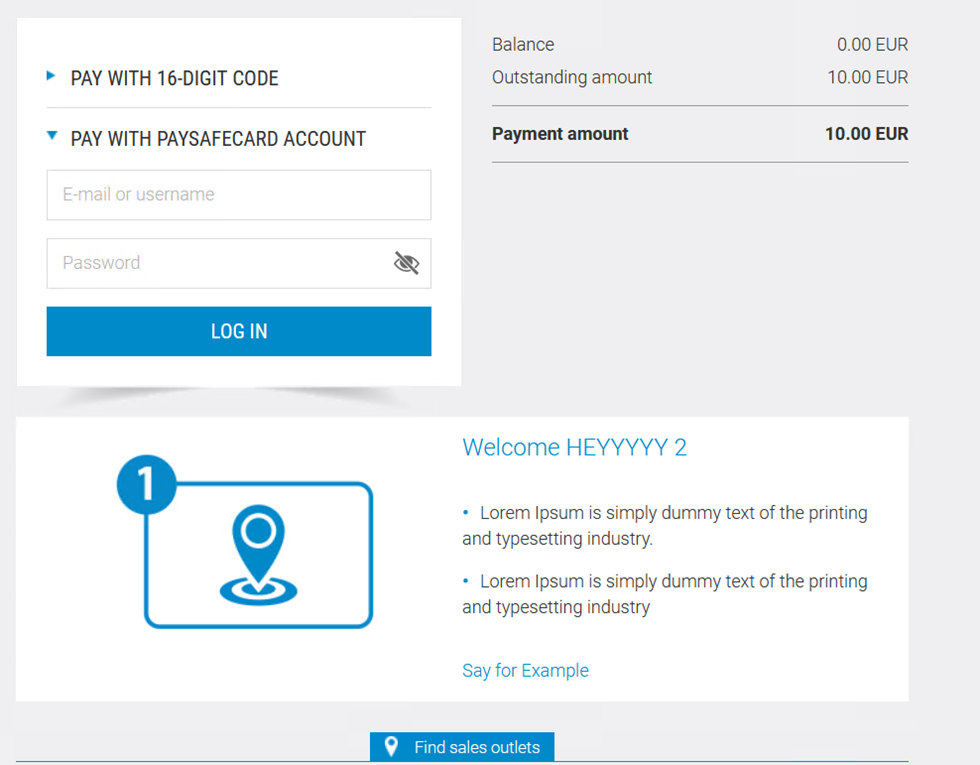
- Upon successful payment, user is redirected to the confirmation page.
Configuration Requirements
In case a Connect mode (Direct MID) is used, the merchant must whitelist our IPs with PaySafeCard.
Production
- 31.207.2.1 – 31.207.3.254
- 87.120.10.1 – 87.120.10.254
- 87.120.11.1 – 87.120.11.254
- 91.220.189.1 – 91.220.189.254
- 149.170.56.1 – 149.170.57.254
- 194.247.167.1 – 194.247.167.254
- 195.28.166.1 – 195.28.167.254
Integration
- 52.16.211.57
- 52.17.110.204
- 52.112.39.133
- 54.242.232.64
Testing
Deposit: PIN 0000009021001201
 Last modified September 2026