

- METHOD TYPEReal-Time Bank Transfer
- PAYMENTS

- PAYOUTS
- REFUNDS
- RECURRING

Introduction
MB WAY is a popular mobile payment service in Portugal. It allows the customers of participating banks to transfer money, make online and offline purchases, and save digitized payment cards in a wallet.
Supported Countries
- Portugal
Supported Currencies
- EUR
REST 1.0 API
Payment (Deposit) Flow
To perform a payment using Nuvei REST 1.0 API integration:
1. Generate a sessionToken.
2. Perform the payment by sending a
/payment request with the following mandatory parameters:-
userTokenId– Unique customer identifier in the merchant system.amountpaymentOption.alternativePaymentMethodclass containing:paymentMethod: “apmgw_MBWAY“mbWay_mobilePhone: <international code>#<mobile phone number>
deviceDetailsclass containing:ipAddress
billingAddressclass containing:firstNamelastNameemailcountry
userDetailsclass containing:firstNamelastNameemailcountry
Example /payment Request
{
  "sessionToken": "<sessionToken from /getSessionToken>",
  "merchantId": "<your merchantId>",
  "merchantSiteId": "<your merchantSiteId>",
  "userTokenId": "<unique customer identifier in merchant system>",
  "clientRequestId": "<unique request ID in merchant system>",
  "clientUniqueId": "<unique transaction ID in merchant system>",
  "currency": "EUR",
  "amount": "100",
  "paymentOption": {
    "alternativePaymentMethod": {
      "paymentMethod": "apmgw_MBWAY",
      "mbWay_mobilePhone": "351#911111111"
    }
   },
  "deviceDetails": {
    "ipAddress": "<customer's IP address>"
  },
  "billingAddress": {
    "firstName": "John",
    "lastName": "Smith",
    "email": "[email protected]",
    "country": "PT"
  },
  "userDetails": {
    "firstName": "John",
    "lastName": "Smith",
    "email": "[email protected]",
    "country": "PT"
  },
  "timeStamp": "<YYYYMMDDHHmmss>",
  "checksum": "<calculated checksum>"
}
After the transaction is processed, Nuvei sends a Direct Merchant Notification (DMN) that includes the result of the transaction to the URL provided in urlDetails.notificationUrl, which Nuvei recommends including in the /payment request.
Handling the Response
The response and DMN include userPaymentOptionId and transactionStatus with the value PENDING.
Example Returned Parameters
{
  ...
  ...
  "transactionId":"36682151",
  "paymentOption": {
    "userPaymentOptionId": "8100521",
    "card": {}
  },
  "transactionStatus": "PENDING",
  ...
  ...
}
Example /payment DMN with status=PENDING
...'ppp_status=PENDING&Status=PENDING&ExErrCode=0&ErrCode=0&errApmCode=0&errApmDescription=&errScCode=0&errScDescription=&Reason=&ReasonCode=0&PPP_TransactionID=1111111111111111&userid=USERID&merchant_unique_id=UNIQUEID&customData=CUSTOMDATA&productId=PRODUCTID&first_name=First&last_name=Second&[email protected]¤cy=EUR&customField1=&customField2=&customField3=&customField4=&customField5=&customField6=&customField7=SAS&customField8=&customField9=&customField10=&customField11=&customField12=&customField13=&customField14=&customField15=&invoice_id=&address1=Address&address2=&country=Germany&state=&city=City&zip=1232134&phone1=%2B123456789&phone2=&phone3=&client_ip=111.111.111.111&nameOnCard=&cardNumber=&bin=&noCVV=&acquirerId=&acquirerBank=SIBS-PI&expMonth=&expYear=&Token=&tokenId=&AuthCode=&AvsCode=&Cvv2Reply=&shippingCountry=&shippingState=&shippingCity=&shippingAddress=&shippingZip=&shippingFirstName=&shippingLastName=&shippingPhone=&shippingCell=&shippingMail=&total_discount=0.00&total_handling=0.00&total_shipping=0.00&total_tax=0.00&buyButtonProductBundleId=&merchant_site_id=111111&merchant_status=&action=&requestVersion=&message=PENDING&merchantLocale=en_US&unknownParameters=&payment_method=apmgw_MBWAY&ID=&merchant_id=111111111111111111&responseTimeStamp=2023-06-28.21%3A00%3A06&buyButtonProductId=&webMasterId=&appliedPromotions=&uniqueCC=&transactionType=Sale&externalEmail=&cardCompany=&eci=&user_token_id=UserTokenID&user_token=auto&userPaymentOptionId=1111111111&TransactionID=111111111111111111&ExternalaccountID=1111111111111111&APMReferenceID=A2FBA2F9DD3D9D6E49F76B279F66DC83&orderTransactionId=11111111111&totalAmount=10.00&dynamicDescriptor=Descriptor&item_name_1=Product&item_number_1=&item_amount_1=10.00&item_quantity_1=1&item_discount_1=0.00&item_handling_1=0.00&item_shipping_1=0.00&feeAmount=&amountWithoutFee=&houseNumber=&customCurrency=&upoRegistrationDate=20200712&type=DEPOSIT&clientRequestId=&relatedTransactionId=&responsechecksum=fa3cbf1407ae584298794db757fa8766&advanceResponseChecksum=474a11c586580c3abe3423baf21c669',
Example /paymentDMN with status=APPROVED
...'ppp_status=OK&Status=APPROVED&ExErrCode=0&ErrCode=0&errApmCode=0&errApmDescription=&errScCode=0&errScDescription=&Reason=&ReasonCode=0&PPP_TransactionID=4351111111111111111&userid=USEDID&merchant_unique_id=UNIQUEID&customData=&productId=&first_name=John&last_name=Doe&[email protected]¤cy=EUR&clientUniqueId=CUID&customField1=&customField2=&customField3=&customField4=&customField5=&customField6=&customField7=&customField8=&customField9=&customField10=&customField11=&customField12=&customField13=&customField14=&customField15=&invoice_id=&address1=&address2=&country=Portugal&state=&city=&zip=&phone1=123456789&phone2=&phone3=&client_ip=100.00.00.00&nameOnCard=&cardNumber=&bin=&noCVV=&acquirerId=&acquirerBank=SIBS-PI&expMonth=&expYear=&Token=&tokenId=&AuthCode=&AvsCode=&Cvv2Reply=&shippingCountry=&shippingState=&shippingCity=&shippingAddress=&shippingZip=&shippingFirstName=&shippingLastName=&shippingPhone=&shippingCell=&shippingMail=&total_discount=0.00&total_handling=0.00&total_shipping=0.00&total_tax=0.00&buyButtonProductBundleId=&merchant_site_id=111111&merchant_status=&action=&requestVersion=&message=APPROVED&merchantLocale=&unknownParameters=&payment_method=apmgw_MBWAY&ID=&merchant_id=1111111111111111111&responseTimeStamp=2023-07-02.21%3A05%3A16&buyButtonProductId=&webMasterId=&appliedPromotions=&uniqueCC=&transactionType=Sale&externalEmail=&cardCompany=&eci=&user_token_id=USERTOKENID&userPaymentOptionId=111111111&TransactionID=1111111111111111111&ExternalaccountID=132456789&APMReferenceID=3A6645C3B1C6CD8DA1A43EF2153987FA&orderTransactionId=11111111111&totalAmount=50.00&dynamicDescriptor=Regulated+Portugal+Ltd&item_name_1=name&item_number_1=&item_amount_1=50.00&item_quantity_1=1&item_discount_1=0.00&item_handling_1=0.00&item_shipping_1=0.00&feeAmount=&amountWithoutFee=&houseNumber=&customCurrency=&upoRegistrationDate=20201214&type=DEPOSIT&clientRequestId=CLIENTREQUESTID&relatedTransactionId=&sessionId=86c4c3bc6e4456541cac373484ac&responsechecksum=295bf4ddc8f0377a441a2bd82ec0b5d735a04af7be3e5da73b125581d64c0326&advanceResponseChecksum=a9d5f1a36641f95cd289823cefcae059729be1ca010333fe5412fc580186ea27',
Example /paymentDMN with status=DECLINED
...'ppp_status=FAIL&Status=DECLINED&ExErrCode=0&ErrCode=9&errApmCode=9&errApmDescription=Transaction+expired&errScCode=9999&errScDescription=Default&Reason=Default&ReasonCode=9999&PPP_TransactionID=11111111111&userid=USERID&merchant_unique_id=UNIQUEID01&customData=&productId=&first_name=JOHN&last_name=DOE&[email protected]¤cy=EUR&clientUniqueId=UNIQUEID&customField1=&customField2=&customField3=&customField4=&customField5=&customField6=&customField7=&customField8=&customField9=&customField10=&customField11=&customField12=&customField13=&customField14=&customField15=&invoice_id=&address1=&address2=&country=Portugal&state=&city=&zip=&phone1=111111111111111&phone2=&phone3=&client_ip=100.100.11.10&nameOnCard=&cardNumber=&bin=&noCVV=&acquirerId=&acquirerBank=SIBS-PI&expMonth=&expYear=&Token=&tokenId=&AuthCode=&AvsCode=&Cvv2Reply=&shippingCountry=&shippingState=&shippingCity=&shippingAddress=&shippingZip=&shippingFirstName=&shippingLastName=&shippingPhone=&shippingCell=&shippingMail=&total_discount=0.00&total_handling=0.00&total_shipping=0.00&total_tax=0.00&buyButtonProductBundleId=&merchant_site_id=111111&merchant_status=&action=&requestVersion=&message=DECLINED&merchantLocale=&unknownParameters=&payment_method=apmgw_MBWAY&ID=&merchant_id=1111111111111111111&responseTimeStamp=2023-07-02.22%3A36%3A57&buyButtonProductId=&webMasterId=&appliedPromotions=&uniqueCC=&transactionType=Sale&externalEmail=&cardCompany=&eci=&user_token_id=USERTOKENID&userPaymentOptionId=1111111111&TransactionID=1111111111111111111&ExternalaccountID=111111111111111&APMReferenceID=3687C614CDE0B01207BAE9971A0784A1&orderTransactionId=11111111111&totalAmount=10.00&dynamicDescriptor=Regulated+Portugal+Ltd&item_name_1=name&item_number_1=&item_amount_1=10.00&item_quantity_1=1&item_discount_1=0.00&item_handling_1=0.00&item_shipping_1=0.00&feeAmount=&amountWithoutFee=&houseNumber=&customCurrency=&upoRegistrationDate=20220214&type=DEPOSIT&clientRequestId=CLIENTREQUESTID&relatedTransactionId=&sessionId=8bbdc16b8f38b39430c433971bb3&responsechecksum=a09b4031ea212dd3da2f2e44a0833ce75075b7aadc54269a798a317955ab3880&advanceResponseChecksum=c30f24ca5dd03b33573e745ff8d7817ebc00869076759d2c89d1614a76bee995',
Payout (Withdrawal) Flow
-
Register a
userTokenId.To register a
userTokenId, send a/createUserrequest that includes the following parameters:
-
firstNamelastNameaddressemailzipcitycountryCodephonedateOfBirth
Example /createUser Request
{
    "merchantSiteId": "{{merchantSiteId}}",
    "merchantId": "{{merchantId}}",
    "userTokenId": "test12345678",
    "clientRequestId": "{{clientRequestId}}",
    "timeStamp": "{{timestamp}}",
    "firstName": "FNAME",
    "lastName": "LNAME",
    "address": "some street",
    "email": "[email protected]",
    "zip": "3032",
    "city": "Paris",
    "countryCode": "PT",
    "phone": "972546657837",
    "dateOfBirth": "0001-01-01",
    "checksum": "{{checksum}}"
}
Example /createUser Response
{
    "internalRequestId": 713904111,
    "status": "SUCCESS",
    "errCode": 0,
    "reason": "",
    "merchantId": "1102398682906145682",
    "merchantSiteId": "228311",
    "version": "1.0",
    "clientRequestId": "20260721165923",
    "userId": 1477743111
}
The request registers the userTokenId in the Nuvei system, which is needed to generate a UPO.
2. To create a UPO, send an /addUPOAPM request that includes the following parameters:
userTokenId– Unique customer identifier in the merchant system.paymentMethodName: “apmgw_MBWAY“apmDatablock containing:mbWay_mobilePhone
Example /addUPOAPM Request
{
    "merchantId": "{{merchantId}}",
    "merchantSiteId": "{{merchantSiteId}}",
    "userTokenId": "test12345678",
    "clientRequestId": "{{clientRequestId}}",
    "apmData": {
        "mbWay_mobilePhone": "972#546657837"
    },
    "paymentMethodName": "apmgw_MBWAY",
    "timeStamp": "{{timestamp}}",
    "checksum": "{{checksum}}"
}
The request returns an encrypted UPO that contains the user APM account details.
Example /addUPOAPM Response
{
    "internalRequestId": 713914111,
    "status": "SUCCESS",
    "errCode": 0,
    "reason": "",
    "merchantId": "1102398682906145682",
    "merchantSiteId": "228311",
    "version": "1.0",
    "clientRequestId": "20260721170209",
    "userPaymentOptionId": 230766347111
}
3. Send a /payout request that includes the userPaymentOptionId, which contains previously stored user APM account details.
urlDetails.notificationUrl, which Nuvei recommends including in the /payout request.Example /payout (Withdrawal) Request
{
    "merchantSiteId": "{{merchantSiteId}}",
    "merchantId": "{{merchantId}}",
    "userTokenId": "testddd12345678",
    "clientUniqueId": "12345",
    "amount": "1",
    "currency": "EUR",
    "userPaymentOption": {
        "userPaymentOptionId": "230766356111"
    },
    "deviceDetails": {
        "ipAddress": "192.168.100.53"
    },
    "timeStamp": "{{timestamp}}",
    "checksum": "{{checksum}}"
}
Example /payout (Withdrawal) Response
{
    "internalRequestId": 713988111,
    "status": "SUCCESS",
    "errCode": 0,
    "reason": "",
    "merchantId": "1102398682906145682",
    "merchantSiteId": "228311",
    "version": "1.0",
    "userTokenId": "testddd12345678",
    "clientUniqueId": "12345",
    "transactionStatus": "PENDING",
    "paymentMethodErrorCode": "0",
    "userPaymentOptionId": "230766356111",
    "externalTransactionId": "2610000000989877",
    "transactionId": "2610000000000620181",
    "orderId": "550831111"
}
User Experience
- The user selects the MB WAY payment option.
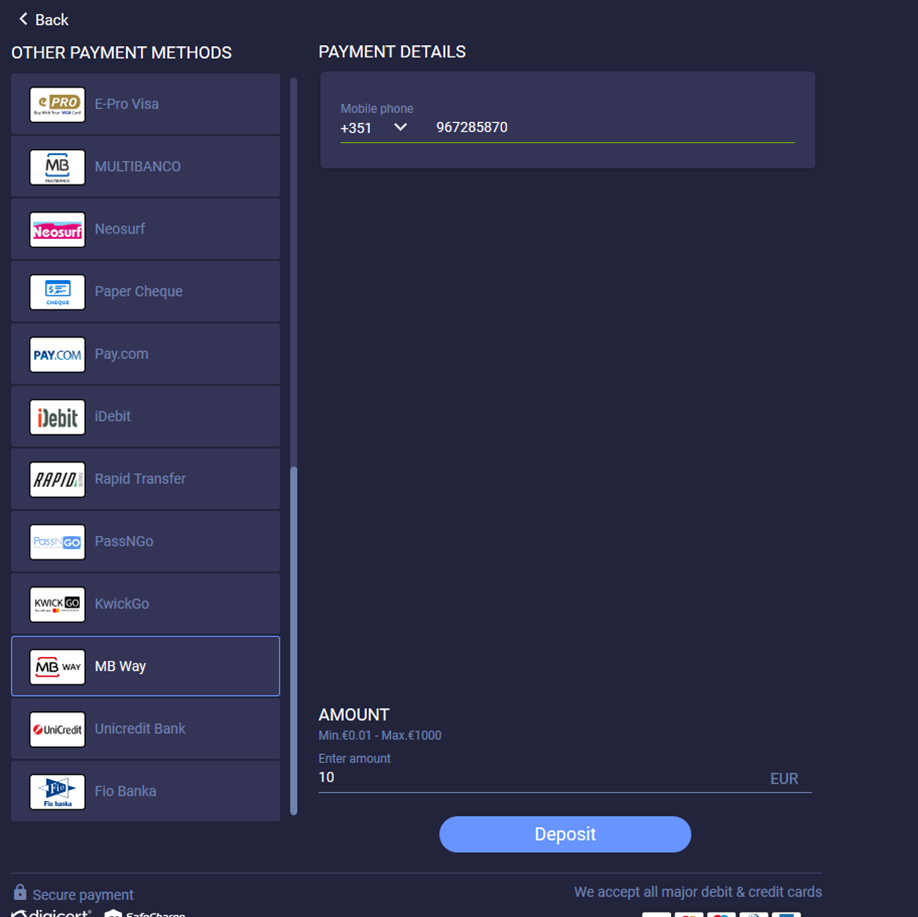
- The user enters the phone number on the payment page and presses Deposit to start the payment process.
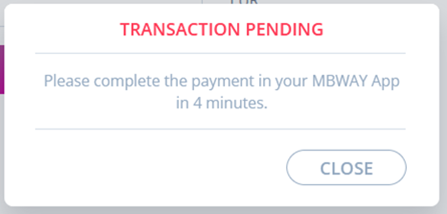
- In the ‘Transaction Pending’ message, the user presses ‘Close’.
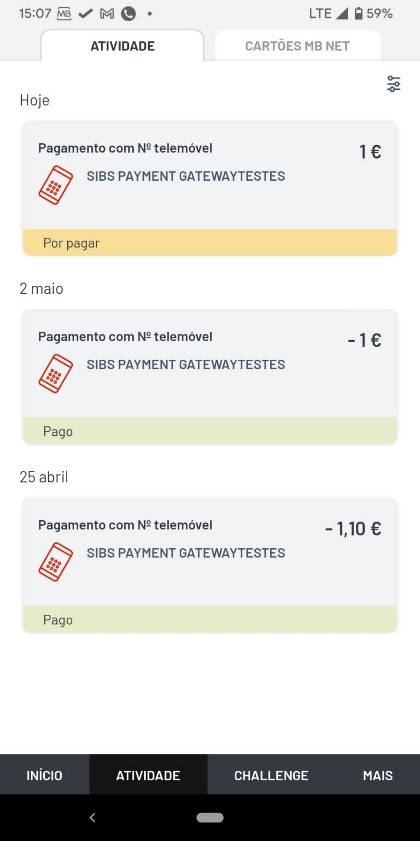
- The user opens the MB WAY application on a mobile phone.
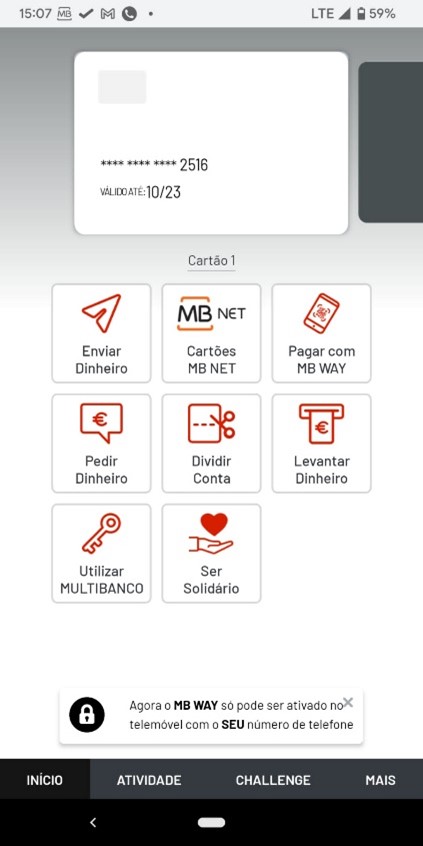
- On the ‘Activity’ tab, the user presses the relevant payment option.
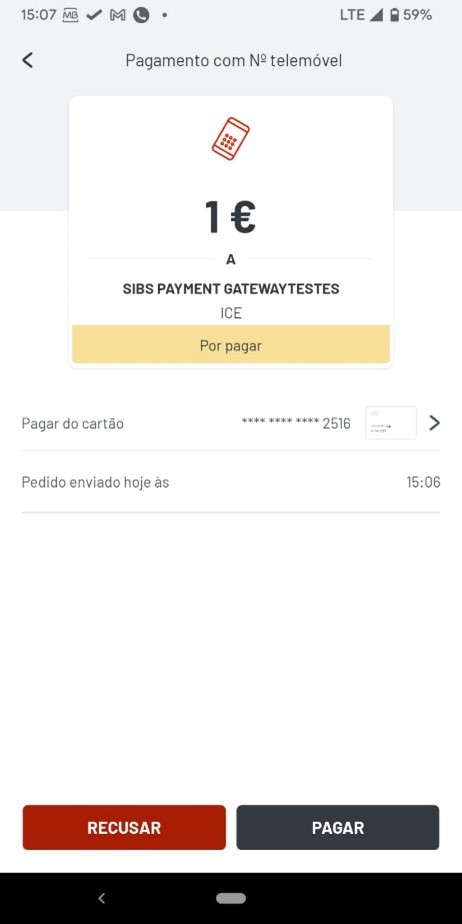
- The user completes the payment process.
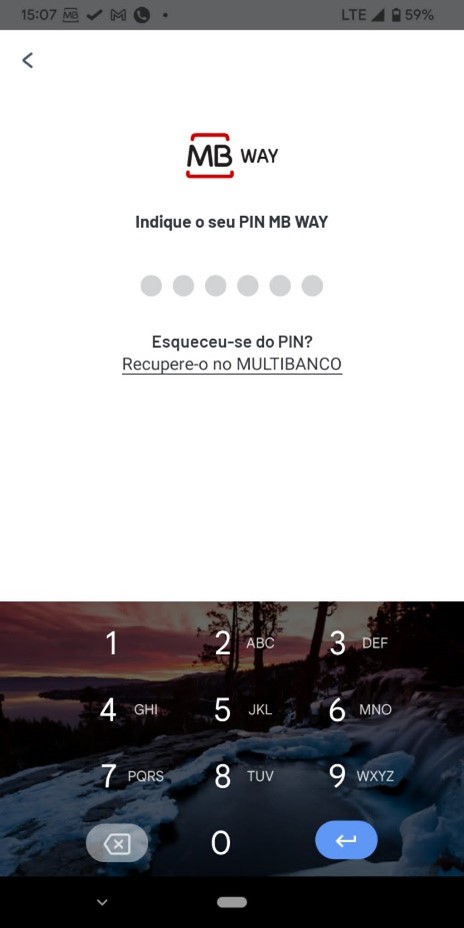
- The user enters a PIN to confirm the payment.
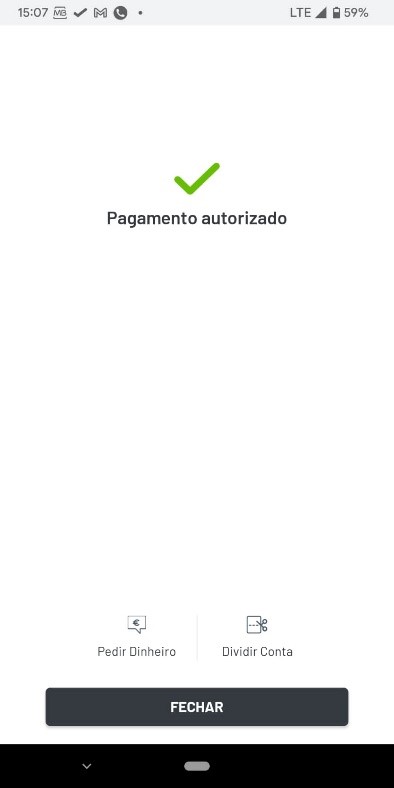
If the payment is successfully completed, a confirmation message is displayed.
 Last modified September 2026