
Attributes 
- METHOD TYPEReal-Time Bank Transfer
- PAYMENTS

- PAYOUTS

- REFUNDS
- RECURRING
Introduction
MB WAY is a popular mobile payment service in Portugal. It allows the customers of 14 participating banks to transfer money, make online and offline purchases, and save digitized payment cards in their wallet.
Supported Countries
- Portugal
Supported Currencies
- EUR
REST API 1.0
Payment (Deposit) Flow
- Generate a
sessionToken.
- Perform the payment by sending a /payment request with the following mandatory parameters:
userTokenId– Unique customer identifier in merchant system.amountpaymentOption.alternativePaymentMethodclass containing:paymentMethod: “apmgw_MBWAY“mbWay_mobilePhone: <international code>#<mobile phone number>
deviceDetailsclass containing:ipAddress
billingAddressclass containing:firstNamelastNameemailcountry
userDetailsclass containing:firstNamelastNameemailcountry
Example /payment Request
{
    "sessionToken": "{{sessionTokenId}}",
    "merchantId": "{{merchantId}}",
    "merchantSiteId": "{{merchantSiteId}}",
    "userTokenId": "MBWAYTEST1",
    "paymentOption": {
        "alternativePaymentMethod": {
            "paymentMethod": "apmgw_MBWAY",
            "mbWay_mobilePhone":"359-883345605"
        }
    },
    "currency": "EUR",
    "amount": "1",
    "deviceDetails": {
        "ipAddress": "114.13.12.11",
        "deviceType": "mobile"
    },
    "billingAddress": {
        "firstName": "Ronald",
        "lastName": "Fielding",
        "email": "[email protected]",
        "phone": "3126122250",
        "address": "Peachtree Dunwoody Rd",
        "city": "Atlanta",
        "zip": "30328",
        "state": "GA",
        "country": "PT",
        "language": "en"
    },
    "userDetails": {
        "firstName": "Test",
        "lastName": "iBrvZBSfVGQqpjPYTSbvfsLoHY",
        "email": "[email protected]",
        "phone": "3126122250",
        "dateOfBirth": "1995-03-18",
        "address": "Peachtree Dunwoody Rd",
        "city": "Atlanta",
        "zip": "30328",
        "state": "GA",
        "country": "PT",
        "language": "en"
    },
    "timeStamp": "{{timestamp}}",
    "checksum": "{{checksum}}"
}
After the transaction is processed, Nuvei sends a Direct Merchant Notification (DMN) that includes the result of the transaction to the URL provided in urlDetails.notificationUrl, which Nuvei recommends including in the /payment request.
Example /payment Response
{
    "internalRequestId": 630015111,
    "status": "SUCCESS",
    "errCode": 0,
    "reason": "",
    "merchantId": "1102398682906145682",
    "merchantSiteId": "228311",
    "version": "1.0",
    "sessionToken": "80fb235ae8db412193ce1417eb658ef90111",
    "orderId": "528957111",
    "userTokenId": "MBWAYTEST1",
    "paymentOption": {
        "userPaymentOptionId": "230756035111",
        "card": {}
    },
    "transactionStatus": "PENDING",
    "transactionId": "2610000000000596294"
}
Handling the Response
The response is always PENDING, and you receive responses and DMNs, which includes transactionStatus: PENDING and a userPaymentOptionId.
Example Some Parameters Returned
{
  ...
  ...
  "transactionId":"36682151",
  "paymentOption": {
    "userPaymentOptionId": "8100521",
    "card": {}
  },
  "transactionStatus": "PENDING",
  ...
  ...
}
Example /payment DMN with status=PENDING
...'ppp_status=PENDING&Status=PENDING&ExErrCode=0&ErrCode=0&errApmCode=0&errApmDescription=&errScCode=0&errScDescription=&Reason=&ReasonCode=0&PPP_TransactionID=1111111111111111&userid=USERID&merchant_unique_id=UNIQUEID&customData=CUSTOMDATA&productId=PRODUCTID&first_name=First&last_name=Second&[email protected]¤cy=EUR&customField1=&customField2=&customField3=&customField4=&customField5=&customField6=&customField7=SAS&customField8=&customField9=&customField10=&customField11=&customField12=&customField13=&customField14=&customField15=&invoice_id=&address1=Address&address2=&country=Germany&state=&city=City&zip=1232134&phone1=%2B123456789&phone2=&phone3=&client_ip=111.111.111.111&nameOnCard=&cardNumber=&bin=&noCVV=&acquirerId=&acquirerBank=SIBS-PI&expMonth=&expYear=&Token=&tokenId=&AuthCode=&AvsCode=&Cvv2Reply=&shippingCountry=&shippingState=&shippingCity=&shippingAddress=&shippingZip=&shippingFirstName=&shippingLastName=&shippingPhone=&shippingCell=&shippingMail=&total_discount=0.00&total_handling=0.00&total_shipping=0.00&total_tax=0.00&buyButtonProductBundleId=&merchant_site_id=111111&merchant_status=&action=&requestVersion=&message=PENDING&merchantLocale=en_US&unknownParameters=&payment_method=apmgw_MBWAY&ID=&merchant_id=111111111111111111&responseTimeStamp=2023-06-28.21%3A00%3A06&buyButtonProductId=&webMasterId=&appliedPromotions=&uniqueCC=&transactionType=Sale&externalEmail=&cardCompany=&eci=&user_token_id=UserTokenID&user_token=auto&userPaymentOptionId=1111111111&TransactionID=111111111111111111&ExternalaccountID=1111111111111111&APMReferenceID=A2FBA2F9DD3D9D6E49F76B279F66DC83&orderTransactionId=11111111111&totalAmount=10.00&dynamicDescriptor=Descriptor&item_name_1=Product&item_number_1=&item_amount_1=10.00&item_quantity_1=1&item_discount_1=0.00&item_handling_1=0.00&item_shipping_1=0.00&feeAmount=&amountWithoutFee=&houseNumber=&customCurrency=&upoRegistrationDate=20200712&type=DEPOSIT&clientRequestId=&relatedTransactionId=&responsechecksum=fa3cbf1407ae584298794db757fa8766&advanceResponseChecksum=474a11c586580c3abe3423baf21c669',
If the transfer is successful, then the following is returned:
Example /paymentDMN with status=APPROVED
...'ppp_status=OK&Status=APPROVED&ExErrCode=0&ErrCode=0&errApmCode=0&errApmDescription=&errScCode=0&errScDescription=&Reason=&ReasonCode=0&PPP_TransactionID=4351111111111111111&userid=USEDID&merchant_unique_id=UNIQUEID&customData=&productId=&first_name=John&last_name=Doe&[email protected]¤cy=EUR&clientUniqueId=CUID&customField1=&customField2=&customField3=&customField4=&customField5=&customField6=&customField7=&customField8=&customField9=&customField10=&customField11=&customField12=&customField13=&customField14=&customField15=&invoice_id=&address1=&address2=&country=Portugal&state=&city=&zip=&phone1=123456789&phone2=&phone3=&client_ip=100.00.00.00&nameOnCard=&cardNumber=&bin=&noCVV=&acquirerId=&acquirerBank=SIBS-PI&expMonth=&expYear=&Token=&tokenId=&AuthCode=&AvsCode=&Cvv2Reply=&shippingCountry=&shippingState=&shippingCity=&shippingAddress=&shippingZip=&shippingFirstName=&shippingLastName=&shippingPhone=&shippingCell=&shippingMail=&total_discount=0.00&total_handling=0.00&total_shipping=0.00&total_tax=0.00&buyButtonProductBundleId=&merchant_site_id=111111&merchant_status=&action=&requestVersion=&message=APPROVED&merchantLocale=&unknownParameters=&payment_method=apmgw_MBWAY&ID=&merchant_id=1111111111111111111&responseTimeStamp=2023-07-02.21%3A05%3A16&buyButtonProductId=&webMasterId=&appliedPromotions=&uniqueCC=&transactionType=Sale&externalEmail=&cardCompany=&eci=&user_token_id=USERTOKENID&userPaymentOptionId=111111111&TransactionID=1111111111111111111&ExternalaccountID=132456789&APMReferenceID=3A6645C3B1C6CD8DA1A43EF2153987FA&orderTransactionId=11111111111&totalAmount=50.00&dynamicDescriptor=Regulated+Portugal+Ltd&item_name_1=name&item_number_1=&item_amount_1=50.00&item_quantity_1=1&item_discount_1=0.00&item_handling_1=0.00&item_shipping_1=0.00&feeAmount=&amountWithoutFee=&houseNumber=&customCurrency=&upoRegistrationDate=20201214&type=DEPOSIT&clientRequestId=CLIENTREQUESTID&relatedTransactionId=&sessionId=86c4c3bc6e4456541cac373484ac&responsechecksum=295bf4ddc8f0377a441a2bd82ec0b5d735a04af7be3e5da73b125581d64c0326&advanceResponseChecksum=a9d5f1a36641f95cd289823cefcae059729be1ca010333fe5412fc580186ea27',
If the transfer is not successful, then the following is returned:
Example /paymentDMN with status=DECLINED
...'ppp_status=FAIL&Status=DECLINED&ExErrCode=0&ErrCode=9&errApmCode=9&errApmDescription=Transaction+expired&errScCode=9999&errScDescription=Default&Reason=Default&ReasonCode=9999&PPP_TransactionID=11111111111&userid=USERID&merchant_unique_id=UNIQUEID01&customData=&productId=&first_name=JOHN&last_name=DOE&[email protected]¤cy=EUR&clientUniqueId=UNIQUEID&customField1=&customField2=&customField3=&customField4=&customField5=&customField6=&customField7=&customField8=&customField9=&customField10=&customField11=&customField12=&customField13=&customField14=&customField15=&invoice_id=&address1=&address2=&country=Portugal&state=&city=&zip=&phone1=111111111111111&phone2=&phone3=&client_ip=100.100.11.10&nameOnCard=&cardNumber=&bin=&noCVV=&acquirerId=&acquirerBank=SIBS-PI&expMonth=&expYear=&Token=&tokenId=&AuthCode=&AvsCode=&Cvv2Reply=&shippingCountry=&shippingState=&shippingCity=&shippingAddress=&shippingZip=&shippingFirstName=&shippingLastName=&shippingPhone=&shippingCell=&shippingMail=&total_discount=0.00&total_handling=0.00&total_shipping=0.00&total_tax=0.00&buyButtonProductBundleId=&merchant_site_id=111111&merchant_status=&action=&requestVersion=&message=DECLINED&merchantLocale=&unknownParameters=&payment_method=apmgw_MBWAY&ID=&merchant_id=1111111111111111111&responseTimeStamp=2023-07-02.22%3A36%3A57&buyButtonProductId=&webMasterId=&appliedPromotions=&uniqueCC=&transactionType=Sale&externalEmail=&cardCompany=&eci=&user_token_id=USERTOKENID&userPaymentOptionId=1111111111&TransactionID=1111111111111111111&ExternalaccountID=111111111111111&APMReferenceID=3687C614CDE0B01207BAE9971A0784A1&orderTransactionId=11111111111&totalAmount=10.00&dynamicDescriptor=Regulated+Portugal+Ltd&item_name_1=name&item_number_1=&item_amount_1=10.00&item_quantity_1=1&item_discount_1=0.00&item_handling_1=0.00&item_shipping_1=0.00&feeAmount=&amountWithoutFee=&houseNumber=&customCurrency=&upoRegistrationDate=20220214&type=DEPOSIT&clientRequestId=CLIENTREQUESTID&relatedTransactionId=&sessionId=8bbdc16b8f38b39430c433971bb3&responsechecksum=a09b4031ea212dd3da2f2e44a0833ce75075b7aadc54269a798a317955ab3880&advanceResponseChecksum=c30f24ca5dd03b33573e745ff8d7817ebc00869076759d2c89d1614a76bee995',
User Experience
- The user selects the MB WAY payment option.
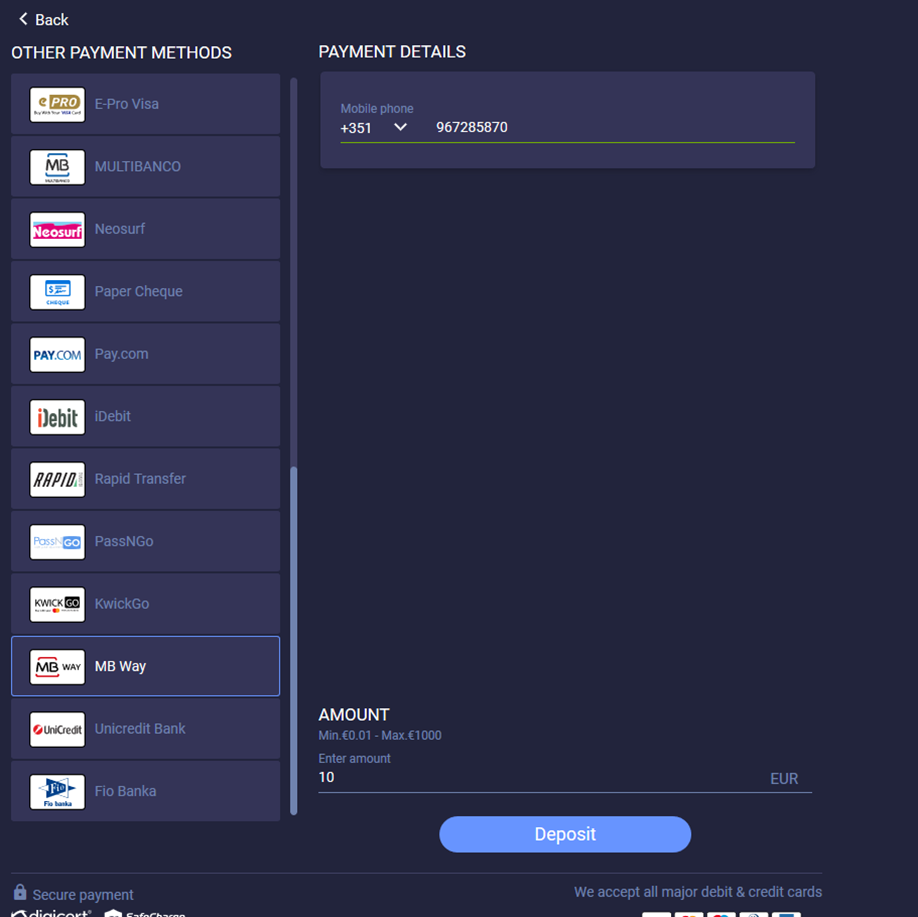
- The user enters the phone number on the payment page and presses ‘Deposit’ to start the payment process.
- The user authorizes payment via one of the following options:
-
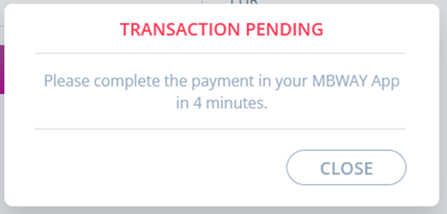
- A ‘Transaction Pending’ notification is displayed requesting the user to complete the payment in the MB Way app within four minutes.
- If supported by internal configuration, the user is redirected to the MB WAY application to authorize payment.
- A ‘Transaction Pending’ notification is displayed requesting the user to complete the payment in the MB Way app within four minutes.
- The user opens MB WAY application on their mobile phone.
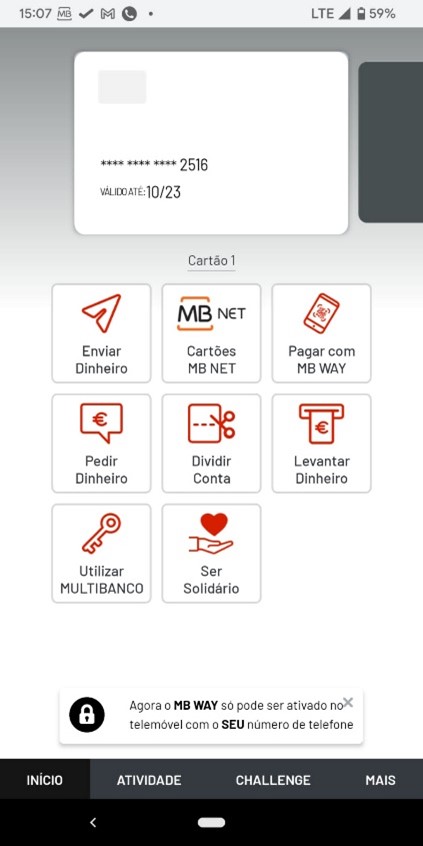
- The user selects the relevant payment tile in the Activity tab to proceed further.
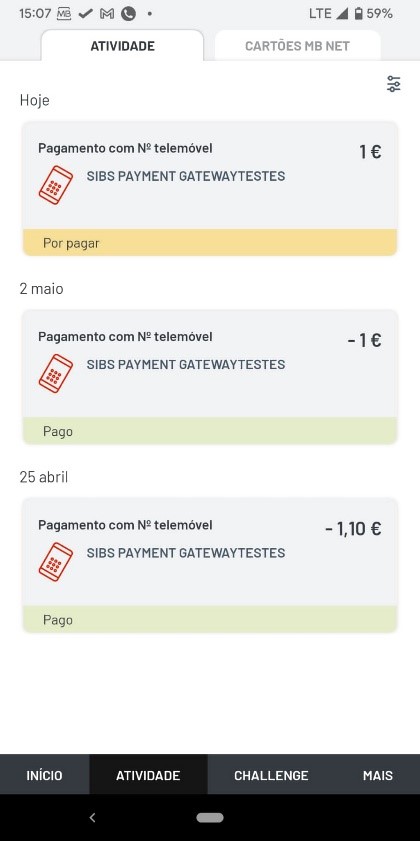
- The user completes the payment process.
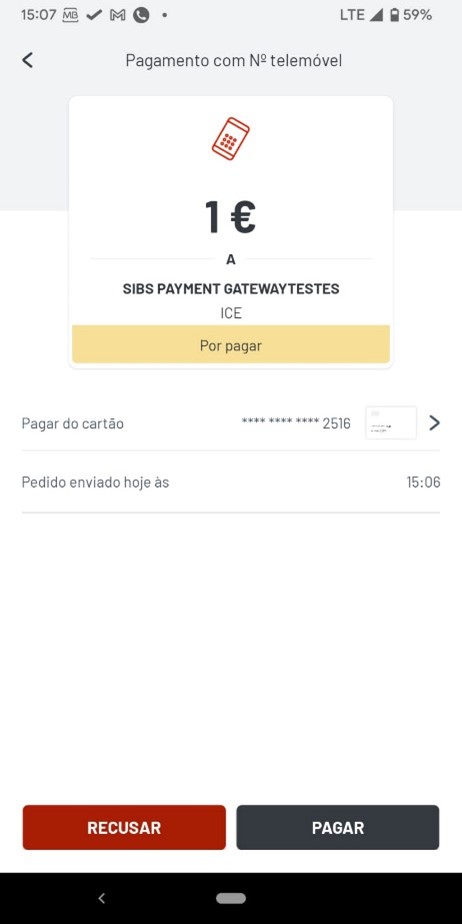
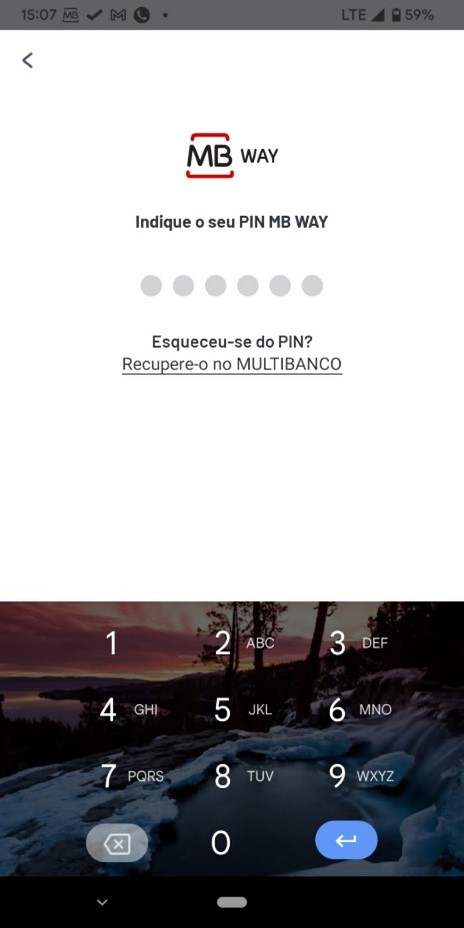
- The user enters their PIN to confirm the payment.
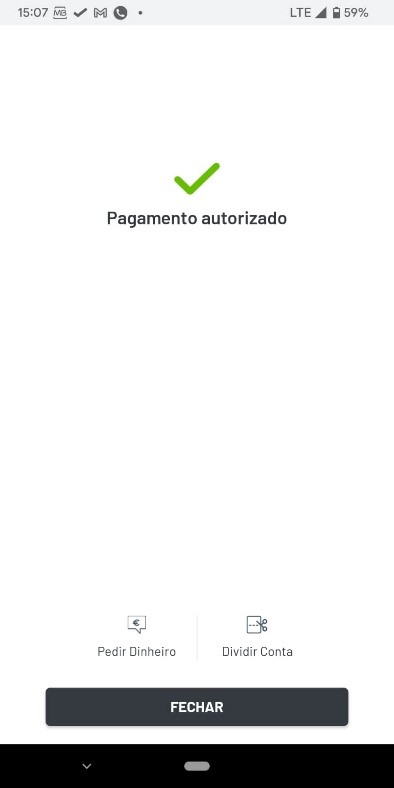
A confirmation message is displayed once the payment is successfully completed.
 Last modified November 2026