

- METHOD TYPEReal-Time Bank Transfer
- PAYMENTS

- PAYOUTS

- REFUNDS
- RECURRING
Introduction
MB WAY is a popular mobile payment service in Portugal. It allows the customers of 14 participating banks to transfer money, make online and offline purchases, and save digitized payment cards in their wallet.
Supported Countries
- Portugal
Supported Currencies
- EUR
REST 1.0 API
Payment (Deposit) Flow
To perform a payment using Nuvei REST 1.0 API integration:
1. Generate a sessionToken
2. Perform the payment by sending a
/payment request with the following mandatory parameters:
userTokenId– Unique customer identifier in the merchant system.amountpaymentOption.alternativePaymentMethodclass containing:paymentMethod: “apmgw_MBWAY“mbWay_mobilePhone: <international code>#<mobile phone number>
deviceDetailsclass containing:ipAddress
billingAddressclass containing:firstNamelastNameemailcountry
userDetailsclass containing:firstNamelastNameemailcountry
Example /payment Request
{
  "sessionToken": "<sessionToken from /getSessionToken>",
  "merchantId": "<your merchantId>",
  "merchantSiteId": "<your merchantSiteId>",
  "userTokenId": "<unique customer identifier in merchant system>",
  "clientRequestId": "<unique request ID in merchant system>",
  "clientUniqueId": "<unique transaction ID in merchant system>",
  "currency": "EUR",
  "amount": "100",
  "paymentOption": {
    "alternativePaymentMethod": {
      "paymentMethod": "apmgw_MBWAY",
      "mbWay_mobilePhone": "351#911111111"
    }
   },
  "deviceDetails": {
    "ipAddress": "<customer's IP address>"
  },
  "billingAddress": {
    "firstName": "John",
    "lastName": "Smith",
    "email": "[email protected]",
    "country": "PT"
  },
  "userDetails": {
    "firstName": "John",
    "lastName": "Smith",
    "email": "[email protected]",
    "country": "PT"
  },
  "timeStamp": "<YYYYMMDDHHmmss>",
  "checksum": "<calculated checksum>"
}
After the transaction is processed, Nuvei sends a Direct Merchant Notification (DMN) that includes the result of the transaction to the URL provided in urlDetails.notificationUrl, which Nuvei recommends including in the /payment request.
Handling the Response
The response is always PENDING, and you receive responses and DMNs, which includes transactionStatus: PENDING and a userPaymentOptionId.
Example of Some Parameters Returned
{
  ...
  ...
  "transactionId":"36682151",
  "paymentOption": {
    "userPaymentOptionId": "8100521",
    "card": {}
  },
  "transactionStatus": "PENDING",
  ...
  ...
}
Example /payment DMN with status=PENDING
...'ppp_status=PENDING&Status=PENDING&ExErrCode=0&ErrCode=0&errApmCode=0&errApmDescription=&errScCode=0&errScDescription=&Reason=&ReasonCode=0&PPP_TransactionID=1111111111111111&userid=USERID&merchant_unique_id=UNIQUEID&customData=CUSTOMDATA&productId=PRODUCTID&first_name=First&last_name=Second&[email protected]¤cy=EUR&customField1=&customField2=&customField3=&customField4=&customField5=&customField6=&customField7=SAS&customField8=&customField9=&customField10=&customField11=&customField12=&customField13=&customField14=&customField15=&invoice_id=&address1=Address&address2=&country=Germany&state=&city=City&zip=1232134&phone1=%2B123456789&phone2=&phone3=&client_ip=111.111.111.111&nameOnCard=&cardNumber=&bin=&noCVV=&acquirerId=&acquirerBank=SIBS-PI&expMonth=&expYear=&Token=&tokenId=&AuthCode=&AvsCode=&Cvv2Reply=&shippingCountry=&shippingState=&shippingCity=&shippingAddress=&shippingZip=&shippingFirstName=&shippingLastName=&shippingPhone=&shippingCell=&shippingMail=&total_discount=0.00&total_handling=0.00&total_shipping=0.00&total_tax=0.00&buyButtonProductBundleId=&merchant_site_id=111111&merchant_status=&action=&requestVersion=&message=PENDING&merchantLocale=en_US&unknownParameters=&payment_method=apmgw_MBWAY&ID=&merchant_id=111111111111111111&responseTimeStamp=2023-06-28.21%3A00%3A06&buyButtonProductId=&webMasterId=&appliedPromotions=&uniqueCC=&transactionType=Sale&externalEmail=&cardCompany=&eci=&user_token_id=UserTokenID&user_token=auto&userPaymentOptionId=1111111111&TransactionID=111111111111111111&ExternalaccountID=1111111111111111&APMReferenceID=A2FBA2F9DD3D9D6E49F76B279F66DC83&orderTransactionId=11111111111&totalAmount=10.00&dynamicDescriptor=Descriptor&item_name_1=Product&item_number_1=&item_amount_1=10.00&item_quantity_1=1&item_discount_1=0.00&item_handling_1=0.00&item_shipping_1=0.00&feeAmount=&amountWithoutFee=&houseNumber=&customCurrency=&upoRegistrationDate=20200712&type=DEPOSIT&clientRequestId=&relatedTransactionId=&responsechecksum=fa3cbf1407ae584298794db757fa8766&advanceResponseChecksum=474a11c586580c3abe3423baf21c669',
If the transfer is successful, the following is returned:
Example /paymentDMN with status=APPROVED
...'ppp_status=OK&Status=APPROVED&ExErrCode=0&ErrCode=0&errApmCode=0&errApmDescription=&errScCode=0&errScDescription=&Reason=&ReasonCode=0&PPP_TransactionID=4351111111111111111&userid=USEDID&merchant_unique_id=UNIQUEID&customData=&productId=&first_name=John&last_name=Doe&[email protected]¤cy=EUR&clientUniqueId=CUID&customField1=&customField2=&customField3=&customField4=&customField5=&customField6=&customField7=&customField8=&customField9=&customField10=&customField11=&customField12=&customField13=&customField14=&customField15=&invoice_id=&address1=&address2=&country=Portugal&state=&city=&zip=&phone1=123456789&phone2=&phone3=&client_ip=100.00.00.00&nameOnCard=&cardNumber=&bin=&noCVV=&acquirerId=&acquirerBank=SIBS-PI&expMonth=&expYear=&Token=&tokenId=&AuthCode=&AvsCode=&Cvv2Reply=&shippingCountry=&shippingState=&shippingCity=&shippingAddress=&shippingZip=&shippingFirstName=&shippingLastName=&shippingPhone=&shippingCell=&shippingMail=&total_discount=0.00&total_handling=0.00&total_shipping=0.00&total_tax=0.00&buyButtonProductBundleId=&merchant_site_id=111111&merchant_status=&action=&requestVersion=&message=APPROVED&merchantLocale=&unknownParameters=&payment_method=apmgw_MBWAY&ID=&merchant_id=1111111111111111111&responseTimeStamp=2023-07-02.21%3A05%3A16&buyButtonProductId=&webMasterId=&appliedPromotions=&uniqueCC=&transactionType=Sale&externalEmail=&cardCompany=&eci=&user_token_id=USERTOKENID&userPaymentOptionId=111111111&TransactionID=1111111111111111111&ExternalaccountID=132456789&APMReferenceID=3A6645C3B1C6CD8DA1A43EF2153987FA&orderTransactionId=11111111111&totalAmount=50.00&dynamicDescriptor=Regulated+Portugal+Ltd&item_name_1=name&item_number_1=&item_amount_1=50.00&item_quantity_1=1&item_discount_1=0.00&item_handling_1=0.00&item_shipping_1=0.00&feeAmount=&amountWithoutFee=&houseNumber=&customCurrency=&upoRegistrationDate=20201214&type=DEPOSIT&clientRequestId=CLIENTREQUESTID&relatedTransactionId=&sessionId=86c4c3bc6e4456541cac373484ac&responsechecksum=295bf4ddc8f0377a441a2bd82ec0b5d735a04af7be3e5da73b125581d64c0326&advanceResponseChecksum=a9d5f1a36641f95cd289823cefcae059729be1ca010333fe5412fc580186ea27',
If the transfer is not successful, the following is returned:
Example /paymentDMN with status=DECLINED
...'ppp_status=FAIL&Status=DECLINED&ExErrCode=0&ErrCode=9&errApmCode=9&errApmDescription=Transaction+expired&errScCode=9999&errScDescription=Default&Reason=Default&ReasonCode=9999&PPP_TransactionID=11111111111&userid=USERID&merchant_unique_id=UNIQUEID01&customData=&productId=&first_name=JOHN&last_name=DOE&[email protected]¤cy=EUR&clientUniqueId=UNIQUEID&customField1=&customField2=&customField3=&customField4=&customField5=&customField6=&customField7=&customField8=&customField9=&customField10=&customField11=&customField12=&customField13=&customField14=&customField15=&invoice_id=&address1=&address2=&country=Portugal&state=&city=&zip=&phone1=111111111111111&phone2=&phone3=&client_ip=100.100.11.10&nameOnCard=&cardNumber=&bin=&noCVV=&acquirerId=&acquirerBank=SIBS-PI&expMonth=&expYear=&Token=&tokenId=&AuthCode=&AvsCode=&Cvv2Reply=&shippingCountry=&shippingState=&shippingCity=&shippingAddress=&shippingZip=&shippingFirstName=&shippingLastName=&shippingPhone=&shippingCell=&shippingMail=&total_discount=0.00&total_handling=0.00&total_shipping=0.00&total_tax=0.00&buyButtonProductBundleId=&merchant_site_id=111111&merchant_status=&action=&requestVersion=&message=DECLINED&merchantLocale=&unknownParameters=&payment_method=apmgw_MBWAY&ID=&merchant_id=1111111111111111111&responseTimeStamp=2023-07-02.22%3A36%3A57&buyButtonProductId=&webMasterId=&appliedPromotions=&uniqueCC=&transactionType=Sale&externalEmail=&cardCompany=&eci=&user_token_id=USERTOKENID&userPaymentOptionId=1111111111&TransactionID=1111111111111111111&ExternalaccountID=111111111111111&APMReferenceID=3687C614CDE0B01207BAE9971A0784A1&orderTransactionId=11111111111&totalAmount=10.00&dynamicDescriptor=Regulated+Portugal+Ltd&item_name_1=name&item_number_1=&item_amount_1=10.00&item_quantity_1=1&item_discount_1=0.00&item_handling_1=0.00&item_shipping_1=0.00&feeAmount=&amountWithoutFee=&houseNumber=&customCurrency=&upoRegistrationDate=20220214&type=DEPOSIT&clientRequestId=CLIENTREQUESTID&relatedTransactionId=&sessionId=8bbdc16b8f38b39430c433971bb3&responsechecksum=a09b4031ea212dd3da2f2e44a0833ce75075b7aadc54269a798a317955ab3880&advanceResponseChecksum=c30f24ca5dd03b33573e745ff8d7817ebc00869076759d2c89d1614a76bee995',
Payout (Withdrawal) Flow
-
Register a
userTokenIdA
userTokenIdis a field in the Nuvei system containing the user identifier in the merchant system.If the user does not have a registered
userTokenId, send a/createUserrequest, including:
-
firstNamelastNameaddressemailzipcitycountryCodephonedateOfBirth
Example /createUser Request
{
    "merchantSiteId": "{{merchantSiteId}}",
    "merchantId": "{{merchantId}}",
    "userTokenId": "test12345678",
    "clientRequestId": "{{clientRequestId}}",
    "timeStamp": "{{timestamp}}",
    "firstName": "FNAME",
    "lastName": "LNAME",
    "address": "some street",
    "email": "[email protected]",
    "zip": "3032",
    "city": "Paris",
    "countryCode": "PT",
    "phone": "972546657837",
    "dateOfBirth": "0001-01-01",
    "checksum": "{{checksum}}"
}
Example /createUser Response
{
    "internalRequestId": 713904111,
    "status": "SUCCESS",
    "errCode": 0,
    "reason": "",
    "merchantId": "1102398682906145682",
    "merchantSiteId": "228311",
    "version": "1.0",
    "clientRequestId": "20260721165923",
    "userId": 1477743111
}
The request registers the userTokenId in the Nuvei system, which is needed to generate a UPO in the next step.
2. Create the UPO
/addUPOAPM request and include the following:userTokenId– Unique customer identifier in the merchant system.paymentMethodName: “apmgw_MBWAY“apmDatablock containing:mbWay_mobilePhone
Example /addUPOAPM Request
{
    "merchantId": "{{merchantId}}",
    "merchantSiteId": "{{merchantSiteId}}",
    "userTokenId": "test12345678",
    "clientRequestId": "{{clientRequestId}}",
    "apmData": {
        "mbWay_mobilePhone": "972#546657837"
    },
    "paymentMethodName": "apmgw_MBWAY",
    "timeStamp": "{{timestamp}}",
    "checksum": "{{checksum}}"
}
The request returns an encrypted UPO representing the user APM account details.
Example /addUPOAPM Response
{
    "internalRequestId": 713914111,
    "status": "SUCCESS",
    "errCode": 0,
    "reason": "",
    "merchantId": "1102398682906145682",
    "merchantSiteId": "228311",
    "version": "1.0",
    "clientRequestId": "20260721170209",
    "userPaymentOptionId": 230766347111
}
3. Send a /payout Request
Send a /payout request and include the userPaymentOptionId, which contains the user’s previously stored APM account details.
urlDetails.notificationUrl, which Nuvei recommends including in the /payout request.Example /payout (Withdrawal) Request
{
    "merchantSiteId": "{{merchantSiteId}}",
    "merchantId": "{{merchantId}}",
    "userTokenId": "testddd12345678",
    "clientUniqueId": "12345",
    "amount": "1",
    "currency": "EUR",
    "userPaymentOption": {
        "userPaymentOptionId": "230766356111"
    },
    "deviceDetails": {
        "ipAddress": "192.168.100.53"
    },
    "timeStamp": "{{timestamp}}",
    "checksum": "{{checksum}}"
}
Example /payout (Withdrawal) Response
{
    "internalRequestId": 713988111,
    "status": "SUCCESS",
    "errCode": 0,
    "reason": "",
    "merchantId": "1102398682906145682",
    "merchantSiteId": "228311",
    "version": "1.0",
    "userTokenId": "testddd12345678",
    "clientUniqueId": "12345",
    "transactionStatus": "PENDING",
    "paymentMethodErrorCode": "0",
    "userPaymentOptionId": "230766356111",
    "externalTransactionId": "2610000000989877",
    "transactionId": "2610000000000620181",
    "orderId": "550831111"
}
User Experience
- The user selects the MB WAY payment option.
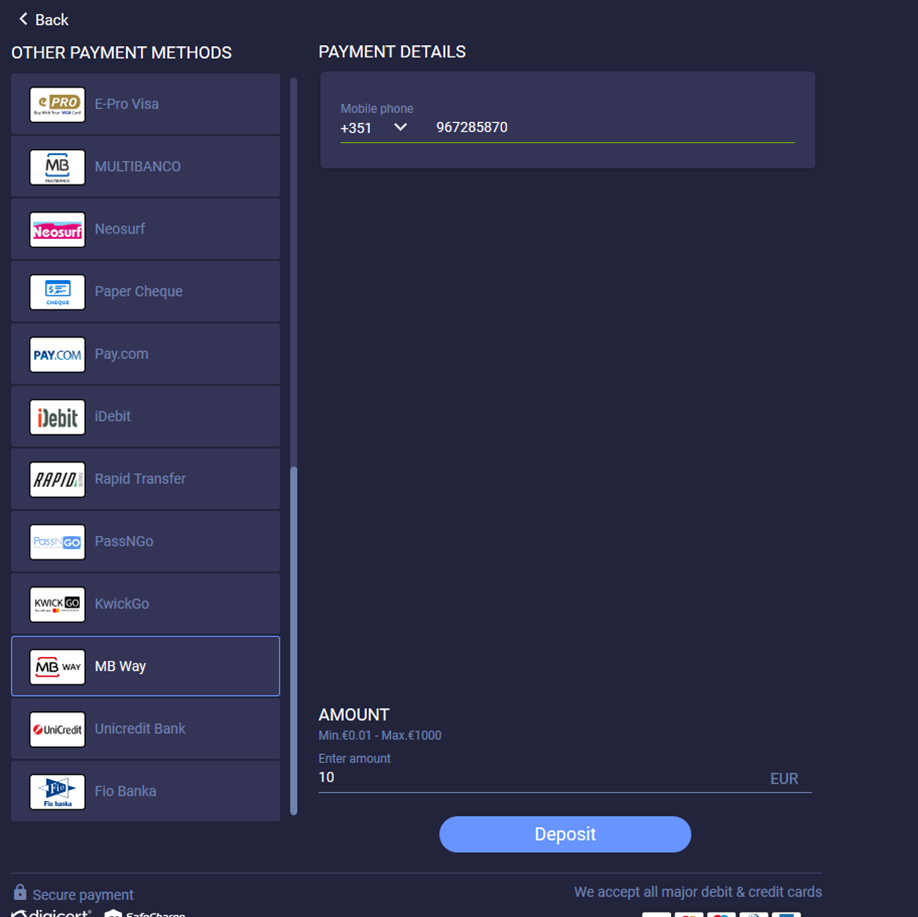
- The user enters the phone number on the payment page and presses Deposit to start the payment process.
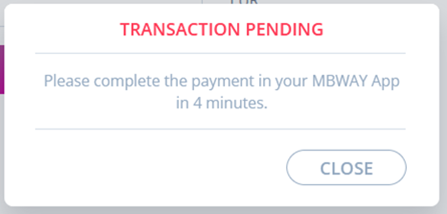
- The user sees a notification popup on Payment Page to complete the payment in 4 minutes.
- The user opens MB WAY App on their mobile phone.
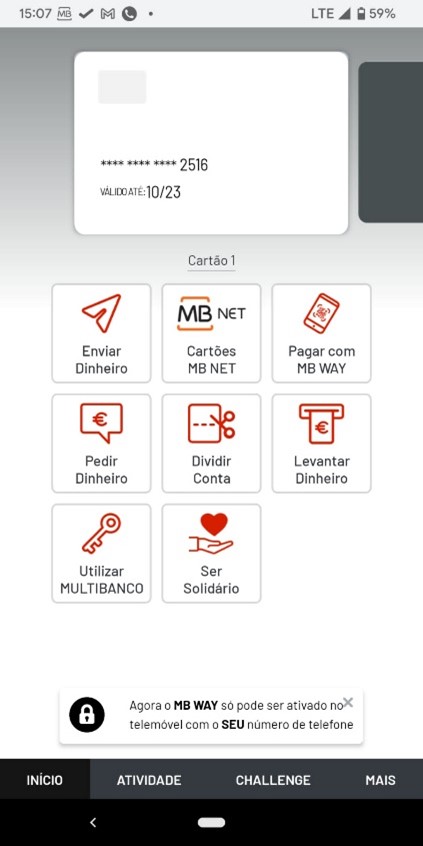
- The user selects the relevant payment tile in the Activity tab to proceed further.
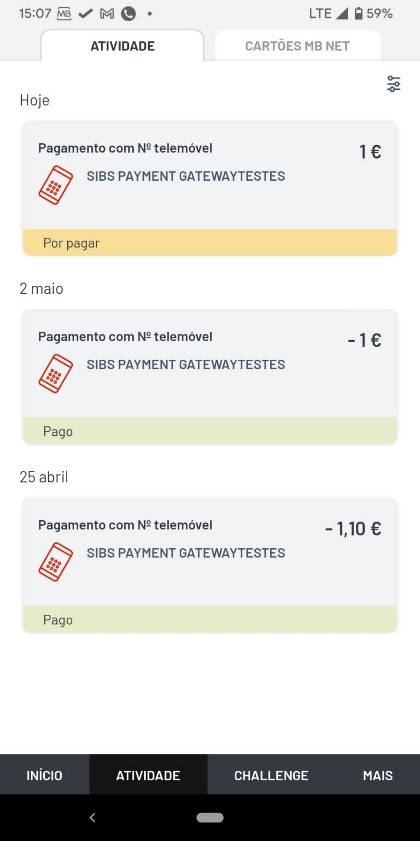
- The user completes the payment process.
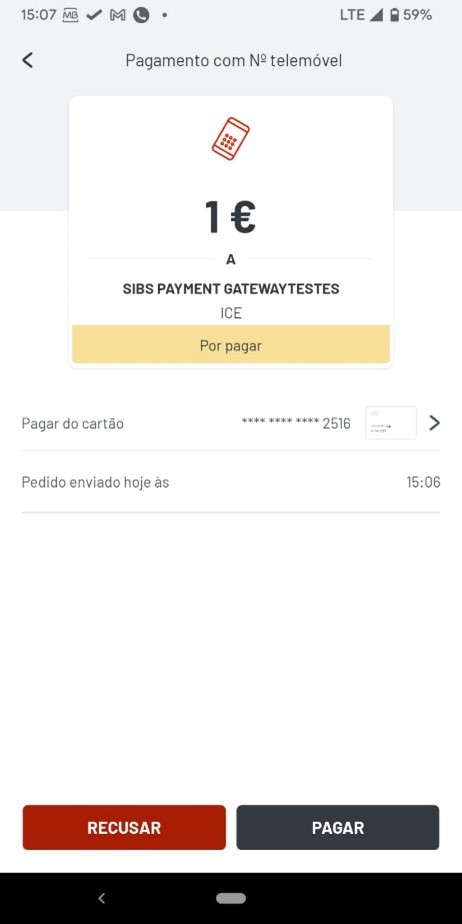
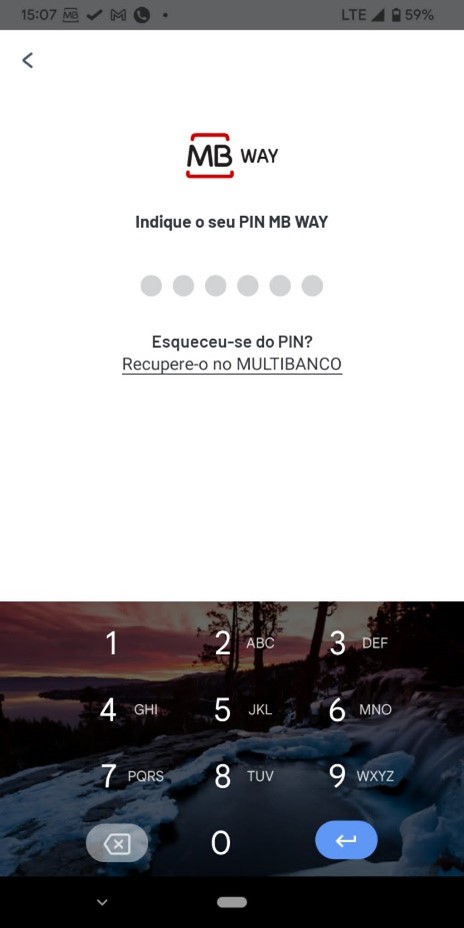
- The user enters their PIN to confirm the payment.
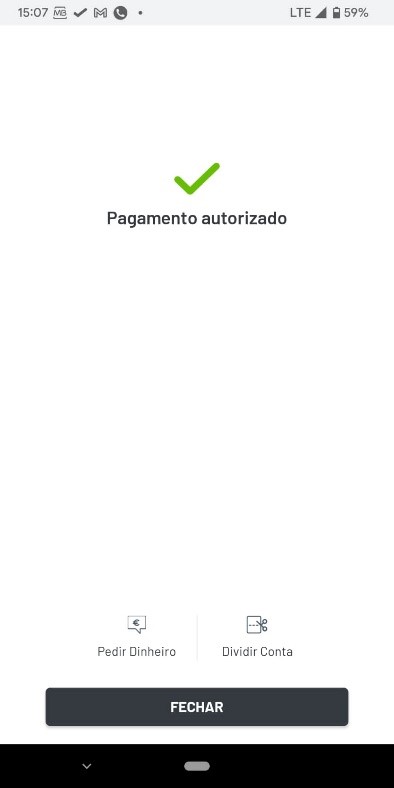
A confirmation message is displayed once the payment is successfully completed.
 Last modified September 2026