
- METHOD TYPEE-wallet
- PAYMENTS

- PAYOUTS
- REFUNDS
- RECURRING
Introduction
PayPal is an alternative payments system that supports online money transfers for both businesses and individuals. It is most popular in western markets such as the U.S.A, Germany, and the U.K. It is an instant way to wire money. As an E-wallet, PayPal is globally recognized and accepted (except for in sanctioned countries and entities).
PayPal requires creating an account, which is linked to a debit or credit card.
PayPal supports refunds, as well as recurring payments using a submethod.
Supported Countries
- Albania
- Algeria
- Andorra
- Angola
- Anguilla
- Antigua and Barbuda
- Argentina
- Armenia
- Aruba
- Australia
- Austria
- Azerbaijan
- Bahamas
- Bahrain
- Barbados
- Belarus
- Belgium
- Belize
- Benin
- Bermuda
- Bhutan
- Bolivia
- Bosnia-Herzegovina
- Botswana
- Brazil
- Saint Lucia
- British Indian Ocean Territory
- Brunei
- Bulgaria
- Burkina Faso
- Burundi
- Cambodia
- Cameroon
- Canada
- Cape Verde
- Cayman Islands
- Chad
- China
- Colombia
- Comoros
- Congo
- Cook Islands
- Costa Rica
- Cote dIvoire
- Croatia
- Cyprus
- Chile
- Denmark
- Djibouti
- Dominica
- Dominican Republic
- Ecuador
- Egypt
- El Salvador
- Eritrea
- Estonia
- Ethiopia
- Falkland Islands (Malvinas)
- Faroe Islands
- Fiji
- Finland
- France
- French Guiana
- French Polynesia
- Gabon
- Gambia
- Georgia
- Germany
- Gibraltar
- Greece
- Greenland
- Grenada
- Guadeloupe
- Guatemala
- Guinea
- Guinea-Bissau
- Guyana
- Honduras
- Hong Kong
- Hungary
- Iceland
- India
- Czech Republic
- Ireland
- Israel
- Italy
- Jamaica
- Japan
- Jordan
- Kazakhstan
- Kenya
- Kiribati
- Kuwait
- Laos
- Latvia
- Lesotho
- Liechtenstein
- Lithuania
- Luxembourg
- Macedonia
- Madagascar
- Malawi
- Malaysia
- Maldives
- Mali
- Malta
- Marshall Islands
- Martinique
- Mauritania
- Mauritius
- Mayotte
- Mexico
- Micronesia
- Indonesia
- Moldova
- Monaco
- Mongolia
- Montenegro
- Montserrat
- Morocco
- Mozambique
- Namibia
- Nauru
- Nepal
- Netherlands
- Netherlands Antilles
- New Caledonia
- New Zealand
- Nicaragua
- Niger
- Nigeria
- Niue
- Norfolk Island
- Norway
- Oman
- Palau
- Panama
- Papua New Guinea
- Paraguay
- Peru
- Philippines
- Pitcairn
- Poland
- Portugal
- Qatar
- Reunion
- Romania
- Russia
- Rwanda
- Saint Helena
- Saint Kitts and Nevis
- Saint Pierre and Miquelon
- Saint Vincent and Grenadines
- Samoa
- San Marino
- Sao Tome and Principe
- Saudi Arabia
- Saudi Arabia
- Senegal
- Serbia
- Seychelles
- Sierra Leone
- Singapore
- Slovakia
- Slovenia
- Solomon Islands
- Somalia
- South Africa
- South Korea
- Spain
- Sri Lanka
- Suriname
- Svalbard and Jan Mayen Islands
- Swaziland
- Sweden
- Switzerland
- Taiwan
- Tajikistan
- Tanzania, United Republic of
- Thailand
- Togo
- Tonga
- Trinidad and Tobago
- Tunisia
- Turkmenistan
- Turks and Caicos Islands
- Tuvalu
- Uganda
- Ukraine
- United Arab Emirates
- United Kingdom
- United States
- Uruguay
- Vanuatu
- Venezuela
- Vietnam
- Virgin Islands
- Wallis and Futuna
- Yemen
- Zambia
- Zimbabwe
Supported Currencies
- AUD
- BRL
- CAD
- CHF
- CNY
- CZK
- DKK
- EUR
- GBP
- HKD
- HUF
- ILS
- JPY
- MXN
- MYR
- NOK
- NZD
- PHP
- PLN
- RUB
- SEK
- SGD
- THB
- TWD
- USD
Payment (Deposit) Flow
There are two flows where you can use PayPal: regular Sale flow and Auth-Settle flow. The default is Sale.
If you want to use an Auth-Settle flow when integrated through REST API, you must send transactionType: Auth in the /payment request.
Authorization places a temporary hold on the funds and is valid for 29 days. However, settlement is guaranteed within the first 3 days. After that, the transaction may not be settled.
Press tab to open…
Follow these steps to perform a payment using Nuvei REST API integration:
1. Generate a sessionToken
Press here for details.
2. Send a /payment Request
Perform the payment by sending a /payment request with its mandatory parameters including:
userTokenIdamountcurrencypaymentOption.alternativePaymentMethodclass containing:paymentMethod: “apmgw_expresscheckout“
deviceDetailsclass containing:ipAddressbillingAddressclass containing:firstName,lastName,country,emailuserDetailsclass containing:firstName,lastName,country,email
Example /payment Request
{
  "sessionToken":"<sessionToken from /getSessionToken>",
  "merchantId":"<your merchantId>",
  "merchantSiteId":"<your merchantSiteId>",
  "clientRequestId":"<unique request ID in merchant system>",
  "amount":"200",
  "currency":"USD",
  "userTokenId":"<unique customer identifier in merchant system>",
  "clientUniqueId":"<unique transaction ID in merchant system>",
  "paymentOption":{
    "alternativePaymentMethod":{
      "paymentMethod":"apmgw_expresscheckout"
    }
  },
  "deviceDetails":{
    "ipAddress":"<customer's IP address>"
  },
  "billingAddress":{
    "firstName": "John",
    "lastName": "Smith",
    "country":"US",
    "email":"[email protected]"
  },
  "userDetails":{
    "firstName": "John",
    "lastName": "Smith",
    "country":"US",
    "email":"[email protected]"
  },
  "timeStamp":"<YYYYMMDDHHmmss>",
  "checksum":"<calculated checksum>"
}
After the transaction is processed, Nuvei sends a Direct Merchant Notification (DMN) that includes the result of the transaction to urlDetails.notificationUrl, which Nuvei recommends including in the /payment request.
Payout (Withdrawal) Flow
Send a /payout request and include the userPaymentOptionId, which contains the user’s previously stored APM account details. Press here for an example.
After the transaction is processed, Nuvei sends a DMN that includes the result of the transaction to urlDetails.notificationUrl, which Nuvei recommends including in the /payout request.
Example Withdrawal Request DMN with wdRequestStatus=APPROVED
wdOrderId=5377261&wdRequestId=6744051&gwTrxId=2610000000000014194¬ificationType=WITHDRAW_REQUEST_NOTIFICATION&merchantSiteId=209631&merchantGwId=4972436454212160565&merchantLocale=en_US&wdRequestState=Closed&wdRequestStatus=Approved&wdOrderStatus=Settled&settlementType=WITHDRAWAL&gwErrCode=0&gwExtendedErrorCode=0&apmTrxId=2610000000021714&apmReferenceId=84CFC2767E5D77967EAB195323F60ECC&apmErrorCode=0&firstName=John&lastName=Doe&userTokenId=ttvfcefcr3frc3rc3ffr33344&zip=M6T+1J1&city=Ontario&country=DE&phone1=%2B14161238888&email=ivanp%40abv.bg&address=Test+Address&amount=45.00&approvedAmount=45.00¤cy=EUR&userId=UID&userPMId=2153172031&paymentMethod=apmgw_expresscheckout&version=1.0&pmDisplayName=sb-ksvvh29494455%40business.example.com&customField1=meccabingo.com&customField3=333&client_ip=97.247.234.249&wdOrderAmount=45.00&wdOrderCurrency=EUR&responseTimeStamp=2024-03-22.07%3A46%3A28&ExternalaccountID=AFV2UDFKFF35J&externalAccountDescription=account_id%3AAFV2UDFKFF35J%7Cemail%3Asb-ksvvh29494455%40business.example.com&feeAmount=0.0&transactionAmount=45.0&merchantUniqueId=merchant_unique_id&externalEmail=sb-ksvvh29494455%40business.example.com&upoRegistrationDate=20240321&acquirerBank=PPCP-PI&checksum=3b0a74f68334d1dd854afc5413aae224
Example Withdrawal Order DMN with wdRequestStatus=APPROVED
wdOrderId=5377261&wdRequestId=6744051&gwTrxId=2610000000000014194¬ificationType=WITHDRAW_ORDER_NOTIFICATION&merchantSiteId=209631&merchantGwId=4972436454212160565&merchantLocale=en_US&wdRequestState=Closed&wdRequestStatus=Approved&wdOrderStatus=Settled&settlementType=WITHDRAWAL&gwErrCode=0&gwExtendedErrorCode=0&apmTrxId=2610000000021714&apmReferenceId=84CFC2767E5D77967EAB195323F60ECC&apmErrorCode=0&firstName=John&lastName=Doe&userTokenId=ttvfcefcr3frc3rc3ffr33344&zip=M6T+1J1&city=Ontario&country=DE&phone1=%2B14161238888&email=ivanp%40abv.bg&address=Test+Address&amount=45.00&approvedAmount=45.00¤cy=EUR&userId=UID&userPMId=2153172031&paymentMethod=apmgw_expresscheckout&version=1.0&pmDisplayName=sb-ksvvh29494455%40business.example.com&customField1=meccabingo.com&customField3=333&client_ip=97.247.234.249&wdOrderAmount=45.00&wdOrderCurrency=EUR&responseTimeStamp=2024-03-22.07%3A46%3A28&ExternalaccountID=AFV2UDFKFF35J&externalAccountDescription=account_id%3AAFV2UDFKFF35J%7Cemail%3Asb-ksvvh29494455%40business.example.com&feeAmount=0.0&transactionAmount=45.0&merchantUniqueId=merchant_unique_id&externalEmail=sb-ksvvh29494455%40business.example.com&upoRegistrationDate=20240321&acquirerBank=PPCP-PI&checksum=c9b6c8de6e05a51bd9e38d582d5368e0
Example Payment DMN with Status=APPROVED
...'ppp_status=OK&Status=APPROVED&ExErrCode=0&ErrCode=0&errApmCode=0&errApmDescription=&errScCode=0&errScDescription=&Reason=&ReasonCode=0&PPP_TransactionID=44702661&userid=Lorem&merchant_unique_id=merchuniqueid&customData=56_Sm96a3ZZWG56RERLJKHkljnJKHjbxiuyTWd4WDVncS9YQURxYWZuS1VCWT0%3D&productId=1&first_name=John&last_name=Doe&email=test%40mymail.com¤cy=USD&pmDisplayName=hristo%40personal.example.com&customField1=enracha.es&customField2=&customField3=&customField4=&customField5=&customField6=&customField7=&customField8=&customField9=&customField10=&customField11=&customField12=&customField13=&customField14=&customField15=&invoice_id=&address1=Sancho+el+fuerte+15&address2=15&country=United+States&state=&city=City&zip=123456&phone1=1234567890&phone2=&phone3=&client_ip=127.0.0.1&nameOnCard=&cardNumber=&bin=&noCVV=&acquirerId=&acquirerBank=PPCP-PI&expMonth=&expYear=&Token=&tokenId=&AuthCode=&AvsCode=&Cvv2Reply=&shippingCountry=&shippingState=&shippingCity=&shippingAddress=&shippingZip=&shippingFirstName=&shippingLastName=&shippingPhone=&shippingCell=&shippingMail=&total_discount=0.00&total_handling=0.00&total_shipping=0.00&total_tax=0.00&buyButtonProductBundleId=&merchant_site_id=186111&merchant_status=&action=&requestVersion=&message=APPROVED&merchantLocale=en_US&unknownParameters=&payment_method=apmgw_expresscheckout&ID=&merchant_id=5416795427517477813&responseTimeStamp=2025-01-29.12%3A50%3A12&buyButtonProductId=&webMasterId=&appliedPromotions=&uniqueCC=&transactionType=Sale&externalEmail=hristo%40personal.example.com&cardCompany=&eci=&user_token_id=13395012wwe123456789012345&user_token=auto&userPaymentOptionId=2153639511&TransactionID=2610000000000123985&ExternalaccountID=F567H2HXTLVP4&externalAccountDescription=account_id%3AF567H2HXTLVP4%7Cemail%3Ahristo%40personal.example.com&externalTransactionId=6SU29313ED6385822&APMReferenceID=DEBD1547D2D04FF9536CDF0C94A887A1&orderTransactionId=25788891&totalAmount=10.00&dynamicDescriptor=hristo+descriptor&item_name_1=1&item_number_1=&item_amount_1=10.00&item_quantity_1=1&item_discount_1=0.00&item_handling_1=0.00&item_shipping_1=0.00&feeAmount=&amountWithoutFee=&houseNumber=&customCurrency=&upoRegistrationDate=20250129&type=DEPOSIT&clientRequestId=&relatedTransactionId=&apmPayerInfo=%7B%22address%22%3A%7B%22address_line_1%22%3A%22Sancho+el+fuerte+15%22%2C%22admin_area_2%22%3A%22Madrid%22%2C%22postal_code%22%3A%22123456%22%2C%22country_code%22%3A%22US%22%7D%2C%22name%22%3A%7B%22surname%22%3A%22Doe%22%2C%22given_name%22%3A%22John%22%7D%2C%22email_address%22%3A%22hristo%40personal.example.com%22%2C%22account_id%22%3A%22F567H2HXTLVP4%22%2C%22account_status%22%3A%22VERIFIED%22%2C%22phone_number%22%3A%7B%22national_number%22%3A%224089881537%22%7D%7D&sessionId=1ffc52156f1eb7a7c4d18e21a435&responsechecksum=f4ffcc0ba5b169dde3a4f586f08a56b9d4932ac1264e7cdbd79483477aa3f4d3&advanceResponseChecksum=9750a9c4551a2b45f67cfeb03ec241efe0cdfb1326d8d0c7ff7a63a8167d2cf7',
Example Payment DMN with Status=PENDING
...'ppp_status=PENDING&Status=PENDING&ExErrCode=0&ErrCode=0&errApmCode=0&errApmDescription=&errScCode=0&errScDescription=&Reason=&ReasonCode=0&PPP_TransactionID=44702661&userid=Lorem&merchant_unique_id=merchuniqueid&customData=56_Sm96a3ZZWG56RERLJKHkljnJKHjbxiuyTWd4WDVncS9YQURxYWZuS1VCWT0%3D&productId=1&first_name=John&last_name=Doe&email=test%40mymail.com¤cy=USD&pmDisplayName=hristo%40personal.example.com&customField1=enracha.es&customField2=&customField3=&customField4=&customField5=&customField6=&customField7=&customField8=&customField9=&customField10=&customField11=&customField12=&customField13=&customField14=&customField15=&invoice_id=&address1=Sancho+el+fuerte+15&address2=15&country=United+States&state=&city=City&zip=123456&phone1=1234567890&phone2=&phone3=&client_ip=127.0.0.1&nameOnCard=&cardNumber=&bin=&noCVV=&acquirerId=&acquirerBank=PPCP-PI&expMonth=&expYear=&Token=&tokenId=&AuthCode=&AvsCode=&Cvv2Reply=&shippingCountry=&shippingState=&shippingCity=&shippingAddress=&shippingZip=&shippingFirstName=&shippingLastName=&shippingPhone=&shippingCell=&shippingMail=&total_discount=0.00&total_handling=0.00&total_shipping=0.00&total_tax=0.00&buyButtonProductBundleId=&merchant_site_id=186111&merchant_status=&action=&requestVersion=&message=PENDING&merchantLocale=en_US&unknownParameters=&payment_method=apmgw_expresscheckout&ID=&merchant_id=5416795427517477813&responseTimeStamp=2025-01-29.12%3A50%3A11&buyButtonProductId=&webMasterId=&appliedPromotions=&uniqueCC=&transactionType=Sale&externalEmail=hristo%40personal.example.com&cardCompany=&eci=&user_token_id=13395012wwe123456789012345&user_token=auto&userPaymentOptionId=2153639511&TransactionID=2610000000000123985&ExternalaccountID=F567H2HXTLVP4&externalAccountDescription=account_id%3AF567H2HXTLVP4%7Cemail%3Ahristo%40personal.example.com&externalTransactionId=6SU29313ED6385822&APMReferenceID=DEBD1547D2D04FF9536CDF0C94A887A1&orderTransactionId=25788891&totalAmount=10.00&dynamicDescriptor=hristo+descriptor&item_name_1=1&item_number_1=&item_amount_1=10.00&item_quantity_1=1&item_discount_1=0.00&item_handling_1=0.00&item_shipping_1=0.00&feeAmount=&amountWithoutFee=&houseNumber=&customCurrency=&upoRegistrationDate=20250129&type=DEPOSIT&clientRequestId=&relatedTransactionId=&apmPayerInfo=%7B%22address%22%3A%7B%22address_line_1%22%3A%22Sancho+el+fuerte+15%22%2C%22admin_area_2%22%3A%22Madrid%22%2C%22postal_code%22%3A%22123456%22%2C%22country_code%22%3A%22US%22%7D%2C%22name%22%3A%7B%22surname%22%3A%22Doe%22%2C%22given_name%22%3A%22John%22%7D%2C%22email_address%22%3A%22hristo%40personal.example.com%22%2C%22account_id%22%3A%22F567H2HXTLVP4%22%2C%22account_status%22%3A%22VERIFIED%22%2C%22phone_number%22%3A%7B%22national_number%22%3A%224089881537%22%7D%7D&sessionId=1ffc52156f1eb7a7c4d18e21a435&responsechecksum=fd5e7e81209b80dfd4743bdfe5c957fdf0afd80fce5a00c032d2f3851526f8d9&advanceResponseChecksum=1d451b0cd5663817a9ca7796a99f992c815db8977fab61798fb8be69517d05e3',
Follow these steps to perform a payment using Nuvei Web SDK integration.
1. Initiate a Session
Before you can submit payment using the client-side Nuvei Web SDK, you need to send the /openOrder API call.
2. Initialize the Web SDK
Instantiate the Web SDK with the sessionToken received from the server call to /openOrder.
3. Create an APM Payment
Send a createPayment() request with its mandatory parameters including:
paymentOption.alternativePaymentMethodclass containing:paymentMethod: “apmgw_expresscheckout“
deviceDetailsclass containing:ipAddressbillingAddressclass containing:firstName,lastName,country,emailuserDetailsclass containing:firstName,lastName,country,email
Example createPayment() Request
sfc.createPayment({
  sessionToken: "<sessiontoken>",
  paymentOption : {
    alternativePaymentMethod: {
      paymentMethod: "apmgw_expresscheckout"
  }},
  deviceDetails:{
    ipAddress:"<customer's IP address>"
  },
  billingAddress: {
    firstName: "John",
    lastName: "Smith",
    country: "US",
    email:"[email protected]"
  },
  userDetails: {
    firstName: "John",
    lastName: "Smith",
    country: "US",
    email:"[email protected]"
  },
}, function(res) {
      console.log(res);
});
After the transaction is processed, Nuvei sends a DMN that includes the result of the transaction to urlDetails.notificationUrl, which Nuvei recommends including in the /openOrder request.
Withdrawal Flow
For information about the Withdrawal flow for WebSDK, see Withdrawal.
Example Payment Page Request
After the transaction is processed, Nuvei sends a DMN that includes the result of the transaction to notify_url, which Nuvei recommends including in the request.
To perform a payment using Nuvei Simply Connect integration:
1. Initiate a Session
Before submitting a Simply Connect payment request, you need to submit a server-side /openOrder API request.
2. Create an HTML Placeholder
Import the checkout.js library for building payment flows and create an HTML placeholder on your payment page for the Simply Connect UI element.
3. Submit a checkout() Request
Send a checkout() request with its mandatory input parameters, along with any other relevant parameters and customizations. For more information, see Quick Start to Simply Connect.
Fast Flow (Optional)
To offer customers the option to skip the PayPal payment confirmation page for future payments, include in the checkout() request:
savePm: “always“, “true“, or “force” – Fast flow requires a saved payment method. Other possiblesavePmvalues do not support fast flow.apmConfigclass containing:apmgw_expresscheckoutclass containing:fastFlow: true
subMethod: [“ReferenceTransaction”,”AliasRegistration”,”Skrill1Tap”] – Array of submethods that support fast flow.
checkout ({...
    savePm: 'true',
    apmConfig: {
        apmgw_expresscheckout: {
            fastFlow: true
        },
    },
    subMethod: ["ReferenceTransaction","AliasRegistration","Skrill1Tap"],...
});
- REST API
-
Follow these steps to perform a payment using Nuvei REST API integration:
1. Generate a
sessionTokenPress here for details.
2. Send a
/paymentRequestPerform the payment by sending a
/paymentrequest with its mandatory parameters including:userTokenIdamountcurrencypaymentOption.alternativePaymentMethodclass containing:paymentMethod: “apmgw_expresscheckout“
deviceDetailsclass containing:ipAddressbillingAddressclass containing:firstName,lastName,country,emailuserDetailsclass containing:firstName,lastName,country,email
Example
/paymentRequest{ "sessionToken":"<sessionToken from /getSessionToken>", "merchantId":"<your merchantId>", "merchantSiteId":"<your merchantSiteId>", "clientRequestId":"<unique request ID in merchant system>", "amount":"200", "currency":"USD", "userTokenId":"<unique customer identifier in merchant system>", "clientUniqueId":"<unique transaction ID in merchant system>", "paymentOption":{ "alternativePaymentMethod":{ "paymentMethod":"apmgw_expresscheckout" } }, "deviceDetails":{ "ipAddress":"<customer's IP address>" }, "billingAddress":{ "firstName": "John", "lastName": "Smith", "country":"US", "email":"[email protected]" }, "userDetails":{ "firstName": "John", "lastName": "Smith", "country":"US", "email":"[email protected]" }, "timeStamp":"<YYYYMMDDHHmmss>", "checksum":"<calculated checksum>" }After the transaction is processed, Nuvei sends a Direct Merchant Notification (DMN) that includes the result of the transaction to
urlDetails.notificationUrl, which Nuvei recommends including in the/paymentrequest.Payout (Withdrawal) Flow
Send a
/payoutrequest and include theuserPaymentOptionId, which contains the user’s previously stored APM account details. Press here for an example.After the transaction is processed, Nuvei sends a DMN that includes the result of the transaction to
urlDetails.notificationUrl, which Nuvei recommends including in the/payoutrequest.Example Withdrawal Request DMN with
wdRequestStatus=APPROVEDwdOrderId=5377261&wdRequestId=6744051&gwTrxId=2610000000000014194¬ificationType=WITHDRAW_REQUEST_NOTIFICATION&merchantSiteId=209631&merchantGwId=4972436454212160565&merchantLocale=en_US&wdRequestState=Closed&wdRequestStatus=Approved&wdOrderStatus=Settled&settlementType=WITHDRAWAL&gwErrCode=0&gwExtendedErrorCode=0&apmTrxId=2610000000021714&apmReferenceId=84CFC2767E5D77967EAB195323F60ECC&apmErrorCode=0&firstName=John&lastName=Doe&userTokenId=ttvfcefcr3frc3rc3ffr33344&zip=M6T+1J1&city=Ontario&country=DE&phone1=%2B14161238888&email=ivanp%40abv.bg&address=Test+Address&amount=45.00&approvedAmount=45.00¤cy=EUR&userId=UID&userPMId=2153172031&paymentMethod=apmgw_expresscheckout&version=1.0&pmDisplayName=sb-ksvvh29494455%40business.example.com&customField1=meccabingo.com&customField3=333&client_ip=97.247.234.249&wdOrderAmount=45.00&wdOrderCurrency=EUR&responseTimeStamp=2024-03-22.07%3A46%3A28&ExternalaccountID=AFV2UDFKFF35J&externalAccountDescription=account_id%3AAFV2UDFKFF35J%7Cemail%3Asb-ksvvh29494455%40business.example.com&feeAmount=0.0&transactionAmount=45.0&merchantUniqueId=merchant_unique_id&externalEmail=sb-ksvvh29494455%40business.example.com&upoRegistrationDate=20240321&acquirerBank=PPCP-PI&checksum=3b0a74f68334d1dd854afc5413aae224
Example Withdrawal Order DMN with
wdRequestStatus=APPROVEDwdOrderId=5377261&wdRequestId=6744051&gwTrxId=2610000000000014194¬ificationType=WITHDRAW_ORDER_NOTIFICATION&merchantSiteId=209631&merchantGwId=4972436454212160565&merchantLocale=en_US&wdRequestState=Closed&wdRequestStatus=Approved&wdOrderStatus=Settled&settlementType=WITHDRAWAL&gwErrCode=0&gwExtendedErrorCode=0&apmTrxId=2610000000021714&apmReferenceId=84CFC2767E5D77967EAB195323F60ECC&apmErrorCode=0&firstName=John&lastName=Doe&userTokenId=ttvfcefcr3frc3rc3ffr33344&zip=M6T+1J1&city=Ontario&country=DE&phone1=%2B14161238888&email=ivanp%40abv.bg&address=Test+Address&amount=45.00&approvedAmount=45.00¤cy=EUR&userId=UID&userPMId=2153172031&paymentMethod=apmgw_expresscheckout&version=1.0&pmDisplayName=sb-ksvvh29494455%40business.example.com&customField1=meccabingo.com&customField3=333&client_ip=97.247.234.249&wdOrderAmount=45.00&wdOrderCurrency=EUR&responseTimeStamp=2024-03-22.07%3A46%3A28&ExternalaccountID=AFV2UDFKFF35J&externalAccountDescription=account_id%3AAFV2UDFKFF35J%7Cemail%3Asb-ksvvh29494455%40business.example.com&feeAmount=0.0&transactionAmount=45.0&merchantUniqueId=merchant_unique_id&externalEmail=sb-ksvvh29494455%40business.example.com&upoRegistrationDate=20240321&acquirerBank=PPCP-PI&checksum=c9b6c8de6e05a51bd9e38d582d5368e0
Example Payment DMN with
Status=APPROVED...'ppp_status=OK&Status=APPROVED&ExErrCode=0&ErrCode=0&errApmCode=0&errApmDescription=&errScCode=0&errScDescription=&Reason=&ReasonCode=0&PPP_TransactionID=44702661&userid=Lorem&merchant_unique_id=merchuniqueid&customData=56_Sm96a3ZZWG56RERLJKHkljnJKHjbxiuyTWd4WDVncS9YQURxYWZuS1VCWT0%3D&productId=1&first_name=John&last_name=Doe&email=test%40mymail.com¤cy=USD&pmDisplayName=hristo%40personal.example.com&customField1=enracha.es&customField2=&customField3=&customField4=&customField5=&customField6=&customField7=&customField8=&customField9=&customField10=&customField11=&customField12=&customField13=&customField14=&customField15=&invoice_id=&address1=Sancho+el+fuerte+15&address2=15&country=United+States&state=&city=City&zip=123456&phone1=1234567890&phone2=&phone3=&client_ip=127.0.0.1&nameOnCard=&cardNumber=&bin=&noCVV=&acquirerId=&acquirerBank=PPCP-PI&expMonth=&expYear=&Token=&tokenId=&AuthCode=&AvsCode=&Cvv2Reply=&shippingCountry=&shippingState=&shippingCity=&shippingAddress=&shippingZip=&shippingFirstName=&shippingLastName=&shippingPhone=&shippingCell=&shippingMail=&total_discount=0.00&total_handling=0.00&total_shipping=0.00&total_tax=0.00&buyButtonProductBundleId=&merchant_site_id=186111&merchant_status=&action=&requestVersion=&message=APPROVED&merchantLocale=en_US&unknownParameters=&payment_method=apmgw_expresscheckout&ID=&merchant_id=5416795427517477813&responseTimeStamp=2025-01-29.12%3A50%3A12&buyButtonProductId=&webMasterId=&appliedPromotions=&uniqueCC=&transactionType=Sale&externalEmail=hristo%40personal.example.com&cardCompany=&eci=&user_token_id=13395012wwe123456789012345&user_token=auto&userPaymentOptionId=2153639511&TransactionID=2610000000000123985&ExternalaccountID=F567H2HXTLVP4&externalAccountDescription=account_id%3AF567H2HXTLVP4%7Cemail%3Ahristo%40personal.example.com&externalTransactionId=6SU29313ED6385822&APMReferenceID=DEBD1547D2D04FF9536CDF0C94A887A1&orderTransactionId=25788891&totalAmount=10.00&dynamicDescriptor=hristo+descriptor&item_name_1=1&item_number_1=&item_amount_1=10.00&item_quantity_1=1&item_discount_1=0.00&item_handling_1=0.00&item_shipping_1=0.00&feeAmount=&amountWithoutFee=&houseNumber=&customCurrency=&upoRegistrationDate=20250129&type=DEPOSIT&clientRequestId=&relatedTransactionId=&apmPayerInfo=%7B%22address%22%3A%7B%22address_line_1%22%3A%22Sancho+el+fuerte+15%22%2C%22admin_area_2%22%3A%22Madrid%22%2C%22postal_code%22%3A%22123456%22%2C%22country_code%22%3A%22US%22%7D%2C%22name%22%3A%7B%22surname%22%3A%22Doe%22%2C%22given_name%22%3A%22John%22%7D%2C%22email_address%22%3A%22hristo%40personal.example.com%22%2C%22account_id%22%3A%22F567H2HXTLVP4%22%2C%22account_status%22%3A%22VERIFIED%22%2C%22phone_number%22%3A%7B%22national_number%22%3A%224089881537%22%7D%7D&sessionId=1ffc52156f1eb7a7c4d18e21a435&responsechecksum=f4ffcc0ba5b169dde3a4f586f08a56b9d4932ac1264e7cdbd79483477aa3f4d3&advanceResponseChecksum=9750a9c4551a2b45f67cfeb03ec241efe0cdfb1326d8d0c7ff7a63a8167d2cf7',Example Payment DMN with
Status=PENDING...'ppp_status=PENDING&Status=PENDING&ExErrCode=0&ErrCode=0&errApmCode=0&errApmDescription=&errScCode=0&errScDescription=&Reason=&ReasonCode=0&PPP_TransactionID=44702661&userid=Lorem&merchant_unique_id=merchuniqueid&customData=56_Sm96a3ZZWG56RERLJKHkljnJKHjbxiuyTWd4WDVncS9YQURxYWZuS1VCWT0%3D&productId=1&first_name=John&last_name=Doe&email=test%40mymail.com¤cy=USD&pmDisplayName=hristo%40personal.example.com&customField1=enracha.es&customField2=&customField3=&customField4=&customField5=&customField6=&customField7=&customField8=&customField9=&customField10=&customField11=&customField12=&customField13=&customField14=&customField15=&invoice_id=&address1=Sancho+el+fuerte+15&address2=15&country=United+States&state=&city=City&zip=123456&phone1=1234567890&phone2=&phone3=&client_ip=127.0.0.1&nameOnCard=&cardNumber=&bin=&noCVV=&acquirerId=&acquirerBank=PPCP-PI&expMonth=&expYear=&Token=&tokenId=&AuthCode=&AvsCode=&Cvv2Reply=&shippingCountry=&shippingState=&shippingCity=&shippingAddress=&shippingZip=&shippingFirstName=&shippingLastName=&shippingPhone=&shippingCell=&shippingMail=&total_discount=0.00&total_handling=0.00&total_shipping=0.00&total_tax=0.00&buyButtonProductBundleId=&merchant_site_id=186111&merchant_status=&action=&requestVersion=&message=PENDING&merchantLocale=en_US&unknownParameters=&payment_method=apmgw_expresscheckout&ID=&merchant_id=5416795427517477813&responseTimeStamp=2025-01-29.12%3A50%3A11&buyButtonProductId=&webMasterId=&appliedPromotions=&uniqueCC=&transactionType=Sale&externalEmail=hristo%40personal.example.com&cardCompany=&eci=&user_token_id=13395012wwe123456789012345&user_token=auto&userPaymentOptionId=2153639511&TransactionID=2610000000000123985&ExternalaccountID=F567H2HXTLVP4&externalAccountDescription=account_id%3AF567H2HXTLVP4%7Cemail%3Ahristo%40personal.example.com&externalTransactionId=6SU29313ED6385822&APMReferenceID=DEBD1547D2D04FF9536CDF0C94A887A1&orderTransactionId=25788891&totalAmount=10.00&dynamicDescriptor=hristo+descriptor&item_name_1=1&item_number_1=&item_amount_1=10.00&item_quantity_1=1&item_discount_1=0.00&item_handling_1=0.00&item_shipping_1=0.00&feeAmount=&amountWithoutFee=&houseNumber=&customCurrency=&upoRegistrationDate=20250129&type=DEPOSIT&clientRequestId=&relatedTransactionId=&apmPayerInfo=%7B%22address%22%3A%7B%22address_line_1%22%3A%22Sancho+el+fuerte+15%22%2C%22admin_area_2%22%3A%22Madrid%22%2C%22postal_code%22%3A%22123456%22%2C%22country_code%22%3A%22US%22%7D%2C%22name%22%3A%7B%22surname%22%3A%22Doe%22%2C%22given_name%22%3A%22John%22%7D%2C%22email_address%22%3A%22hristo%40personal.example.com%22%2C%22account_id%22%3A%22F567H2HXTLVP4%22%2C%22account_status%22%3A%22VERIFIED%22%2C%22phone_number%22%3A%7B%22national_number%22%3A%224089881537%22%7D%7D&sessionId=1ffc52156f1eb7a7c4d18e21a435&responsechecksum=fd5e7e81209b80dfd4743bdfe5c957fdf0afd80fce5a00c032d2f3851526f8d9&advanceResponseChecksum=1d451b0cd5663817a9ca7796a99f992c815db8977fab61798fb8be69517d05e3', - Web SDK
-
Follow these steps to perform a payment using Nuvei Web SDK integration.
1. Initiate a Session
Before you can submit payment using the client-side Nuvei Web SDK, you need to send the
/openOrderAPI call.2. Initialize the Web SDK
Instantiate the Web SDK with the
sessionTokenreceived from the server call to/openOrder.3. Create an APM Payment
Send a
createPayment()request with its mandatory parameters including:paymentOption.alternativePaymentMethodclass containing:paymentMethod: “apmgw_expresscheckout“
deviceDetailsclass containing:ipAddressbillingAddressclass containing:firstName,lastName,country,emailuserDetailsclass containing:firstName,lastName,country,email
Example
createPayment()Requestsfc.createPayment({ sessionToken: "<sessiontoken>", paymentOption : { alternativePaymentMethod: { paymentMethod: "apmgw_expresscheckout" }}, deviceDetails:{ ipAddress:"<customer's IP address>" }, billingAddress: { firstName: "John", lastName: "Smith", country: "US", email:"[email protected]" }, userDetails: { firstName: "John", lastName: "Smith", country: "US", email:"[email protected]" }, }, function(res) { console.log(res); });After the transaction is processed, Nuvei sends a DMN that includes the result of the transaction to
urlDetails.notificationUrl, which Nuvei recommends including in the/openOrderrequest.Withdrawal Flow
For information about the Withdrawal flow for WebSDK, see Withdrawal.
- Payment Page
-
Example Payment Page Request
After the transaction is processed, Nuvei sends a DMN that includes the result of the transaction to
notify_url, which Nuvei recommends including in the request. - Simply Connect
-
To perform a payment using Nuvei Simply Connect integration:
1. Initiate a Session
Before submitting a Simply Connect payment request, you need to submit a server-side
/openOrderAPI request.2. Create an HTML Placeholder
Import the
checkout.jslibrary for building payment flows and create an HTML placeholder on your payment page for the Simply Connect UI element.3. Submit a
checkout()RequestSend a
checkout()request with its mandatory input parameters, along with any other relevant parameters and customizations. For more information, see Quick Start to Simply Connect.Fast Flow (Optional)
To offer customers the option to skip the PayPal payment confirmation page for future payments, include in the
checkout()request:savePm: “always“, “true“, or “force” – Fast flow requires a saved payment method. Other possiblesavePmvalues do not support fast flow.apmConfigclass containing:apmgw_expresscheckoutclass containing:fastFlow: true
subMethod: [“ReferenceTransaction”,”AliasRegistration”,”Skrill1Tap”] – Array of submethods that support fast flow.
checkout ({...
    savePm: 'true',
    apmConfig: {
        apmgw_expresscheckout: {
            fastFlow: true
        },
    },
    subMethod: ["ReferenceTransaction","AliasRegistration","Skrill1Tap"],...
});
After the transaction is processed, Nuvei sends a DMN that includes the result of the transaction.
User Experience
Payment (First-Time User)
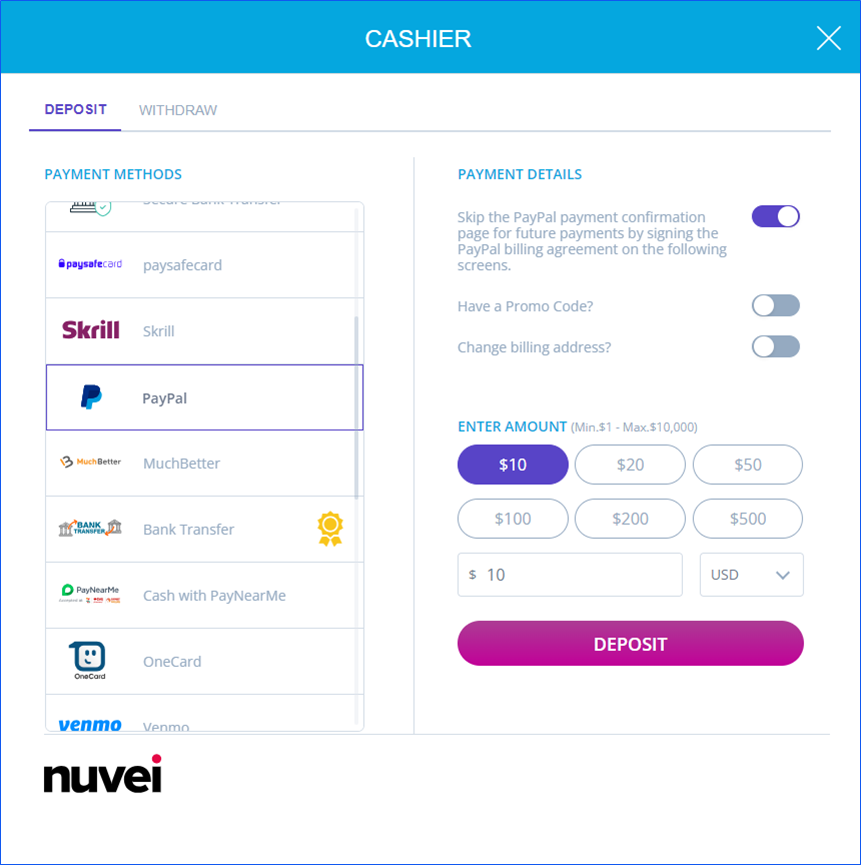
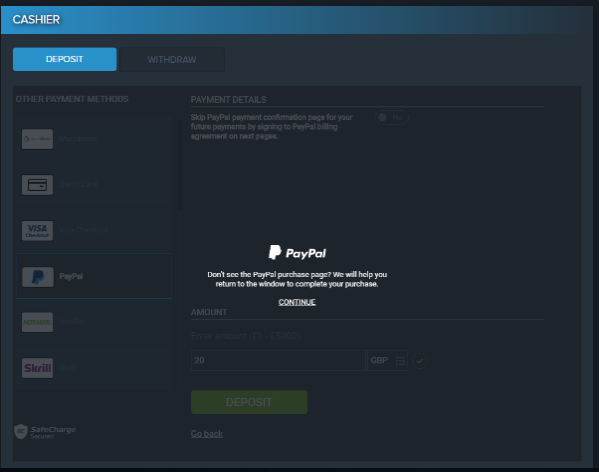
- The user selects the PayPal payment method and can enable Skip the PayPal payment confirmation page for future payments by signing the PayPal billing agreement on the following screens.
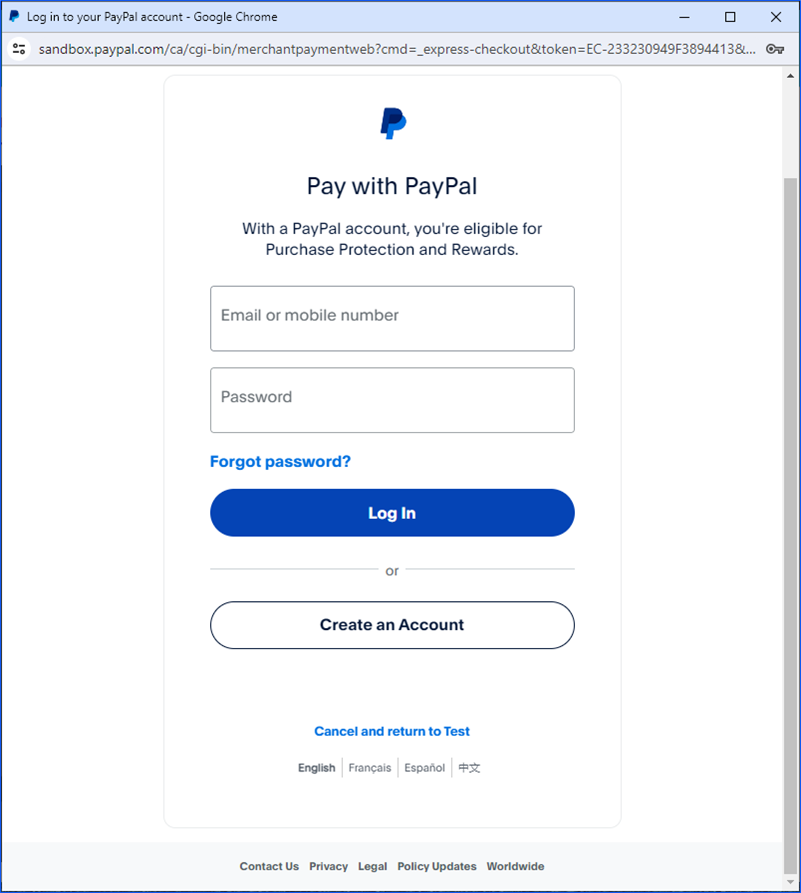
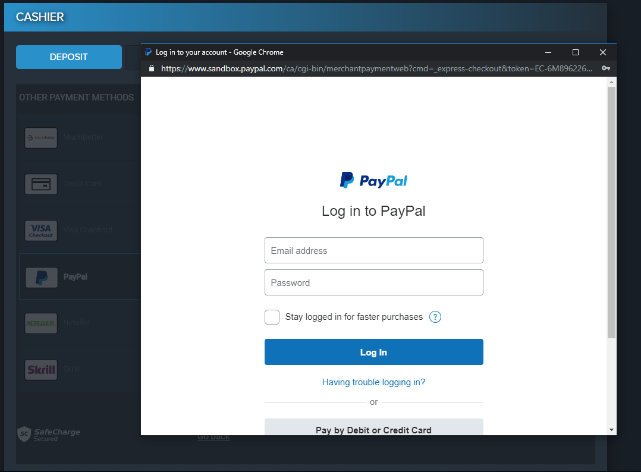
- PayPal opens a pop-up window for the user to log in to their PayPal account.
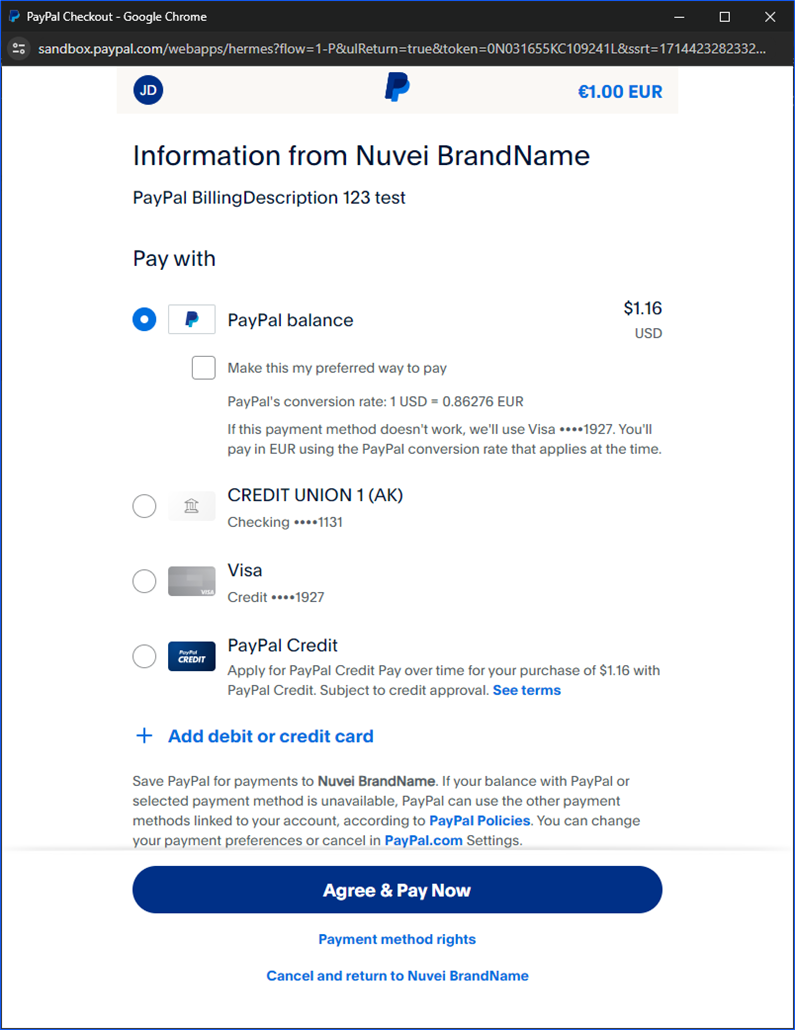
- After logging in, the user sees a summary of the payment and selects the payment method for this transaction.
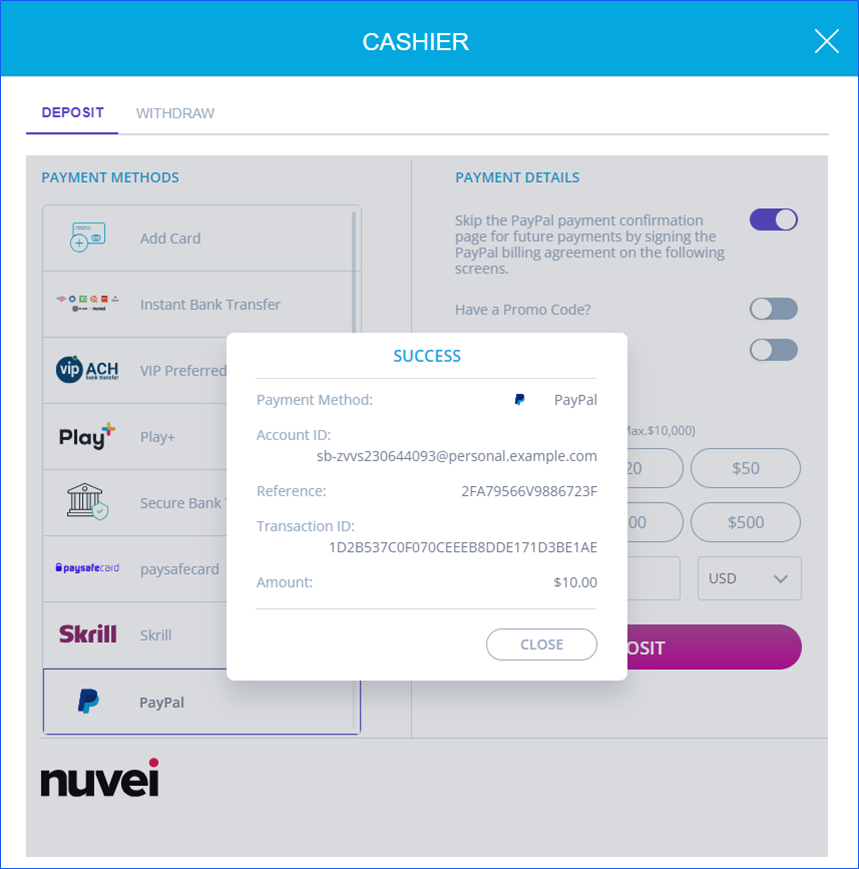
- The user confirms and the payment is performed.
Payment (Returning User)
- The user selects the existing PayPal payment method from My Payment Methods and can enable Skip the PayPal payment confirmation page.
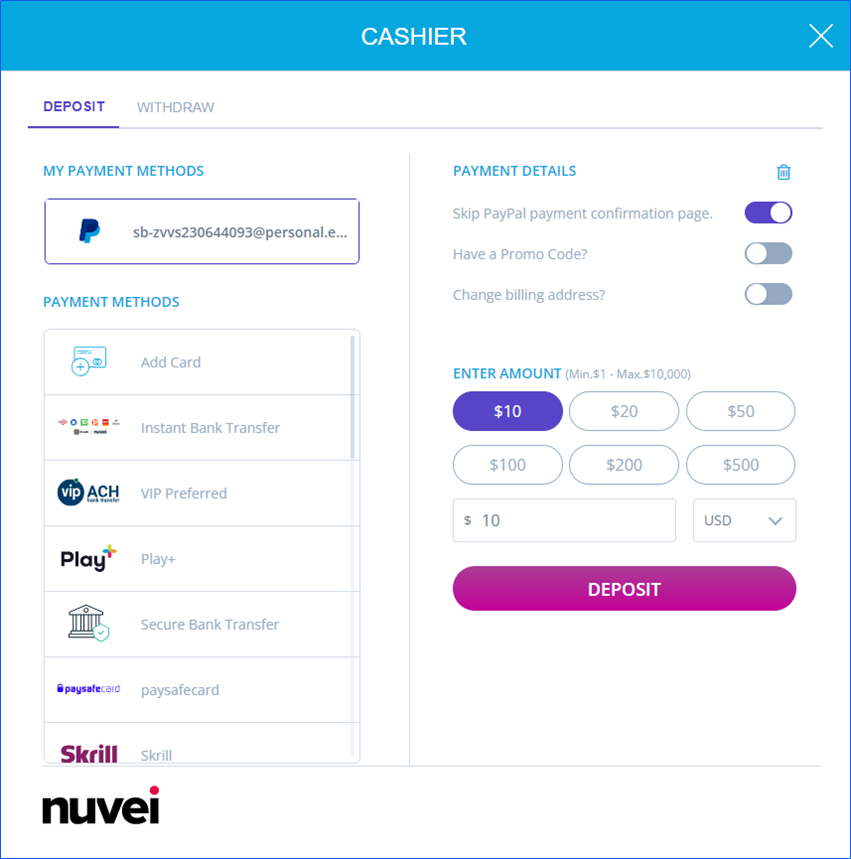
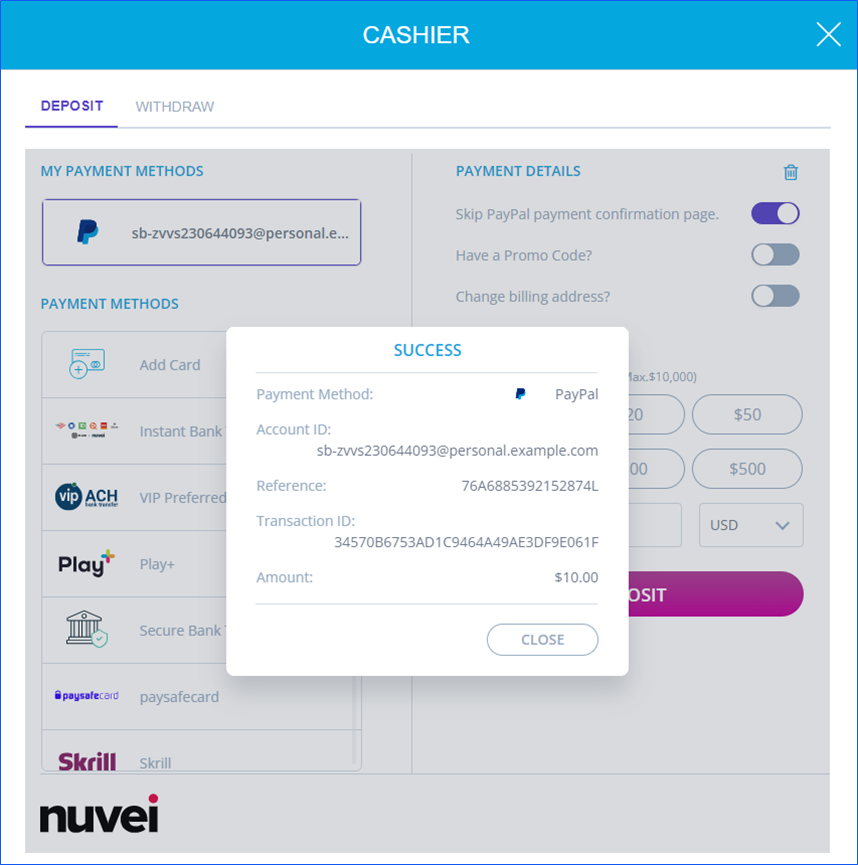
- The user confirms and the payment is performed.
Payout
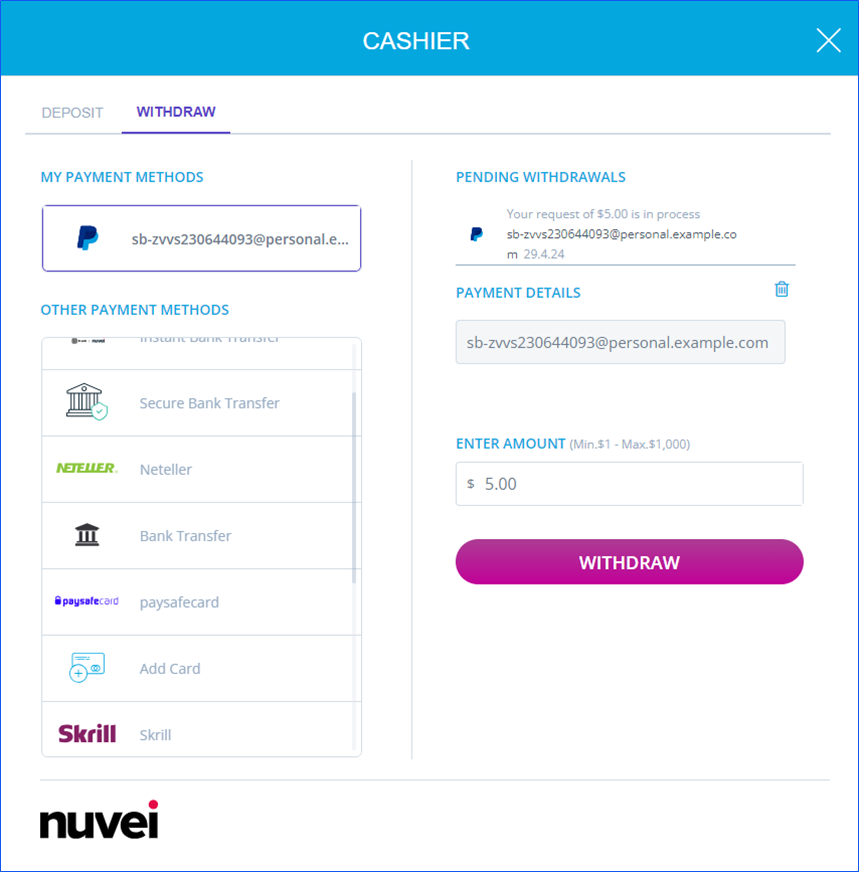
- The user selects the existing PayPal payment method from My Payment Methods, enters the withdrawal amount, and presses Withdraw.
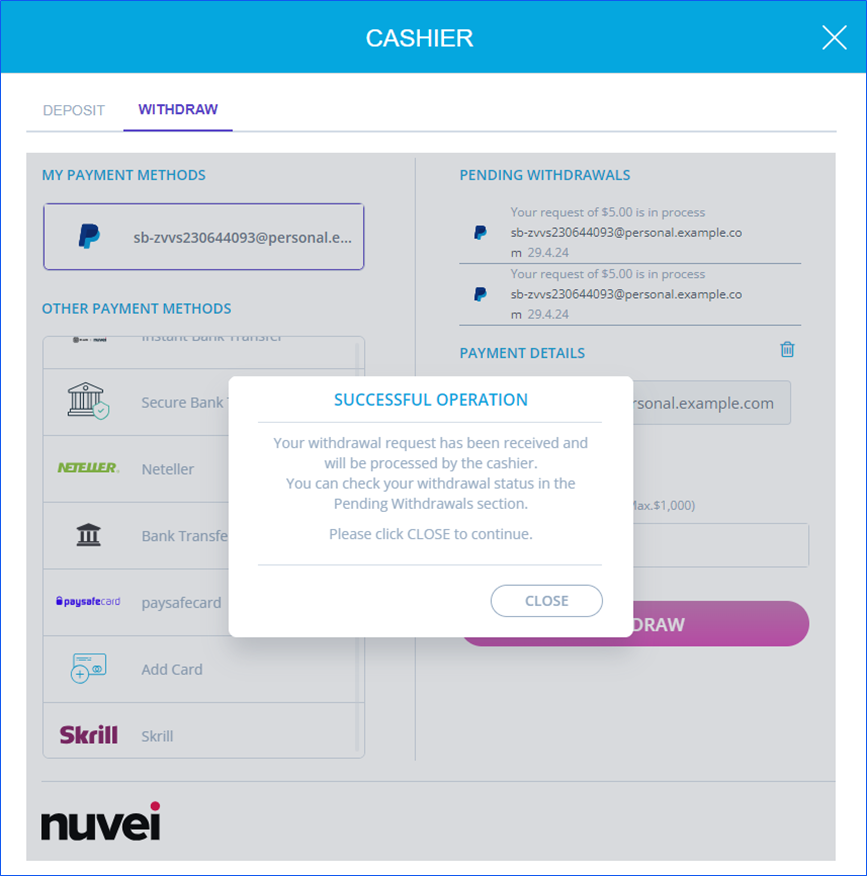
- The withdrawal request is submitted.
Saved Additional Information
Nuvei saves in Provider additional information all the user information that Nuvei receives from PayPal. For example:
{"address":{"address_line_1":"22 Main Street","admin_area_2":"MA","postal_code":"02460","country_code":"US"},"name":{"surname":"Smith","given_name":"John"},"email_address":"[email protected]","account_id":"5AF5974M3SJWU","account_status":"VERIFIED","phone_number":{"national_number":"123456789"}}
Gaming Restrictions
The gaming restriction means that a user cannot use more than one PayPal account per website, and other users cannot share the same account. (In other words, one unique PayPal account per user per site.)
Account Validations
After a user logs in to their PayPal account, Nuvei requests from PayPal the user information.
PayPal responds to this call with the user information they have on their system.
Nuvei can use this data to perform an account validation check on our risk system to compare user data such as first name, last name, etc.
In-Context Flow
The PayPal Express Checkout with the In-Context flow gives customers a simplified checkout experience, which keeps them local to the merchant’s website throughout the payment authorization process.
PayPal Redirect In-Context Message
Vault/Billing Agreements and Reference Transactions
Vault/Billing Agreements are established when a buyer agrees to allow a merchant to use their PayPal account as a funding source for transactions.
This allows two types of deposit flows:
- Direct deposit – After the first deposit, when the user is redirected to PayPal and signs the vault/billing agreement, all future deposits of the user are direct deposits without any redirect to PayPal.
- Rebilling – Signing the vault/billing agreement allows the merchant to make future charges according to a billing plan. The first transaction can be a “sign and pay” deposit, or only a sign deposit (when sending
amount=0).
Technical Requirements
To initiate the first deposit for signing the vault/billing agreements, you must include this submethod = “ReferenceTransaction” parameter. Once the first payment is complete, Nuvei receives a response from PayPal with the Reference ID (associated with the userPaymentOptionId), which Nuvei automatically uses for any future direct/billing transactions. When sending subsequent direct transaction requests, you must include this submethod = “ReferenceTransaction” parameter along with the userPaymentOptionId.
First Deposit Request Example
{
    "clientRequestId":"20211203355101",
    "merchantId":"321231666932625700",
    "merchantSiteId":"224668",
    "timeStamp":"20211201155101",
    "checksum":"10F14BF35DC1E16B5A0402D9FD3C008DB47ABA3392B117239AFB08425CA8CCE4",
    "sessionToken":"b0858285-3c2d-4812-b9f4-e6065153246d",
    "userTokenId":"testJohn",
    "clientUniqueId":"Sunisshining444",
    "transactionType":"Sale",
    "paymentOption":{
        "alternativePaymentMethod":{
            "paymentMethod":"apmgw_expresscheckout"
        },
        "userPaymentOptionId": "null",
        "subMethod":{
            "subMethod":"ReferenceTransaction"
        }
    },
    "currency":"GBP",
    "amount":"10",
    "deviceDetails":{
        "ipAddress":"<customer's IP address>"
    },
    "billingAddress":{
        "firstName":"John",
        "lastName":"Smith",
        "email":"[email protected]",
        "phone":"123456789",
        "address":"39 Rotschild st",
        "city":"London",
        "country":"GB"
    },
    "urlDetails":{
        "notificationUrl":"https://cashier.com.e/paymentservice/safecharge/deposit-notification"
    }
}
First Deposit Response Example
{
    "orderId":"301028008",
    "userTokenId":"testJohn",
    "paymentOption":{
        "redirectUrl":"https://www.sandbox.paypal.com/ca/cgi-bin/merchantpaymentweb?cmd=_express-checkout&token=EC-1YT80578R0459232J",
        "userPaymentOptionId":"71693528",
        "card":{

        }
    },
    "transactionStatus":"REDIRECT",
    "sessionToken":"b0858285-3c2d-4812-b9f4-e6065153246d",
    "clientUniqueId":"Sunisshining444",
    "internalRequestId":342526048,
    "status":"SUCCESS",
    "errCode":0,
    "reason":"",
    "merchantId":"321231666932625700",
    "merchantSiteId":"224668",
    "version":"1.0",
    "clientRequestId":"20211203355101"
}
Second Deposit Request Example
{
    "clientRequestId":"20211201155101",
    "merchantId":"321231666932625700",
    "merchantSiteId":"224668",
    "timeStamp":"20211201155101",
    "checksum":"AFC3B55C7A6EC562043599C8C8CAB20AFE97FA282085B7D95C5282877F73853F",
    "sessionToken":"e5d01bad-8c0c-44d5-8821-a0ea78f43153",
    "userTokenId":"testJohn",
    "clientUniqueId":"Sunisshining445",
    "transactionType":"Sale",
    "paymentOption":{
        "userPaymentOptionId":"71693528",
        "subMethod":{
            "subMethod":"ReferenceTransaction"
        }
    },
    "currency":"GBP",
    "amount":"10",
    "deviceDetails":{
        "ipAddress":"<customer's IP address>"
    },
    "billingAddress":{
        "firstName":"John",
        "lastName":"Smith",
        "email":"[email protected]",
        "phone":"123456789",
        "address":"39 Rotschild st",
        "city":"London",
        "country":"GB"
    },
    "urlDetails":{
        "notificationUrl":"https://cashier.com.e/paymentservice/safecharge/deposit-notification"
    }
}
Second Deposit Response Example
{
    "orderId":"301031778",
    "userTokenId":"testJohn",
    "paymentOption":{
        "userPaymentOptionId":"71693528",
        "card":{

        }
    },
    "transactionStatus":"APPROVED",
    "transactionId":"711000000003645919",
    "sessionToken":"e5d01bad-8c0c-44d5-8821-a0ea78f43153",
    "clientUniqueId":"Sunisshining445",
    "internalRequestId":342540878,
    "status":"SUCCESS",
    "errCode":0,
    "reason":"",
    "merchantId":"321231666932625700",
    "merchantSiteId":"224668",
    "version":"1.0",
    "clientRequestId":"20211201155101"
}
Error Handling
The Recovery feature in PayPal after receiving a funding error is not relevant when using PayPal’s vault/billing agreement:
- On the redirect flow, if a funding error is received from PayPal, Nuvei redirects the customer back to PayPal instead of back to the Cashier page in order to fix the funding source.
- On the direct flow (vault/billing agreement), there is no redirect so we cannot redirect the user to PayPal to fix the funding source, and therefore we decline it.
Set Transaction Context
The PayPal Set Transaction Context (STC) feature allows merchants to send additional transaction(s), customer-related data, and industry-related data to PayPal during the checkout flow. This information helps enhance risk assessment and improve fraud detection.
Mapping of Fields
- Confirm with PayPal which fields, if any, need to be sent.
- Map each field that needs to be sent to a corresponding field. See xxx (table)
- Include the corresponding field(s) in the
extendedRiskAddendumobject according to your integration type.
STC Mapping Table
| PayPal STC Fields | Nuvei Fields | ElementType | Field Type | Example | Field Description |
|---|---|---|---|---|---|
| senderProfile | Object | ||||
| sender_account_id | accountId | Field | String | A12345N343 | Unique identifier of the buyer account on the partner/merchant platform |
| sender_first_name | firstName | Field | String | John | First name registered with the buyer’s partner/merchant account |
| sender_last_name | lastName | Field | String | Smith | Last name registered with the buyer’s partner/merchant account |
| sender_email | Field | String | [email protected] | Email address registered with the buyer’s partner/merchant account | |
| sender_phone | phone | Field | String | (042) 1123 4567 | Phone number (national notation) registered with the buyer’s partner/merchant account |
| sender_country_code | countryCode | Field | String | US | Country code registered with the buyer’s partner/merchant account. ISO Alpha-2 Country Code |
| sender_address_state | state | Field | String | CA | State (or equivalent) of the buyer registered on the partner/merchant platform. 2-letter code for US states, or equivalent for other countries. If the information is not available,set to null. |
| sender_address_city | city | Field | String | San Jose | City of the buyer registered on the partner/merchant platform |
| sender_address_zip | zip | Field | String | 95131 | Postal code of the buyer registered on the partner/merchant platform |
| sender_address_line1 | addressLine1 | Field | String | 2211 N 1st St | Address details of the buyer registered on the partner/merchant platform |
| sender_address_line2 | addressLine2 | Field | String | #103 | Secondary address details of the buyer registered on the partner/merchant platform |
| sender_create_date | customerSince | Field | String | 012-12-09T 19:14:55.277-0:00 | Date of creation of the buyer’s account on the partner/merchant platform. ISO 8601 date format |
| sender_signup_ip | senderSignupIp | Field | String | 10.220.90.20 | IP address that the sender/buyer used to sign up on the marketplace platform IP (IPv4 / IPv6) |
| loyalty_flag_exists | loyaltyFlagExists | Field | Boolean | 1 | A loyalty flag is present for the partner/merchant. If a merchant has a loyalty program for which customers must sign up voluntarily, this field is required. |
| sender_popularity_score | senderPopularityScore | Field | String | high | Risk-based scoring on the sender/buyer by the marketplace platform (e.g., social score, identity score, risk score). This score is likely unique for each platform based on marketplace platform’s risk platform capabilities. {high, medium, low} |
| existingCustomer | Field | Boolean | True/False | ||
| br_cpf | cpf | Field | String | 12249752788 | Brazilian individual taxpayer registry identification. |
| deviceInfo | Object | ||||
| msisdn | msisdn | Field | Numeric | 4673496206 | MSISDN stored with the merchant |
| iccid | iccid | Field | String | 9 91 10 1200 00 320451 0 | ICCID stored with the merchant. String of space delimited numbers |
| imei | imei | Field | Numeric | 49015420323751 | IMEI stored with the merchant. |
| device_possession | devicePossession | Field | String | lost | Indicates a lost or stolen device. Optional values: {lost, stolen} |
| transactionInformation | Object | ||||
| txn_count_1_hr | txnCount1Hr | Field | Numeric | Number of transactions the buyer has had in the last 1 hour on the partner platform (through PayPal or otherwise) | |
| txn_count_24_hr | txnCount24Hr | Field | Numeric | Number of transactions the buyer has had in the last 24 hours on the partner platform (through PayPal or otherwise) |
|
| txn_count_3_month | txnCount3Month | Field | Numeric | Number of transactions the buyer has had in the last three months on the partner platform (through PayPal or otherwise) | |
| txn_count_total | currentNumberOfTransactions | Field | Numeric | Total number of transactions the buyer has had to-date on the partner platform (through PayPal or otherwise) | |
| number_top_ups_24_hr | numberTopUps24Hr | Field | Numeric | 34 | Number of top-ups the sender sent in the last 24 hours |
| number_top_up_receivers | numberTopUpReceivers | Field | Numeric | 34 | Number of top-up receivers associated with the sender; that is, the total number of recipients to whom the sender has sent top-ups in the past. |
| transactions_chargebacks_indicator | transactionsChargebacksIndicator | Field | String | low | Indicator of the number of chargebacks. Optional values: {zero, low, medium, high} |
| transaction_is_tangible | transactionIsTangible | Field | Boolean | 1 | The merchant’s transaction is for tangible rather than digital goods. 0 for intangible goods, 1 for tangible goods. |
| merchantCustomData | Object | ||||
| cd_string_one | stringOne | Field | String | Dependency on Industry - see paypal STC manual. | |
| cd_string_two | stringTwo | Field | String | Dependency on Industry - see paypal STC manual. | |
| cd_int_one | intOne | Field | Numeric | Dependency on Industry - see paypal STC manual. | |
| receiverProfile | Object | ||||
| receiver_account_id | accountId | Field | String | A12345N343 | Unique identifier of the seller/recipient’s account on the marketplace platform Format: Alphanumeric |
| receiver_email | Field | String | [email protected] | Seller/recipient’s registered email on the marketplace platform | |
| receiver_address_country_code | countryCode | Field | String | US | Seller/recipient’s country code registered on the marketplace platform Format: ISO Alpha-2 Country Code |
| business_name | businessName | Field | String | John Ltd | Business name used by the seller/recipient to register on the marketplace platform. Format: Alphanumeric |
| recipient_popularity_score | popularityScore | Field | String | high | Risk-based scoring on the seller/recipient by the marketplace platform (e.g., social score, identity score, risk score). This score is likely unique for each platform based on marketplace platform’s risk platform capabilities. Optional values: {high, medium, low} |
| receiver_create_date | customerSince | Field | String | 2012-12-09T 19:14:55.277-0:00 | ate of creation of the seller/recipient’s account on the marketplace platform Format: The following ISO 8601 formats are accepted: YYYY-MM-DDThh:mm:ssZ YYYY-MM-DDThh:mm:ss YYYY-MM-DDThh:mmZ YYYY-MM-DDThh:mm Condition: |
| receiver_phone_create_date | phoneCreateDate | Field | String | 2012-12-09T 19:14:55.277-0:00 | Date when the phone number was assigned to the recipient. This field helps to calculate the number of days the recipient has had this number. ISO 8601 date format |
| receiver_phone | phone | Field | String | (042) 1123 4567 | Recipient’s phone number (national notation) registered with the partner/merchant platform |
| receiver_first_name | firstName | Field | String | John | Recipient’s first name registered with the partner/merchant platform. If the recipient name is unavailable, use the business name. If there are multiple suppliers, the merchant should pass the information for the first service offered. In a marketplace scenario, a receiver is a Merchant of Record. Alphanumeric. |
| receiver_last_name | lastName | Field | String | Smith | Recipient’s last name registered with the partner/merchant platform. If the recipient name is unavailable, use the business name. Alphanumeric |
| receiver_address_state | state | Field | String | CA | Recipient’s state (or equivalent) registered on the partner/merchant platform. 2-letter code for US states, or equivalent for other countries. If the information is not available,set to null. |
| receiver_address_city | city | Field | String | San Jose | Recipient’s city registered on the partner/merchant platform. |
| receiver_address_zip | zip | Field | String | 95131 | Recipient’s postal code registered on the partner/merchant platform |
| receiver_address_line1 | addressLine1 | Field | String | 2211 N 1st St | Recipient’s address information registered on the partner/merchant platform. |
| receiver_address_line2 | addressLine2 | Field | String | #103 | Recipient’s secondary address details registered on the partner/merchant platform. |
| receiver_signup_ip | signupIp | Field | String | 10.220.90.21 | IP address used by the recipient while creating their partner account. IP (IPv4 / IPv6) |
| senderReceiverInteraction | Object | ||||
| first_interaction_date | firstInteractionDate | Field | String | 2012-12-09T 19:14:55.277-0:00 | Date of the first interaction between the sender and receiver on the marketplace platform. Definition of ‘interaction’ is to be defined by the marketplace platform. Examples are: first transaction attempt between sender and receiver, addfriend date between sender and receiver, etc. Format: ISO 8601 date |
| interaction_three_month | interaction3Month | Field | String | high | Interaction count (set as high, medium, low) between the sender and receiver in the last 3 months. For a transportation industry, an interaction can be defined as a transaction or an app download. The partner assigns a category based on the raw transaction count, hence the information is optional for merchants who do not have such counters. Optional values: {high, medium, low} |
| interaction_frequency | interactionFrequency | Field | String | high | Total interaction count (set as high, medium, low) between the sender and receiver. For a transportation industry, an interaction can be defined as a transaction or an app download. The partner assigns a category based on the raw transaction count, hence the information is optional for merchants who do not have such counters. Optional values: {high, medium, low} |
| sender_first_interaction_date_with_app | senderFirstInteractionDateWithApp | Field | String | 2012-12-09T 19:14:55.277-0:00 | Date on which the sender first interacted with the partner app. For a transportation industry, an interaction can be defined as a transaction or an app download. Format: ISO 8601 date |
| paymentFlow | Object | ||||
| pos_payment_consent_mode | posPaymentConsentMode | Field | String | manual | Payment consent mode. Optional values: {manual, automatic} |
| highrisk_txn_flag | highriskTxnFlag | Field | Boolean | 1 | Flag for high-risk items such as gift cards/anything cash equivalent |
| vertical | vertical | Field | String | tickets | Transaction level vertical flag for the seller/receiver’s transactions that are in several verticals. E.g. Household goods, shoes, clothing, tickets, etc. |
| transaction_is_tangible | transactionIsTangible | Field | Boolean | 1 | The seller/receiver’s transaction is for tangible rather than digital goods. If tangible, value = 1. If intangible, value = 0. |
| deliveryInformation | Object | ||||
| dg_delivery_method | deliveryMethod | Field | String | Delivery method for an intangible item if there is an associated email/phone. It acts as the shipping address for an intangible. E.g. {email, phone, venue_pickup, kiosk_pickup} |
|
| dg_delivery_address_change_date | deliveryAddressChangeDate | Field | String | 2012-12-09T 19:14:55.277-0:00 | The date on which the delivery address changed. It shows the age for the shipping address/email/phone. Format: ISO 8601 date |
| otaServiceFulfillment | Object | ||||
| ota_type | type | Field | String | Car rental | OTA industry type. Format: Alphanumeric |
| ota_service_start_date | serviceStartDate | Field | Date | 2012-12-09T 19:14:55.277-0:00 | OTA service start date. A service start date that is very close to the transaction date elevates risk. ISO 8601 date format. |
| ota_service_end_date | serviceEndDate | Field | Date | 2012-12-09T 19:14:55.277-0:00 | OTA service end date. A consumer booking a service such as a hotel for too many days elevates risk. ISO 8601 date format. |
| ota_change_guest_t_f | changeGuestTF | Field | Boolean | 0 | Whether the guest (the person being served) is able to be changed. Fraudsters tend to pay for services that can change the guest. |
| ota_start_country | startCountry | Field | String | US | OTA start country; for example, country where bus ticket was purchased. Compare this variable with the sender’s country / IP country / billing country to manage risk. ISO Alpha-2 Country Code. |
| ota_end_country | endCountry | Field | String | US | OTA service end country |
| ota_start_city | startCity | Field | String | an Jose | OTA service start city |
| ota_end_city | endCity | Field | String | an Jose | OTA service end city |
| ota_start_zipcode | startZipcode | Field | String | 95131 | OTA service start zip code. |
| ota_end_zipcode | endZipcode | Field | String | 95131 | OTA service end zip code. |
| ota_start_spot | startSpot | Field | String | 2211 N 1st St | Address line 1 of the OTA start location |
| ota_end_spot | endSpot | Field | String | 2211 N 1st St | Address line 1 of the OTA end location |
| geolocationData | Object | ||||
| store_latitude | storeLatitude | Field | String | 41.461350 | Instore experience, store geolocation |
| store_longitude | storeLongitude | Field | String | 41.461350 | Instore experience, store geolocation |
| sender_longitude | senderLongitude | Field | String | 41.461350 | sender geolocation |
| sender_latitude | senderLatitude | Field | String | 41.461350 | sender geolocation |
| merchantScores | Object | ||||
| multi_card_txn_indicator | multiCardTxnIndicator | Field | String | 0 | Vtex Pay with 2 cards indication. Optional values: 0: Not a multi card transaction 1: Multi card transaction with 1st card 2: Multi card transaction with 2nd card |
| serasa_score_cpf | sersaScoreCpf | Field | String | 0.788 | CPF risk score from Vtex |
| serasa_score_phone_verification | sersaScorePhoneVerification | Field | String | 0.112 | Verification risk score from Vtex |
| storeIdentifier | Object | ||||
| store_id | storeId | Field | String | 45,24,9 etc… | store id |
 Last modified April 2026