
- METHOD TYPEE-wallet
- PAYMENTS

- PAYOUTS
- REFUNDS
- RECURRING

Introduction
PayPal is a widely used digital payment platform that allows individuals and businesses to send, receive, and manage money online. The Venmo PayPal SDK can be used by a merchant as a native, one-click payment option for mobile apps and websites that provides reduced checkout friction and increased conversion.
Supported Countries
- United States
Supported Currencies
- USD
About Payment (Deposit)
The Venmo PayPal SDK payment flows are the default Sale flow and the Auth-Settle flow.
REST API 1.0
Payment (Deposit) Flow
Follow these steps to perform a payment using Nuvei REST API integration:
1. Generate a sessionToken
Press here for details.
2. Send a /payment Request
Perform the payment by sending a /payment request with mandatory parameters including:
userTokenIdamountcurrencypaymentOption.alternativePaymentMethodclass containing:paymentMethod: “apmgw_VenmoPP“
deviceDetailsclass containing:ipAddressbillingAddressclass containing:firstName,lastName,country,emailuserDetailsclass containing:firstName,lastName,country,email
Example /payment Request
{
  "sessionToken":"<sessionToken from /getSessionToken>",
  "merchantId":"<your merchantId>",
  "merchantSiteId":"<your merchantSiteId>",
  "clientRequestId":"<unique request ID in merchant system>",
  "amount":"200",
  "currency":"USD",
  "userTokenId":"<unique customer identifier in merchant system>",
  "clientUniqueId":"<unique transaction ID in merchant system>",
  "paymentOption":{
    "alternativePaymentMethod":{
      "paymentMethod":"apmgw_VenmoPP"
    }
  },
  "deviceDetails":{
    "ipAddress":"<customer's IP address>"
  },
  "billingAddress":{
    "firstName": "John",
    "lastName": "Smith",
    "country":"US",
    "email":"[email protected]"
  },
  "userDetails":{
    "firstName": "John",
    "lastName": "Smith",
    "country":"US",
    "email":"[email protected]"
  },
  "timeStamp":"<YYYYMMDDHHmmss>",
  "checksum":"<calculated checksum>"
}
After the transaction is processed, Nuvei sends a Direct Merchant Notification (DMN) that includes the result of the transaction to urlDetails.notificationUrl, which Nuvei recommends including in the /payment request.
Payout (Withdrawal) Flow
Send a /payout request and include the userPaymentOptionId, which contains the user’s previously stored APM account details. Press here for an example.
After the transaction is processed, Nuvei sends a DMN that includes the result of the transaction to urlDetails.notificationUrl, which Nuvei recommends including in the /payout request.
Example Withdrawal Request DMN with wdRequestStatus=APPROVED
wdOrderId=5377261&wdRequestId=6744051&gwTrxId=2610000000000014194¬ificationType=WITHDRAW_REQUEST_NOTIFICATION&merchantSiteId=209631&merchantGwId=4972436454212160565&merchantLocale=en_US&wdRequestState=Closed&wdRequestStatus=Approved&wdOrderStatus=Settled&settlementType=WITHDRAWAL&gwErrCode=0&gwExtendedErrorCode=0&apmTrxId=2610000000021714&apmReferenceId=84CFC2767E5D77967EAB195323F60ECC&apmErrorCode=0&firstName=John&lastName=Doe&userTokenId=ttvfcefcr3frc3rc3ffr33344&zip=M6T+1J1&city=Ontario&country=DE&phone1=%2B14161238888&email=ivanp%40abv.bg&address=Test+Address&amount=45.00&approvedAmount=45.00¤cy=EUR&userId=UID&userPMId=2153172031&paymentMethod=apmgw_VenmoPP&version=1.0&pmDisplayName=sb-ksvvh29494455%40business.example.com&customField1=meccabingo.com&customField3=333&client_ip=97.247.234.249&wdOrderAmount=45.00&wdOrderCurrency=EUR&responseTimeStamp=2024-03-22.07%3A46%3A28&ExternalaccountID=AFV2UDFKFF35J&externalAccountDescription=account_id%3AAFV2UDFKFF35J%7Cemail%3Asb-ksvvh29494455%40business.example.com&feeAmount=0.0&transactionAmount=45.0&merchantUniqueId=merchant_unique_id&externalEmail=sb-ksvvh29494455%40business.example.com&upoRegistrationDate=20240321&acquirerBank=PPCP-PI&checksum=3b0a74f68334d1dd854afc5413aae224
Example Withdrawal Order DMN with wdRequestStatus=APPROVED
wdOrderId=5377261&wdRequestId=6744051&gwTrxId=2610000000000014194¬ificationType=WITHDRAW_ORDER_NOTIFICATION&merchantSiteId=209631&merchantGwId=4972436454212160565&merchantLocale=en_US&wdRequestState=Closed&wdRequestStatus=Approved&wdOrderStatus=Settled&settlementType=WITHDRAWAL&gwErrCode=0&gwExtendedErrorCode=0&apmTrxId=2610000000021714&apmReferenceId=84CFC2767E5D77967EAB195323F60ECC&apmErrorCode=0&firstName=John&lastName=Doe&userTokenId=ttvfcefcr3frc3rc3ffr33344&zip=M6T+1J1&city=Ontario&country=DE&phone1=%2B14161238888&email=ivanp%40abv.bg&address=Test+Address&amount=45.00&approvedAmount=45.00¤cy=EUR&userId=UID&userPMId=2153172031&paymentMethod=
apmgw_VenmoPP
&version=1.0&pmDisplayName=sb-ksvvh29494455%40business.example.com&customField1=meccabingo.com&customField3=333&client_ip=97.247.234.249&wdOrderAmount=45.00&wdOrderCurrency=EUR&responseTimeStamp=2024-03-22.07%3A46%3A28&ExternalaccountID=AFV2UDFKFF35J&externalAccountDescription=account_id%3AAFV2UDFKFF35J%7Cemail%3Asb-ksvvh29494455%40business.example.com&feeAmount=0.0&transactionAmount=45.0&merchantUniqueId=merchant_unique_id&externalEmail=sb-ksvvh29494455%40business.example.com&upoRegistrationDate=20240321&acquirerBank=PPCP-PI&checksum=c9b6c8de6e05a51bd9e38d582d5368e0
Example Payment DMN with Status=APPROVED
...'ppp_status=OK&Status=APPROVED&ExErrCode=0&ErrCode=0&errApmCode=0&errApmDescription=&errScCode=0&errScDescription=&Reason=&ReasonCode=0&PPP_TransactionID=44702661&userid=Lorem&merchant_unique_id=merchuniqueid&customData=56_Sm96a3ZZWG56RERLJKHkljnJKHjbxiuyTWd4WDVncS9YQURxYWZuS1VCWT0%3D&productId=1&first_name=John&last_name=Doe&email=test%40mymail.com¤cy=USD&pmDisplayName=hristo%40personal.example.com&customField1=enracha.es&customField2=&customField3=&customField4=&customField5=&customField6=&customField7=&customField8=&customField9=&customField10=&customField11=&customField12=&customField13=&customField14=&customField15=&invoice_id=&address1=Sancho+el+fuerte+15&address2=15&country=United+States&state=&city=City&zip=123456&phone1=1234567890&phone2=&phone3=&client_ip=127.0.0.1&nameOnCard=&cardNumber=&bin=&noCVV=&acquirerId=&acquirerBank=PPCP-PI&expMonth=&expYear=&Token=&tokenId=&AuthCode=&AvsCode=&Cvv2Reply=&shippingCountry=&shippingState=&shippingCity=&shippingAddress=&shippingZip=&shippingFirstName=&shippingLastName=&shippingPhone=&shippingCell=&shippingMail=&total_discount=0.00&total_handling=0.00&total_shipping=0.00&total_tax=0.00&buyButtonProductBundleId=&merchant_site_id=186111&merchant_status=&action=&requestVersion=&message=APPROVED&merchantLocale=en_US&unknownParameters=&payment_method=apmgw_VenmoPP&ID=&merchant_id=5416795427517477813&responseTimeStamp=2025-01-29.12%3A50%3A12&buyButtonProductId=&webMasterId=&appliedPromotions=&uniqueCC=&transactionType=Sale&externalEmail=hristo%40personal.example.com&cardCompany=&eci=&user_token_id=13395012wwe123456789012345&user_token=auto&userPaymentOptionId=2153639511&TransactionID=2610000000000123985&ExternalaccountID=F567H2HXTLVP4&externalAccountDescription=account_id%3AF567H2HXTLVP4%7Cemail%3Ahristo%40personal.example.com&externalTransactionId=6SU29313ED6385822&APMReferenceID=DEBD1547D2D04FF9536CDF0C94A887A1&orderTransactionId=25788891&totalAmount=10.00&dynamicDescriptor=hristo+descriptor&item_name_1=1&item_number_1=&item_amount_1=10.00&item_quantity_1=1&item_discount_1=0.00&item_handling_1=0.00&item_shipping_1=0.00&feeAmount=&amountWithoutFee=&houseNumber=&customCurrency=&upoRegistrationDate=20250129&type=DEPOSIT&clientRequestId=&relatedTransactionId=&apmPayerInfo=%7B%22address%22%3A%7B%22address_line_1%22%3A%22Sancho+el+fuerte+15%22%2C%22admin_area_2%22%3A%22Madrid%22%2C%22postal_code%22%3A%22123456%22%2C%22country_code%22%3A%22US%22%7D%2C%22name%22%3A%7B%22surname%22%3A%22Doe%22%2C%22given_name%22%3A%22John%22%7D%2C%22email_address%22%3A%22hristo%40personal.example.com%22%2C%22account_id%22%3A%22F567H2HXTLVP4%22%2C%22account_status%22%3A%22VERIFIED%22%2C%22phone_number%22%3A%7B%22national_number%22%3A%224089881537%22%7D%7D&sessionId=1ffc52156f1eb7a7c4d18e21a435&responsechecksum=f4ffcc0ba5b169dde3a4f586f08a56b9d4932ac1264e7cdbd79483477aa3f4d3&advanceResponseChecksum=9750a9c4551a2b45f67cfeb03ec241efe0cdfb1326d8d0c7ff7a63a8167d2cf7',
Example Payment DMN with Status=PENDING
...'ppp_status=PENDING&Status=PENDING&ExErrCode=0&ErrCode=0&errApmCode=0&errApmDescription=&errScCode=0&errScDescription=&Reason=&ReasonCode=0&PPP_TransactionID=44702661&userid=Lorem&merchant_unique_id=merchuniqueid&customData=56_Sm96a3ZZWG56RERLJKHkljnJKHjbxiuyTWd4WDVncS9YQURxYWZuS1VCWT0%3D&productId=1&first_name=John&last_name=Doe&email=test%40mymail.com¤cy=USD&pmDisplayName=hristo%40personal.example.com&customField1=enracha.es&customField2=&customField3=&customField4=&customField5=&customField6=&customField7=&customField8=&customField9=&customField10=&customField11=&customField12=&customField13=&customField14=&customField15=&invoice_id=&address1=Sancho+el+fuerte+15&address2=15&country=United+States&state=&city=City&zip=123456&phone1=1234567890&phone2=&phone3=&client_ip=127.0.0.1&nameOnCard=&cardNumber=&bin=&noCVV=&acquirerId=&acquirerBank=PPCP-PI&expMonth=&expYear=&Token=&tokenId=&AuthCode=&AvsCode=&Cvv2Reply=&shippingCountry=&shippingState=&shippingCity=&shippingAddress=&shippingZip=&shippingFirstName=&shippingLastName=&shippingPhone=&shippingCell=&shippingMail=&total_discount=0.00&total_handling=0.00&total_shipping=0.00&total_tax=0.00&buyButtonProductBundleId=&merchant_site_id=186111&merchant_status=&action=&requestVersion=&message=PENDING&merchantLocale=en_US&unknownParameters=&payment_method=apmgw_VenmoPP&ID=&merchant_id=5416795427517477813&responseTimeStamp=2025-01-29.12%3A50%3A11&buyButtonProductId=&webMasterId=&appliedPromotions=&uniqueCC=&transactionType=Sale&externalEmail=hristo%40personal.example.com&cardCompany=&eci=&user_token_id=13395012wwe123456789012345&user_token=auto&userPaymentOptionId=2153639511&TransactionID=2610000000000123985&ExternalaccountID=F567H2HXTLVP4&externalAccountDescription=account_id%3AF567H2HXTLVP4%7Cemail%3Ahristo%40personal.example.com&externalTransactionId=6SU29313ED6385822&APMReferenceID=DEBD1547D2D04FF9536CDF0C94A887A1&orderTransactionId=25788891&totalAmount=10.00&dynamicDescriptor=hristo+descriptor&item_name_1=1&item_number_1=&item_amount_1=10.00&item_quantity_1=1&item_discount_1=0.00&item_handling_1=0.00&item_shipping_1=0.00&feeAmount=&amountWithoutFee=&houseNumber=&customCurrency=&upoRegistrationDate=20250129&type=DEPOSIT&clientRequestId=&relatedTransactionId=&apmPayerInfo=%7B%22address%22%3A%7B%22address_line_1%22%3A%22Sancho+el+fuerte+15%22%2C%22admin_area_2%22%3A%22Madrid%22%2C%22postal_code%22%3A%22123456%22%2C%22country_code%22%3A%22US%22%7D%2C%22name%22%3A%7B%22surname%22%3A%22Doe%22%2C%22given_name%22%3A%22John%22%7D%2C%22email_address%22%3A%22hristo%40personal.example.com%22%2C%22account_id%22%3A%22F567H2HXTLVP4%22%2C%22account_status%22%3A%22VERIFIED%22%2C%22phone_number%22%3A%7B%22national_number%22%3A%224089881537%22%7D%7D&sessionId=1ffc52156f1eb7a7c4d18e21a435&responsechecksum=fd5e7e81209b80dfd4743bdfe5c957fdf0afd80fce5a00c032d2f3851526f8d9&advanceResponseChecksum=1d451b0cd5663817a9ca7796a99f992c815db8977fab61798fb8be69517d05e3',
Web SDK
Payment (Deposit) Flow
Follow these steps to perform a payment using Nuvei Web SDK integration.
1. Initiate a Session
Before you can submit payment using the client-side Nuvei Web SDK, you need to send the /openOrder API call.
2. Initialize the Web SDK
Instantiate the Web SDK with the sessionToken received from the server call to /openOrder.
3. Create an APM Payment
Send a createPayment() request with its mandatory parameters including:
paymentOption.alternativePaymentMethodclass containing:paymentMethod: “apmgw_VenmoPP“
deviceDetailsclass containing:ipAddressbillingAddressclass containing:firstName,lastName,country,emailuserDetailsclass containing:firstName,lastName,country,email
Example createPayment() Request
sfc.createPayment({
  sessionToken: "<sessiontoken>",
  paymentOption: {
    alternativePaymentMethod: {
      paymentMethod: "
apmgw_VenmoPP
"
  }},
  deviceDetails:{
    ipAddress:"<customer's IP address>"
  },
  billingAddress: {
    firstName: "John",
    lastName: "Smith",
    country: "US",
    email:"[email protected]"
  },
  userDetails: {
    firstName: "John",
    lastName: "Smith",
    country: "US",
    email:"[email protected]"
  },
}, function(res) {
      console.log(res);
});
After the transaction is processed, Nuvei sends a DMN that includes the result of the transaction to urlDetails.notificationUrl, which Nuvei recommends including in the /openOrder request.
Withdrawal Flow
For information about the Withdrawal flow for WebSDK, see Withdrawal.
Payment Page
Payment (Deposit) Flow
Example Payment Page Request
After the transaction is processed, Nuvei sends a DMN that includes the result of the transaction to notify_url, which Nuvei recommends including in the request.
Simply Connect
Payment (Deposit) Flow
To perform a payment using Nuvei Simply Connect integration:
1. Initiate a Session
Before submitting a Simply Connect payment request, you need to submit a server-side /openOrder API request.
2. Create an HTML Placeholder
Import the checkout.js library for building payment flows and create an HTML placeholder on your payment page for the Simply Connect UI element.
3. Submit a checkout() Request
Send a checkout() request with its mandatory input parameters, along with any other relevant parameters and customizations. For more information, see Quick Start to Simply Connect.
User Experience
Deposit Flow
- The user selects the ‘Venmo’ payment method, enters an amount, and clicks the ‘Venmo’ button.
A pop-up opens.
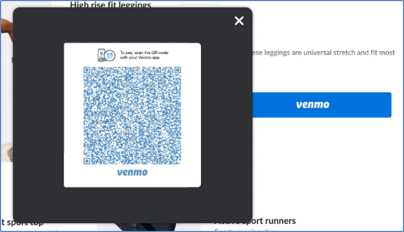
- The user scans the QR code using the Venmo app on a mobile device or using the mobile device camera.
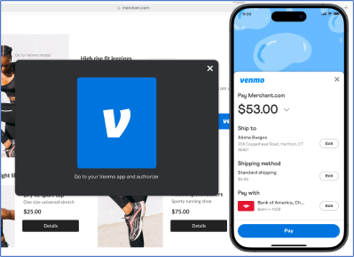
- On the Venmo app, the user reviews the payment details.
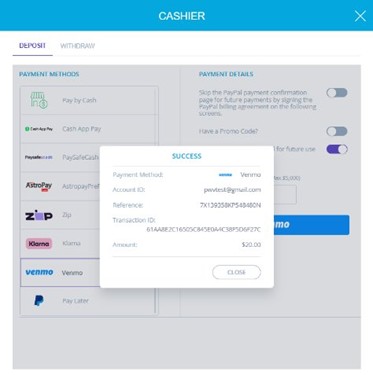
Payout
- The user selects the ‘Venmo’ payment method, enters an amount, and clicks the ‘Withdraw’ button.
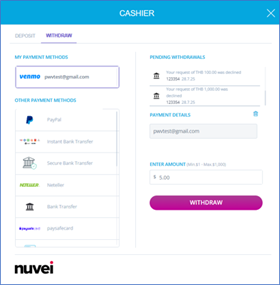
Upon successful completion of the withdrawal request, a ‘successful operation’ message is displayed.
Testing
- In the sandbox environment, there is no QR code and the user must log in with username and password.
- Vaulting is only supported through the QR code and app-switch flows, as they transition the user from a web session to the Venmo mobile app, where vaulting functionality is handled.
- A testing guide is available at: https://developer.paypal.com/docs/checkout/pay-with-venmo/test/#venmo-features-supported-in-sandbox
Test Users
- User: Sandbox-test-user1 / Password: P@yW1thV3nm0
- User: Sandbox-test-user2 / Password: P@yW1thV3nm0
- User: Sandbox-test-user3 / Password: P@yW1thV3nm
- User: pwv-test-user2 /Password: VenmoP@y12345
- User: pwv-test-user3 / Password: VenmoP@y12345
Simulation of Statuses
Deposit
- Approved: Log in and complete the deposit.
- Declined: Log in and cancel the deposit.
Payout
- Automatically approved.
- In the sandbox environment, Payouts ‘recipient_wallet’: ‘Venmo’ cannot be simulated; only the default PayPal can be used)
- Notification URL configuration: Configured on PayPal Backoffice
 Last modified March 2026