- Introduction
- Supported Countries
- Supported Currencies
- Integrations
- DMNs
- User Experience
- Testing
-
Payment (Deposit) Flow
- H3 content (REST API)
- H3 content (Web SDK)
- H3 content (Simply Connect)
- H3 content (REST API)
- H3 content (Web SDK)
- H3 content (Simply Connect)
- Payment (Deposit) Flow
- Payment (Deposit) Flow
- Payment (Deposit) Flow
- Payment (Deposit) Flow
- Payment (Deposit) Flow
- Payment (Deposit) Flow
- Payment (Deposit) Flow for REST API (test 4)
- Payment (Deposit) Flow for Web SDK (test 4)
- Payment (Deposit) Flow for Simply Connect (test 4)
- Payment (Deposit) Flow for REST API (test 4)
- Payment (Deposit) Flow for Web SDK (test 4)
- Payment (Deposit) Flow for Simply Connect (test 4)
- REST API
- Web SDK
- Simply Connect
- REST API
- Web SDK
- Simply Connect
-
Payment (Deposit) Flow
- H3 content (REST API)
- H3 content (REST API)
- H3 content (Web SDK)
- H3 content (Web SDK)
- H3 content (Simply Connect)
- H3 content (Simply Connect)
- Payment (Deposit) Flow
- Payment (Deposit) Flow
- Payment (Deposit) Flow
- Payment (Deposit) Flow
- Payment (Deposit) Flow
- Payment (Deposit) Flow
- REST API
- Web SDK
- Simply Connect
- REST API
- Web SDK
- Simply Connect
- REST API
- Web SDK
- Simply Connect
- REST API
- Web SDK
- Simply Connect
- REST API
- Web SDK
- Simply Connect
- REST API
- Web SDK
- Simply Connect
- METHOD TYPE
- PAYMENTS

- PAYOUTS
- REFUNDS
- RECURRING
Introduction
Wero is a payment solution that aims to become the standard for European consumers and merchants. It is available through EPI member bank applications and as a mobile application on Android and iOS platforms. Built on SEPA Instant rails, Wero was launched by the European Payments Initiative (EPI). Designed to unify fragmented local schemes, Wero allows consumers to move money in seconds through a mobile application, either as a standalone wallet or embedded within an existing bank application.
Supported Countries
Supported Currencies
Integrations
**SECOND REVISED VERSION FOR H3 ALIGNMENT**
**align tab UI with what’s standard for the doc**
Press tab to open…
Follow these steps to perform a payment using Nuvei REST API integration:
1. Generate a sessionToken
Press here for details.
2. Send a /payment Request
Perform the payment by sending a /payment request with mandatory parameters including paymentMethod: “apmgw_Wero“.
{ "paymentOption":{ "alternativePaymentMethod":{ "paymentMethod":"apmgw_Wero" } } }
DMNs
Example of DMN with Approved Status (Sale)
ppp_status=OK&Status=APPROVED&ExErrCode=0&ErrCode=0&errApmCode=0&errApmDescription=&errScCode=0&errScDescription=&Reason=&ReasonCode=0&PPP_TransactionID=130808111&userid=TstWero13&merchant_unique_id=&customData=&productId=&first_name=&middle_name=&last_name=&email=¤cy=EUR&customField1=&customField2=&customField3=&customField4=&customField5=&customField6=&customField7=&customField8=&customField9=&customField10=&customField11=&customField12=&customField13=&customField14=&customField15=&invoice_id=&address1=&address2=&country=Belgium&state=&city=&zip=&phone1=&phone2=&phone3=&client_ip=&nameOnCard=&cardNumber=&bin=&noCVV=&acquirerId=&acquirerBank=EPI+Wero+MS-PI&expMonth=&expYear=&Token=&tokenId=&AuthCode=&AvsCode=&Cvv2Reply=&shippingCountry=&shippingState=&shippingCity=&shippingAddress=&shippingZip=&shippingFirstName=&shippingLastName=&shippingPhone=&shippingCell=&shippingMail=&total_discount=0.00&total_handling=0.00&total_shipping=0.00&total_tax=0.00&buyButtonProductBundleId=&merchant_site_id=242181&merchant_status=&action=&requestVersion=&message=APPROVED&merchantLocale=&unknownParameters=&payment_method=apmgw_Wero&ID=&merchant_id=5634436935940029474&responseTimeStamp=2025-07-09.06%3A11%3A57&buyButtonProductId=&webMasterId=&appliedPromotions=&uniqueCC=&transactionType=Sale&externalEmail=&cardCompany=&eci=&user_token_id=TstWero13&userPaymentOptionId=2305904111&TransactionID=2610000000000310749&ExternalaccountID=0051469b-339e-4a66-a5af-f0b534249700&externalTransactionId=8fcd66b6-86ff-469f-b674-db4c2a2146f2&APMReferenceID=DFAA9D9BB2595AF32D87BB4ABB6B702E&orderTransactionId=98620111&totalAmount=11.00&dynamicDescriptor=static+test&item_name_1=NA&item_number_1=&item_amount_1=11.00&item_quantity_1=1&item_discount_1=0.00&item_handling_1=0.00&item_shipping_1=0.00&feeAmount=&amountWithoutFee=&houseNumber=&customCurrency=&externalToken_blockedCard=&externalToken_cardAcquirerId=&externalToken_cardAcquirerName=&externalToken_cardBin=&externalToken_cardBrandId=&externalToken_cardBrandName=&externalToken_cardExpiration=&externalToken_cardLength=&externalToken_cardMask=&externalToken_cardName=&externalToken_cardTypeId=&externalToken_cardTypeName=&externalToken_clubName=&externalToken_creditCompanyId=&externalToken_creditCompanyName=&externalToken_extendedCardType=&externalToken_Indication=&externalToken_tokenValue=&externalToken_tokenProvider=&ECIRaw=&cryptogram=&maskedNetworkTokenNumber=&upoRegistrationDate=20250709&type=DEPOSIT&clientRequestId=&relatedTransactionId=&apmPayerInfo=%7B%22paymentPlanType%22%3A%22SingleImmediate%22%2C%22APMrequestId%22%3A%228fcd66b6-86ff-469f-b674-db4c2a2146f2%22%2C%22APMcaptureId%22%3A%223811ec33-7671-4788-895a-e57a824fb208%22%2C%22ConsentId%22%3A%22e803fcf7-a0ee-4f58-baad-2fd7aac05a47%22%2C%22BeneficiaryIban%22%3A%22GB33BUKB20201555555555%22%2C%22BeneficiaryName%22%3A%22MerchantName-acceptor-name%22%7D&sessionId=dcf8c423a6e0db03463b4eaa14bb&responsechecksum=dbf396803880c9e5dd47306f2088a246&advanceResponseChecksum=0e1355090baffd99e8e932d467302ef1
Example of DMN with Declined Status
ppp_status=FAIL&Status=DECLINED&ExErrCode=0&ErrCode=1&errApmCode=1&errApmDescription=insufficient+funds&errScCode=1150&errScDescription=Insufficient+funds&Reason=Insufficient+funds&ReasonCode=1150&PPP_TransactionID=131187111&userid=TesWer3&merchant_unique_id=&customData=&productId=&first_name=&middle_name=&last_name=&email=¤cy=EUR&customField1=&customField2=&customField3=&customField4=&customField5=&customField6=&customField7=&customField8=&customField9=&customField10=&customField11=&customField12=&customField13=&customField14=&customField15=&invoice_id=&address1=&address2=&country=Belgium&state=&city=&zip=&phone1=&phone2=&phone3=&client_ip=&nameOnCard=&cardNumber=&bin=&noCVV=&acquirerId=&acquirerBank=EPI+Wero+MS-PI&expMonth=&expYear=&Token=&tokenId=&AuthCode=&AvsCode=&Cvv2Reply=&shippingCountry=&shippingState=&shippingCity=&shippingAddress=&shippingZip=&shippingFirstName=&shippingLastName=&shippingPhone=&shippingCell=&shippingMail=&total_discount=0.00&total_handling=0.00&total_shipping=0.00&total_tax=0.00&buyButtonProductBundleId=&merchant_site_id=242181&merchant_status=&action=&requestVersion=&message=DECLINED&merchantLocale=&unknownParameters=&payment_method=apmgw_Wero&ID=&merchant_id=5634436935940029474&responseTimeStamp=2025-07-09.12%3A47%3A32&buyButtonProductId=&webMasterId=&appliedPromotions=&uniqueCC=&transactionType=Auth&externalEmail=&cardCompany=&eci=&user_token_id=TesWer3&userPaymentOptionId=2305972111&TransactionID=2610000000000311059&ExternalaccountID=0051469b-339e-4a66-a5af-f0b534249700&externalTransactionId=a873edc3-ce85-40ed-acbd-fcbe8138ceb5&APMReferenceID=7F4AE86F225E2318DAEF48F3451172C6&orderTransactionId=98964111&totalAmount=88000.00&dynamicDescriptor=static+test&item_name_1=NA&item_number_1=&item_amount_1=88000.00&item_quantity_1=1&item_discount_1=0.00&item_handling_1=0.00&item_shipping_1=0.00&feeAmount=&amountWithoutFee=&houseNumber=&customCurrency=&externalToken_blockedCard=&externalToken_cardAcquirerId=&externalToken_cardAcquirerName=&externalToken_cardBin=&externalToken_cardBrandId=&externalToken_cardBrandName=&externalToken_cardExpiration=&externalToken_cardLength=&externalToken_cardMask=&externalToken_cardName=&externalToken_cardTypeId=&externalToken_cardTypeName=&externalToken_clubName=&externalToken_creditCompanyId=&externalToken_creditCompanyName=&externalToken_extendedCardType=&externalToken_Indication=&externalToken_tokenValue=&externalToken_tokenProvider=&ECIRaw=&cryptogram=&maskedNetworkTokenNumber=&upoRegistrationDate=20250709&type=DEPOSIT&clientRequestId=&relatedTransactionId=&apmPayerInfo=%7B%22paymentPlanType%22%3A%22EventDependent%22%2C%22APMrequestId%22%3A%22a873edc3-ce85-40ed-acbd-fcbe8138ceb5%22%2C%22ConsentId%22%3A%220082af66-0079-4f3f-ba08-038031e49b37%22%2C%22BeneficiaryIban%22%3A%22GB33BUKB20201555555555%22%2C%22BeneficiaryName%22%3A%22MerchantName-acceptor-name%22%7D&sessionId=f38c64db446ddf7fa86591af1e48&responsechecksum=1e66236c626236277aa42300212f89eb&advanceResponseChecksum=d34c378c520694363a1ec4bdfd22d01b
User Experience
User Journey – Single Payment, First-time User
- Customer selects the Wero payment method from the merchant page.
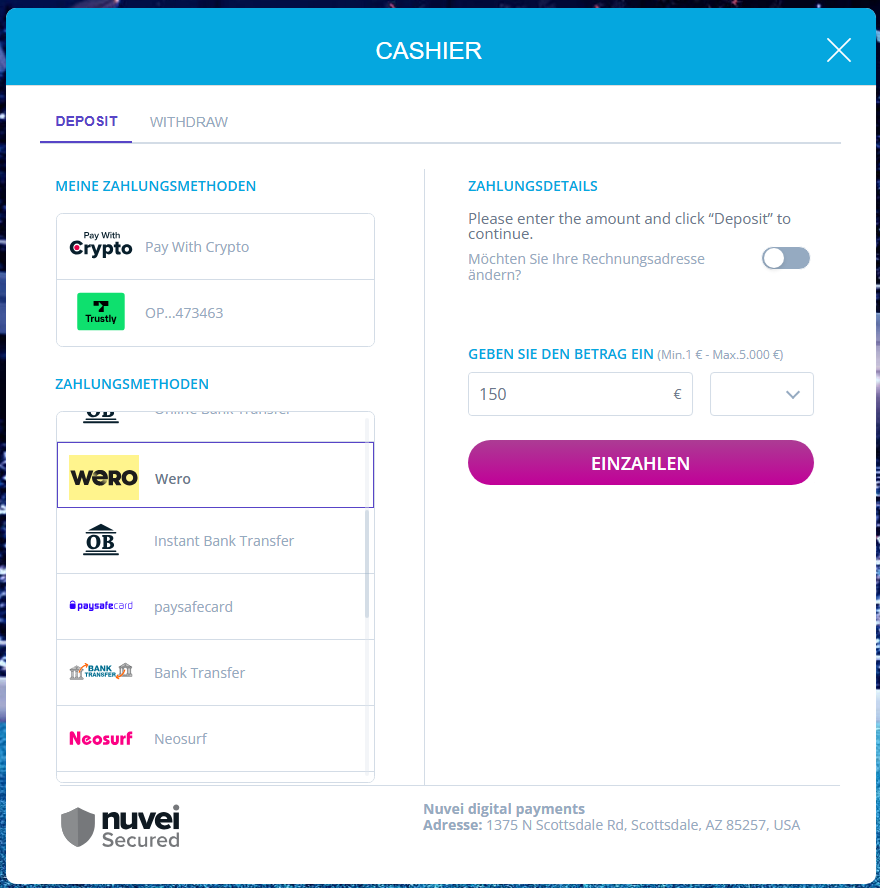
- Customer is redirected to a page that displays the QR code.
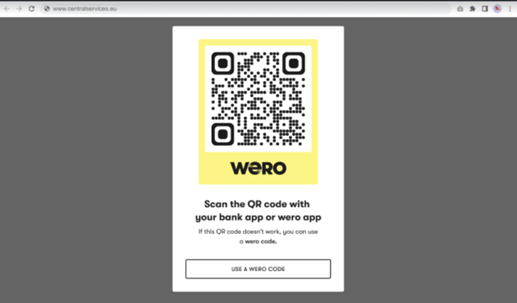
- Customer scans the QR code with a mobile phone.
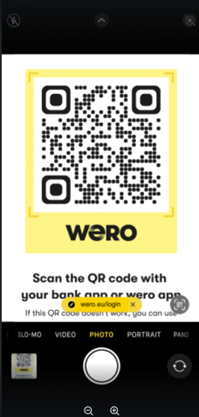
- In the Wero application that opens, the customer is identified.
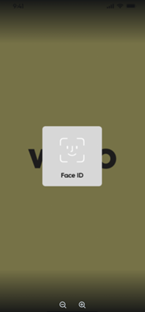
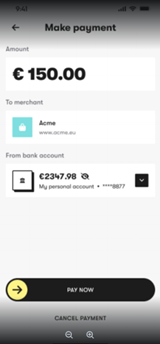
- The customer chooses a bank account and swipes right to approve the payment.
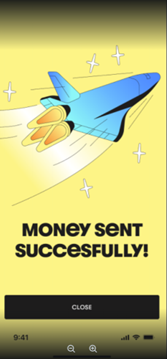
- The payment confirmation is displayed to the customer.
User Journey – Single Payment, Returning User
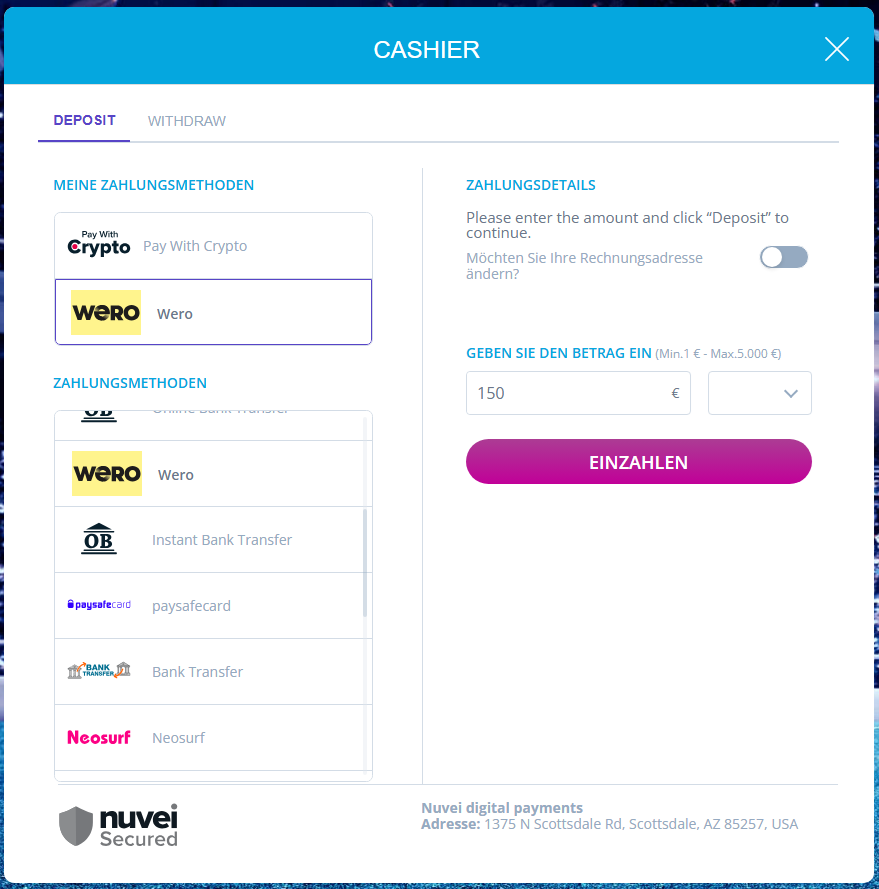
- The customer selects the existing Wero payment method from 'My Payment Methods'. The method is displayed in 'My Payment Methods', if during one of the customer's previous payments the customer selected 'Save this payment method for future use'.
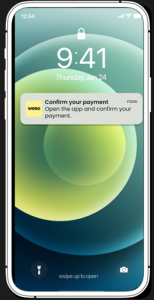
- The customer taps the push notification on the mobile phone.
- The Wero application opens and the user is authenticated.
- The customer swipes right to approve the payment.
- The payment confirmation is displayed to the customer.
Testing
**THIS IS THE GEMINI GENERATED CONTENT FROM JAN. 19**
// Reset all tab header styles const tabs = [ {id: 'toc-rest', active: '#00c7b1'}, {id: 'toc-websdk', active: '#00c7b1'}, {id: 'toc-simply', active: '#00c7b1'} ];
tabs.forEach(tab => { const el = document.getElementById(tab.id); el.style.color = '#87c6c6'; // Your hover/inactive color el.style.borderBottomColor = 'transparent'; });
// Activate selected pane and tab document.getElementById('pane-' + tabId).style.display = 'block'; const activeTab = document.getElementById('toc-' + tabId); activeTab.style.color = '#00c7b1'; // Your active color activeTab.style.borderBottomColor = '#00c7b1'; }
*THIS IS THE END OF THE GEMINI GENERATED CONTENT FROM JAN. 19**
Payment (Deposit) Flow
** START OF SECOND ATTEMPT JAN. 19 with GEMINI**
**END OF SECOND ATTEMPT JAN. 19 with GEMINI**
** START OF THIRD ATTEMPT Jan. 19 with Gemini**
tabHeaders.forEach((header, index) => { // We ensure the link behavior matches the internal WordPress tab switching header.addEventListener('click', function(e) { // The shortcode handles the UI switch automatically when clicked console.log('Navigating to tab: ' + (index + 1)); }); }); });
** END OF THIRD ATTEMPT Jan. 19 with Gemini**
**START OF 4TH ATTEMPT**
**END OF 4TH ATTEMPT**
**START OF 5TH ATTEMPT**
// 2. Update the TOC UI (Active/Inactive states)
const tocItems = document.querySelectorAll('.toc-item');
tocItems.forEach((item, i) => {
if (i === index) {
item.style.color = '#00c7b1';
item.style.borderBottomColor = '#00c7b1';
} else {
item.style.color = '#666';
item.style.borderBottomColor = 'transparent';
}
});
}
**END OF 5TH ATTEMPT**
**START OF 6TH ATTEMPT**
// 2. Update the visual state of your TOC headers var items = document.querySelectorAll('.toc-nav-item'); items.forEach(function(item) { item.style.color = '#666'; item.style.borderBottomColor = 'transparent'; });
element.style.color = '#00c7b1';
element.style.borderBottomColor = '#00c7b1';
}
**END OF 6TH ATTEMPT GEMINI**
**START OF TZY REVISED ATTEMPT 1 - based on GEMINI attempt 2**
Payment (Deposit) Flow
** END OF TZY REVISED ATTEMPT 1**
** START OF TZY REVISED ATTEMPT 2 using Gemini (based on code attempt 4 from Gemini)
** END OF TZY REVISED ATTEMPT 2 using Gemini
** START OF TZY REVISED ATTEMPT 3 using Gemini**
- REST API
-
REST API CONTENT PLACEHOLDER
- Web SDK
-
WEB SDK CONTENT PLACEHOLDER
- Simply Connect
-
SIMPLY CONNECT CONTENT PLACEHOLDER
**END OF TZY REVISED ATTEMPT 3 USING GEMINI**
**TZY ATTEMPT 4 using GEMINI**
- REST API
-
REST API CONTENT PLACEHOLDER
- Web SDK
-
WEB SDK CONTENT PLACEHOLDER
- Simply Connect
-
SIMPLY CONNECT CONTENT PLACEHOLDER
// 2. Reset Side Menu Styling document.querySelectorAll('.toc-label').forEach(function(label) { label.style.color = '#87c6c6'; }); document.querySelectorAll('.toc-subtext').forEach(function(sub) { sub.style.display = 'none'; });
// 3. Highlight Active Side Menu Item element.querySelector('.toc-label').style.color = '#00c7b1'; element.querySelector('.toc-subtext').style.display = 'block'; }
** END OF TZY ATTEMP 4 using GEMINI**
** START OF TZY ATTEMPT 5 (with Gemini) using GEMINI ATTEMPT 4 as basis**
*** END OF TZY ATTEMPT 5 (with Gemini)**
** START OF TZY ATTEMPT 6 (with Gemini)**
** END OF TZY ATTEMPT 6 (with GEMINI)**
** START OF TZY ATTEMPT 7 (with GEMINI)**
// 2. Hide all panes and reset nav colors panes.forEach(function(p) { p.style.display = 'none'; }); navs.forEach(function(n) { n.style.color = '#666'; n.style.borderBottomColor = 'transparent'; });
// 3. Show active pane and highlight active nav panes[index].style.display = 'block'; navs[index].style.color = '#00c7b1'; navs[index].style.borderBottomColor = '#00c7b1'; }
** END OF TZY ATTEMPT 7 (with GEMINI)**
** START OF TZY ATTEMPT 8 (with GEMINI)**
**END OF TZY ATTEMPT 8 (with Gemini)**
 Last modified January 2026