Overview
Upon initialization of Simply Connect 2.0 on your website’s payment page, you are ready to start accepting card payments.
Acceptance of a card payment is performed via the Card fields block:
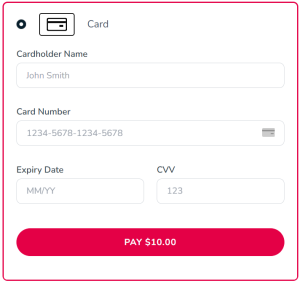
Save Payment Option
ThesavePM parameter determines whether or not to present the user with a checkbox to save payment details and whether or not Nuvei saves the details as a payment token for ease of further use.
Possible values:
true(default) – Checkbox to save payment details is displayed. If the user selects the checkbox, Nuvei saves the payment details as a payment token. Required in the initial request of an APM Recurring Billing workflow.
Example Card Payment Method (if savePM equals “true”)
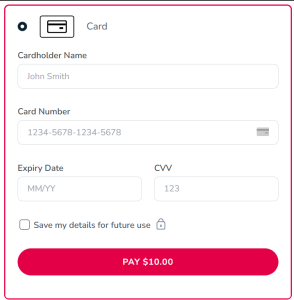
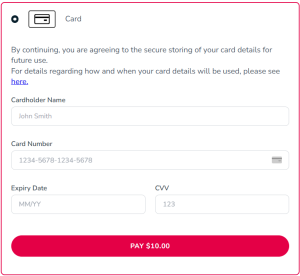
force– The user can clear the selection of the checkbox before submitting the payment request.false– The checkbox to save payment details is not displayed under the card fields. A user is not able to choose to save card details as a payment token.always– An agreement message for imminent secure-storage of payment details is displayed instead of a checkbox. This serves to notify the end-user that the payment method details are stored as a payment token for ease of further use. In addition, a merchant may include asavePmUrlproperty where the value must be a valid URL for a page, containing for example a specific T&C text.
Example Card Payment Method (if savePM equals “always” with a savePmUrl)
simplyConnect({
…
    uiConfig: {
...
        savePM: "always",
        savePmUrl: "",
…
    }
});
Blocking and Whitelisting Cards
With Simply Connect 2.0, you can specify cards that you do not accept or cards that you accept (card whitelisting). This topic describes how to specify cards you do not accept and cards that you accept.
Card Attributes
Use one or more arrays of possible values for the following card attributes, for accepted and unaccepted cards:
brand– Possible values: visa, mastercard, amex, diners, discover, jcb, dankort, unionpay.cardProduct– Possible values: debit, credit.cardType– Possible values: consumer, corporate.country– Possible values: Any ISO 3166-1 two-letter country code.blockCards– Is a parameter that specifies cards and sets of cards you do not accept.cardWhitelist– Specifies cards and sets of cards you accept.
Syntax
The following is the syntax for specification of card(s):
blockCards or cardWhiteList: [[[ "value1"][, "value2"][, "value3"][, "value4"]], [array2], [arrayN]]]
The intersection of each array of card-attribute values determines which cards you accept or do not accept; that is, cards that meet all specified attributes in an array, using AND logic. The following example specifies that you do not accept corporate Visa credit cards and prepaid British American Express cards:
blockCards: [[“visa”,”credit”,”corporate”],[“amex”,”GB”,”prepaid”]]
Support
When you initialize Nuvei Simply Connect 2.0 using simplyConnect(), you must include cardWhiteList or blockCards in a uiConfig class.
The following example specifies that you do not accept corporate Visa credit cards and prepaid British American Express cards.
simplyConnect({
…
    uiConfig: {
...
        blockCards: [
            ["visa", "credit", "corporate"],
            ["amex", "GB", "prepaid"]
        ], // Visa corporate credit cards and British prepaid Amex cards are blocked
…
    }
});
 Last modified September 2025