
- METHOD TYPEReal-Time Bank Transfer
- PAYMENTS

- PAYOUTS

- REFUNDS
- RECURRING
Introduction
BLIK is a mobile payment system in Poland that allows users to make payments using their mobile phone. It can be used to make purchases in stores, online and to transfer money to other users.
It is a secure, fast, and convenient way to make payments and it is widely accepted by retailers and businesses in Poland.
Supported Countries
- Poland
Supported Currencies
- PLN
UX Requirements
- Use the most up-to-date logo.
- The method name is BLIK and the input field is code.
- Code validation: only 6 digits are allowed.
- When entering the 6-digit code, the cashier should display it to the user as [3digits][space][3digits].
- The 6-digit code should prompt the numeric keyboard on a mobile device.
- Once a One-Click account is created (after a successful transaction), the cashier should display two BLIK options:
- The “original method” is renamed to “BLIK with code”.
- The saved account appears as “BLIK without code” (press here for details).
- After initiating a deposit, the user needs to see this message:
- PL: “Potwierdź płatność w aplikacji swojego banku.”
- ENG: “Confirm the payment in your bank’s app.”
Payment (Deposit) Flow
Send a /payments Request
Perform the payment by sending a /payments request with its mandatory parameters including:
buyerDetails.buyerIdamountcurrencypaymentOption.alternativePaymentMethod:name: "blik"data.code
deviceDetails.ipAddressbuyerDetails.billingAddress.countryCodebuyerDetails.firstName, lastName, country, email
Example /payments Request
{
    "processingEntityId": "",
    "amount": 1,
    "currency": "PLN",
    "transactionType": "Sale",
    "paymentOption": {
        "alternativePaymentMethod": {
            "name": "blik",
            "data": {
                "code": "<code>"
            }
        }
    },
    "custom": {
        "description": "Some description"
    },
    "urlDetails": {
        "webhookUrl": "https://example.com/webhook",
        "successUrl": "https://example.com/success",
        "failureUrl": "https://example.com/failure",
        "pendingUrl": "https://example.com/pending"
    },
    "deviceDetails": {
        "ipAddress": "192.168.2.38"
    },
    "buyerDetails": {
        "buyerId": "JohnSmith123",
        "firstName": "John",
        "lastName": "JSmith",
        "companyName": "Nuvei Corp",
        "locale": "bg-BG",
        "dateOfBirth": "1978-01-01",
        "email": "[email protected]",
        "phone": "+1234567889",
        "billingAddress": {
            "address": "30 Alenbi st",
            "zip": "1234",
            "city": "Berlin",
            "countryCode": "DE",
            "phone": "+1234567889",
            "addressMatch": true
        },
        "shippingAddress": {
            "sameAsBilling": true
        }
    }
}
BLIK processes the transaction and returns a transaction notification and status.
After the transaction is processed, Nuvei sends a Direct Merchant Notification (DMN) (webhook) that includes the result of the transaction to urlDetails.webhookUrl, which Nuvei recommends including in the /payments request.
Example /payments webhook with status=approved
**GABI WILL PROVIDE NEW EXAMPLE**
User Experience (Direct)
- The user selects the BLIK payment option on the Merchant’s payment page.
- The user logs in to their bank application to get their 6-digit code.
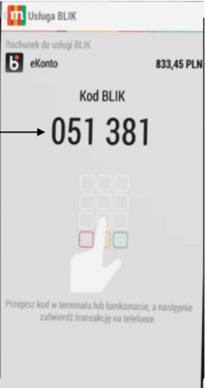
- The user enters the 6-digit code in the Cashier.

- The user must confirm the transaction on their bank application.
Testing
Testing payments using the BLIK channel requires an authorization code. For test payments, a valid authorization code starts with 777 (such as 777654). A code that does not start with 777 (such as 332885) is considered invalid and the payment is declined.
To test one-click, use amount *.04 PLN
Appendix – BLIK One-Click
The one-click payment method is an extension of the regular BLIK payment, with the ability to remember the device that the customer most often uses to finalize the transaction. The user interface is extended by the option to pay with a one-click flow. In the one-click flow, the user only needs to enter their 6-digit code once. For future deposits, the code is not required.
REST API
To initiate one-click, include usageIntent: “direct” in the /payments request.
Example One-Click /payments Request
{
    "paymentOption": {
        "alternativePaymentMethod": {
            "name": "blik",
            "data": {
                "code": "<code>"
            },
            "usageIntent": "direct"
        }
    }
}
The response and the DMN (webhook) include the paymentTokenId to use in subsequent BLIK one-click transaction requests.
Example Subsequent One-Click/payments Request with paymentTokenId
{
    "paymentOption": {
        "paymentTokenId": {
          "paymentTokenId": "<payment token id>",
         "usageIntent": "direct"
    }
}
 Last modified December 2025