
- METHOD TYPEBank Transfer
- PAYMENTS

- PAYOUTS
- REFUNDS
- RECURRING

Introduction
PayTo is a modern digital payment solution offering a fast, easy and secure way to pay. It gives consumers more visibility and control over their payments and enables merchants and businesses to initiate real-time payments from their customers’ bank accounts.
Supported Countries
- Australia
Supported Currencies
- AUD
REST API
Payment (Deposit) Flow
Follow these steps to perform a payment using Nuvei REST API integration:
1. Generate a sessionToken
Press here for details.
2. Send a /payment Request
Perform the payment by sending a /payment request with its mandatory parameters including:
sessionTokenamountcurrencypaymentOption.alternativePaymentMethodclass containing:paymentMethod: “apmgw_PayTo“- (
payto_account_name,payto_pay_id,payto_pay_id_type) OR ("payto_account_number","payto_bsb","payto_account_name")
deviceDetailsclass containing:ipAddressbillingAddressclass containing:firstName,lastName,countryuserDetailsclass containing:firstName,lastName,country
Example /payment Request
{
  "sessionToken":"<sessionToken from /getSessionToken>",
  "merchantId":"<your merchantId>",
  "merchantSiteId":"<your merchantSiteId>",
  "clientRequestId":"<unique request ID in merchant system>",
  "amount":"200",
  "currency":"AUD",
  "userTokenId":"<unique customer identifier in merchant system>",
  "clientUniqueId":"<unique transaction ID in merchant system>",
   "paymentOption": {
       "alternativePaymentMethod": {
            "paymentMethod": "apmgw_PayTo",
            "payto_account_name": "daniel test",
            "payto_pay_id": "987654321",
            "payto_pay_id_type": "OrganisationId"
        }
    },
  "deviceDetails":{
    "ipAddress":"<customer's IP address>"
  },
  "billingAddress":{
    "firstName": "John",
    "lastName": "Smith",
    "country":"AU",
    "email":"[email protected]"
    },
  "userDetails":{
    "firstName": "John",
    "lastName": "Smith",
    "country":"AU",
    "email":"[email protected]"
  },
  "timeStamp":"<YYYYMMDDHHmmss>",
  "checksum":"<calculated checksum>"
}
Example /payment Response
{
    "internalRequestId": 42177351,
    "status": "SUCCESS",
    "errCode": 0,
    "reason": "",
    "merchantId": "5634436935940029474",
    "merchantSiteId": "242181",
    "version": "1.0",
    "clientRequestId": "20240710161332",
    "sessionToken": "86002737-a9d9-4cff-8d5b-f2bc594e9ead",
    "orderId": "43362441",
    "userTokenId": "DanielREST_1720416670",
    "paymentOption": {
        "redirectUrl": "https://apmtest.gate2shop.com/ppp/resources/cdn/v1/payment-instructions-81337.html?timeoutMinutes=6000&sessionId=cc7157f16046d6117be14c426304&payId=987654321&payIdName=daniel%20test&payee=TEST%20Nuvei%20Merchant&paymentAmount=$1000.00&paymentFrequency=ADHO&startDate=2024-07-10T16%3A13%3A33Z&firstPaymentDate=2024-07-10T16%3A13%3A33Z&wss=wss%3A%2f%2fsrv-bsf-websock.gw-4u.com%2fws&returnUrl=https%3A%2f%2fjumpbox.safecharge.com%2fapm%2fpayto%2fv1%2fconsumerReturn%2f27EC167F02BE929BC02E6133A8CC9446",
        "userPaymentOptionId": "2153281591",
        "card": {}
    },
    "transactionStatus": "REDIRECT"
}
After the transaction is processed, Nuvei sends a Direct Merchant Notification (DMN) that includes the result of the transaction to the URL provided in urlDetails.notificationUrl, which Nuvei recommends including in the /payment request.
DMN with Approved Status
ppp_status=OK&Status=APPROVED&ExErrCode=0&ErrCode=0&errApmCode=0&errApmDescription=&errScCode=0&errScDescription=&Reason=&ReasonCode=0&PPP_TransactionID=43262041&userid=ScMigrationTest3&merchant_unique_id=97c10831-d399-48d7-8ea5-41f89619d2fa6&customData=anca.gheorghitanu&productId=test_name_1&first_name=John&last_name=Doe&email=ivanp%40abv.bg¤cy=AUD&pmDisplayName=sample%40monoova.com&customField1=meccabingo.com&customField2=a2db82db-8186-44bb-a6d9-cb9f8f7ea25e&customField3=&customField4=&customField5=&customField6=&customField7=&customField8=&customField9=&customField10=&customField11=&customField12=&customField13=&customField14=&customField15=rnk_pr01&invoice_id=&address1=Test+Address&address2=&country=Australia&state=&city=Ontario&zip=M6T+1J1&phone1=%2B14161238888&phone2=&phone3=&client_ip=127.0.0.1&nameOnCard=&cardNumber=&bin=&noCVV=&acquirerId=&acquirerBank=PayToMS-AUS-PI&expMonth=&expYear=&Token=&tokenId=&AuthCode=test+test&AvsCode=&Cvv2Reply=&shippingCountry=AU&shippingState=&shippingCity=Ontario&shippingAddress=Test+Address&shippingZip=M6T+1J1&shippingFirstName=John&shippingLastName=Doe&shippingPhone=%2B14161238888&shippingCell=%2B14161238888&shippingMail=ivanp%40abv.bg&total_discount=0.00&total_handling=0.00&total_shipping=0.00&total_tax=0.00&buyButtonProductBundleId=&merchant_site_id=242181&merchant_status=&action=&requestVersion=&message=APPROVED&merchantLocale=en_US&unknownParameters=&payment_method=apmgw_PayTo&ID=&merchant_id=5634436935940029474&responseTimeStamp=2024-06-25.23%3A03%3A42&buyButtonProductId=&webMasterId=&appliedPromotions=&uniqueCC=&transactionType=Sale&externalEmail=&cardCompany=&eci=&user_token_id=daniel_payto216&user_token=auto&userPaymentOptionId=2153263571&TransactionID=2610000000000036875&APMReferenceID=1091533A468BB9CBF77FF4AEA6BDF6C1&orderTransactionId=24591731&totalAmount=50.00&dynamicDescriptor=static+test&item_name_1=test_name_1&item_number_1=&item_amount_1=50.00&item_quantity_1=1&item_discount_1=0.00&item_handling_1=0.00&item_shipping_1=0.00&feeAmount=&amountWithoutFee=&houseNumber=&customCurrency=&externalToken_blockedCard=&externalToken_cardAcquirerId=&externalToken_cardAcquirerName=&externalToken_cardBin=&externalToken_cardBrandId=&externalToken_cardBrandName=&externalToken_cardExpiration=&externalToken_cardLength=&externalToken_cardMask=&externalToken_cardName=&externalToken_cardTypeId=&externalToken_cardTypeName=&externalToken_clubName=&externalToken_creditCompanyId=&externalToken_creditCompanyName=&externalToken_extendedCardType=&externalToken_Indication=&externalToken_tokenValue=&externalToken_tokenProvider=&ECIRaw=&cryptogram=&maskedNetworkTokenNumber=&upoRegistrationDate=20240625&type=DEPOSIT&clientRequestId=&relatedTransactionId=&apmPayerInfo=%5B%5D&sessionId=e881955ece874b644667aa037ce2&responsechecksum=b941a9d2fb256032a363cab3ad505c88&advanceResponseChecksum=7d7a22759107f6d25f2e6f396f2a3194
DMN with Decline Status
ppp_status=FAIL&Status=DECLINED&ExErrCode=0&ErrCode=1&errApmCode=1&errApmDescription=Creditor+not+on+Whitelist+of+Debtor&errScCode=101472&errScDescription=Blacklisted&Reason=Blacklisted&ReasonCode=101472&PPP_TransactionID=43264581&userid=DanielREST_1719318767&merchant_unique_id=&customData=&productId=&first_name=John&last_name=Doe&email=ivanp%40abv.bg¤cy=AUD&pmDisplayName=987654321&customField1=&customField2=&customField3=&customField4=&customField5=&customField6=&customField7=&customField8=&customField9=&customField10=&customField11=&customField12=&customField13=&customField14=&customField15=&invoice_id=&address1=65%2C+Overlea+str&address2=&country=Australia&state=&city=test+shipping&zip=K0A+0A2&phone1=&phone2=&phone3=&client_ip=&nameOnCard=&cardNumber=&bin=&noCVV=&acquirerId=&acquirerBank=PayToMS-AUS-PI&expMonth=&expYear=&Token=&tokenId=&AuthCode=daniel+test&AvsCode=&Cvv2Reply=&shippingCountry=AU&shippingState=&shippingCity=test+city&shippingAddress=&shippingZip=&shippingFirstName=&shippingLastName=&shippingPhone=&shippingCell=&shippingMail=&total_discount=0.00&total_handling=0.00&total_shipping=0.00&total_tax=0.00&buyButtonProductBundleId=&merchant_site_id=242181&merchant_status=&action=&requestVersion=&message=DECLINED&merchantLocale=&unknownParameters=&payment_method=apmgw_PayTo&ID=&merchant_id=5634436935940029474&responseTimeStamp=2024-06-25.23%3A04%3A23&buyButtonProductId=&webMasterId=&appliedPromotions=&uniqueCC=&transactionType=Sale&externalEmail=&cardCompany=&eci=&user_token_id=DanielREST_1719318767&userPaymentOptionId=2153264041&TransactionID=2610000000000036879&APMReferenceID=9F5E2FD1DCF57DFE9C070CE4729384EF&orderTransactionId=24594111&totalAmount=20.00&dynamicDescriptor=static+test&item_name_1=NA&item_number_1=&item_amount_1=20.00&item_quantity_1=1&item_discount_1=0.00&item_handling_1=0.00&item_shipping_1=0.00&feeAmount=&amountWithoutFee=&houseNumber=&customCurrency=&externalToken_blockedCard=&externalToken_cardAcquirerId=&externalToken_cardAcquirerName=&externalToken_cardBin=&externalToken_cardBrandId=&externalToken_cardBrandName=&externalToken_cardExpiration=&externalToken_cardLength=&externalToken_cardMask=&externalToken_cardName=&externalToken_cardTypeId=&externalToken_cardTypeName=&externalToken_clubName=&externalToken_creditCompanyId=&externalToken_creditCompanyName=&externalToken_extendedCardType=&externalToken_Indication=&externalToken_tokenValue=&externalToken_tokenProvider=&ECIRaw=&cryptogram=&maskedNetworkTokenNumber=&upoRegistrationDate=20240625&type=DEPOSIT&clientRequestId=&relatedTransactionId=&apmPayerInfo=%5B%5D&sessionId=f62628c693944f4661006c266e2a&responsechecksum=7b67566c181e350f8cd6e69302eb6fc8&advanceResponseChecksum=1e88069ba23a9d132a61e2aac435ceab
Payout (Withdrawal) Flow
Send a /payout request and include the userPaymentOptionId, which contains the user’s previously stored APM account details. Press here for an example.
After the transaction is processed, Nuvei sends a DMN that includes the result of the transaction to the URL provided in urlDetails.notificationUrl, which Nuvei recommends including in the /payout request.
Web SDK
Payment (Deposit) Flow
Follow these steps to perform a payment using Nuvei Web SDK integration.
1. Initiate a Session
Before you can submit payment using the client-side Nuvei Web SDK, you need to send the /openOrder API call.
2. Initialize the Web SDK
Instantiate the Web SDK with the sessionToken received from the server call to /openOrder.
3. Create an APM Payment
Send a createPayment() request with its mandatory parameters including:
paymentOption.alternativePaymentMethodclass containing:paymentMethod: “apmgw_PayTo“- (
payto_account_name,payto_pay_id,payto_pay_id_type) OR ("payto_account_number","payto_bsb","payto_account_name")
deviceDetailsclass containing:ipAddressbillingAddressclass containing:firstName,lastName,country,emailuserDetailsclass containing:firstName,lastName,country,email
Example createPayment() Request
sfc.createPayment({
    "sessionToken": sessionData.sessionToken,
    "paymentOption": {
        "alternativePaymentMethod": {
        "paymentMethod": "apmgw_PayTo",
            "payto_account_number": "<Pay To account number>",
            "payto_account_name": "<PayTo account name>",
            "payto_bsb": "<PayTo BSB number>",

    },
    "billingAddress": {
      "country": "AU",
      "firstName": "John",
      "lastName": "Doe",
    },
    userDetails: {
      firstName: "John",
      lastName: "Doe",
         "country": "AU",
    },
  }, function(res) {
    console.log(res);
  })
After the transaction is processed, Nuvei sends a Direct Merchant Notification (DMN) that includes the result of the transaction to the URL provided in urlDetails.notificationUrl, which Nuvei recommends including in the /openOrder request.
Withdrawal Flow
For information about the Withdrawal flow for WebSDK, see Withdrawal.
Payment Page
Example Payment Page Request
Copy the URL from the example and paste it into a browser to open the example Payment Page Request.
https://srv-bsf-devppptrunk.gw-4u.com/ppp/purchase.do?checksum=85a41472f7a78ff7fe3c41152f0d1cbe&item_open_amount_1=true&shippingCity=&country=AU&personalId=9988979799&customField1=meccabingo.com&customField2=a2db82db-8186-44bb-a6d9-cb9f8f7ea25e&mobileNumber=13094526617&identificationType=NationalId&item_name_1=test_name_1&userid=ScMigrationTest3&isNative=&building=BV+8&phone1=%2B14161238888&identification=4080470885&shippingCountry=&debit_type=RegularCredit&state=ON&zip=M6T+1J1&customField15=rnk_pr01&merchant_site_id=242181&allow_special_debit=0&languageCode=EN&item_min_amount_1=0.1&encoding=utf-8&version=3.0.0&user_token_id=daniel_payto214&docUploadSuccessUrl=https%3A%2f%2fwww.safecharge.com%2fpayment-methods&allow_installments=1&kyc=&total_amount=1&parent_url=*&shippingFirstName=&item_quantity_1=1&item_amount_1=1&merchantLocale=en_US&merchant_unique_id=97c10831-d399-48d7-8ea5-41f89619d2fa6&gender=Male&city=Ontario&quick_deposit=&theme_id=&kycFlow=&initial_amount=&merchant_id=5634436935940029474&title=Mr&docUploadCancelUrl=https%3A%2f%2fwww.safecharge.com%2fpayments-engine&item_max_amount_1=1000000¤cy=AUD&descriptorMerchantName=test&user_token=auto&max_num_installments=12&first_name=John&email=ivanp%40abv.bg&shippingZip=&firstDepositConfirmation=&time_stamp=2024-06-25.07%3A06%3A48&shippingLastName=&mobileCountryCode=054&address1=Test+Address&last_name=Doe&dateOfBirth=1985-01-01&eKYCType=&userName=Test+Username&rebilling_amount=&shippingAddress=" target="_blank" rel="noopener">https://srv-bsf-devppptrunk.gw-4u.com/ppp/purchase.do?checksum=85a41472f7a78ff7fe3c41152f0d1cbe&item_open_amount_1=true&shippingCity=&country=AU&personalId=9988979799&customField1=meccabingo.com&customField2=a2db82db-8186-44bb-a6d9-cb9f8f7ea25e&mobileNumber=13094526617&identificationType=NationalId&item_name_1=test_name_1&userid=ScMigrationTest3&isNative=&building=BV+8&phone1=%2B14161238888&identification=4080470885&shippingCountry=&debit_type=RegularCredit&state=ON&zip=M6T+1J1&customField15=rnk_pr01&merchant_site_id=242181&allow_special_debit=0&languageCode=EN&item_min_amount_1=0.1&encoding=utf-8&version=3.0.0&user_token_id=daniel_payto214&docUploadSuccessUrl=https%3A%2f%2fwww.safecharge.com%2fpayment-methods&allow_installments=1&kyc=&total_amount=1&parent_url=*&shippingFirstName=&item_quantity_1=1&item_amount_1=1&merchantLocale=en_US&merchant_unique_id=97c10831-d399-48d7-8ea5-41f89619d2fa6&gender=Male&city=Ontario&quick_deposit=&theme_id=&kycFlow=&initial_amount=&merchant_id=5634436935940029474&title=Mr&docUploadCancelUrl=https%3A%2f%2fwww.safecharge.com%2fpayments-engine&item_max_amount_1=1000000¤cy=AUD&descriptorMerchantName=test&user_token=auto&max_num_installments=12&first_name=John&email=ivanp%40abv.bg&shippingZip=&firstDepositConfirmation=&time_stamp=2024-06-25.07%3A06%3A48&shippingLastName=&mobileCountryCode=054&address1=Test+Address&last_name=Doe&dateOfBirth=1985-01-01&eKYCType=&userName=Test+Username&rebilling_amount=&shippingAddress=
After the transaction is processed, Nuvei sends a Direct Merchant Notification (DMN) that includes the result of the transaction to notify_url, which Nuvei recommends including in the request.
Simply Connect
To perform a payment using Nuvei Simply Connect integration:
1. Initiate a Session
Before submitting a Simply Connect payment request, you need to submit a server-side /openOrder API request.
2. Create an HTML Placeholder
Import the checkout.js library for building payment flows and create an HTML placeholder on your payment page for the Simply Connect UI element.
3. Submit a checkout() Request
Send a checkout() request with its mandatory input parameters, along with any other relevant parameters and customizations. For more information, see Quick Start to Simply Connect.
checkout({
    sessionToken: '<session token>',
    env: '<env>',
    merchantSiteId: '<your merchantSiteId>'
    merchantId: '<your merchantSiteId>',
    country: 'AU',
    currency: 'AUD',
    amount: 100,
   "billingAddress": {
      "firstName": "John",
      "lastName": "Doe",
      "country": 'AU',
    },
    "userDetails": {
      "firstName": "John",
      "lastName": "Doe",
      "country": 'AU',
   },
    renderTo: '#checkout',
    onResult: onResult
  })
User Experience
User Experience – Deposit
1. Customer chooses PayTo on the Merchant’s website.
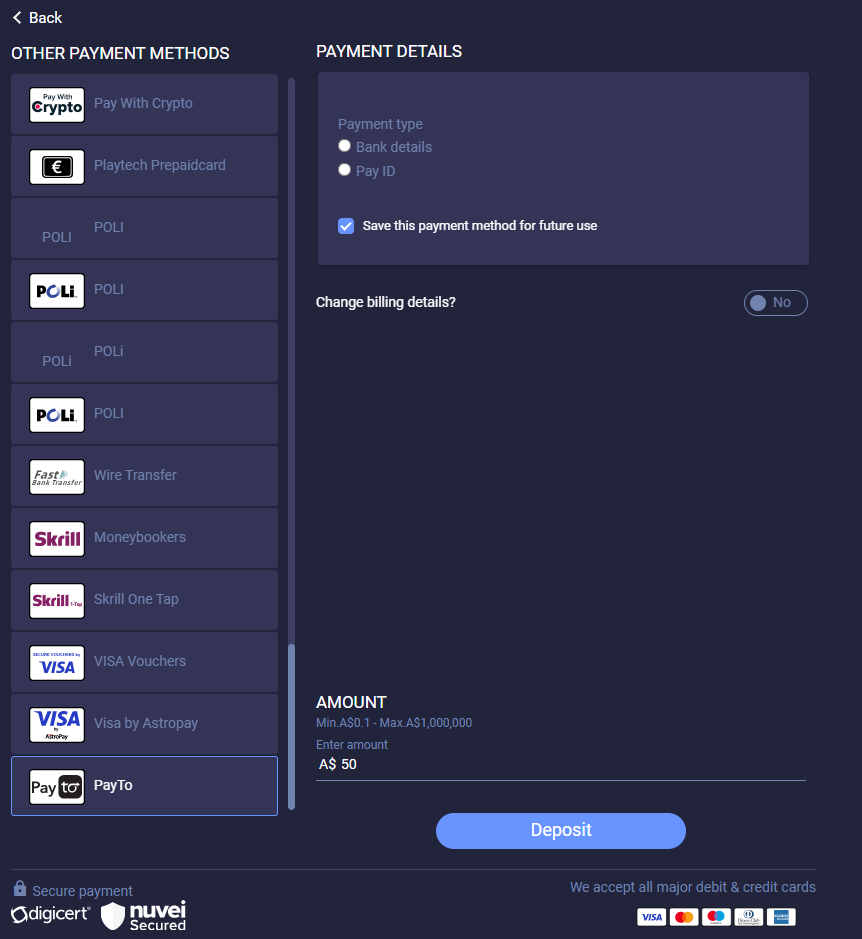
2. Customer chooses which details to use (‘Bank details’ or ‘Pay ID’).
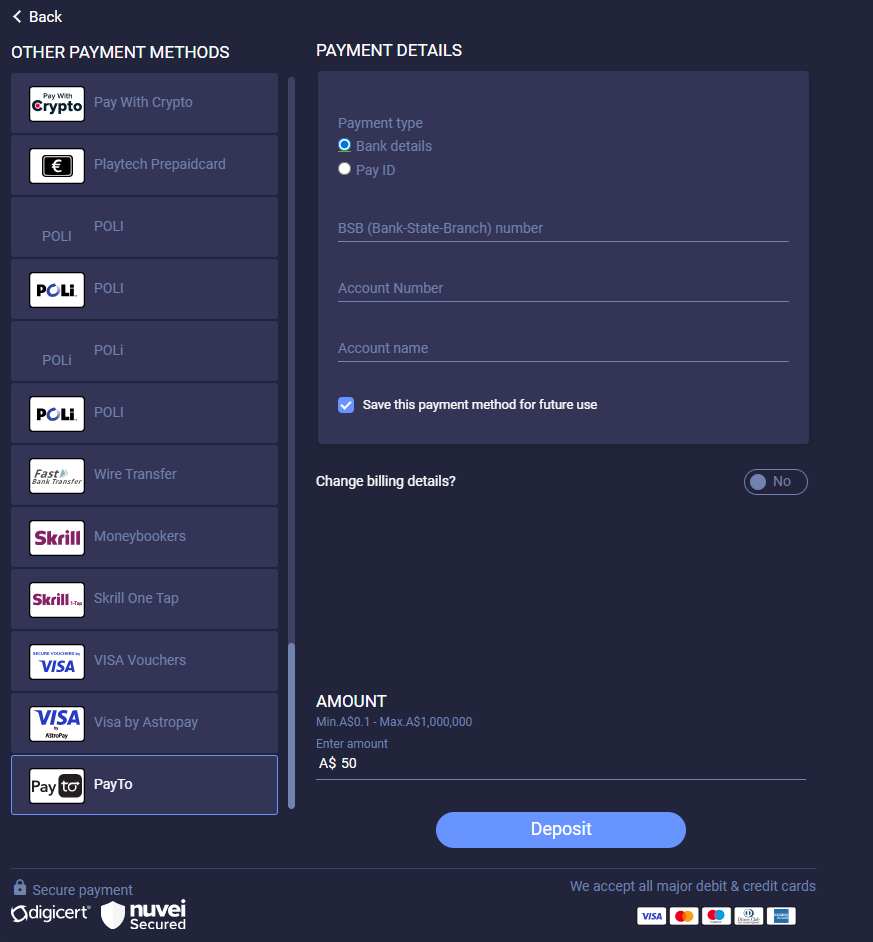
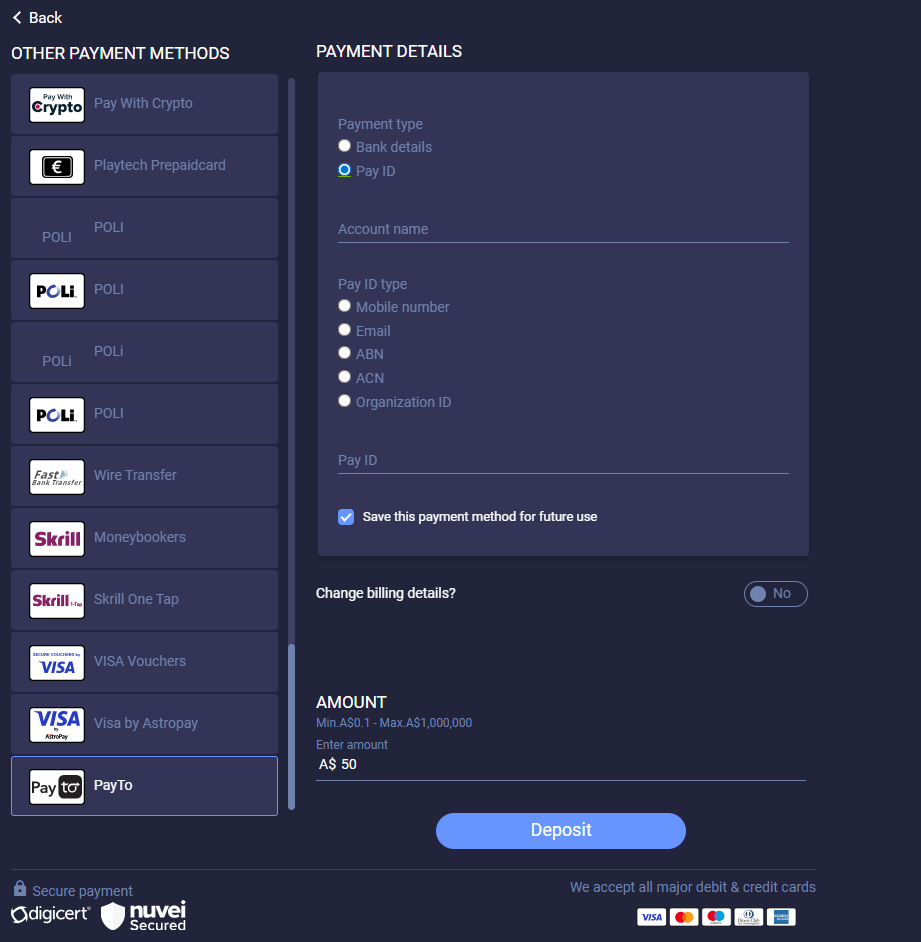
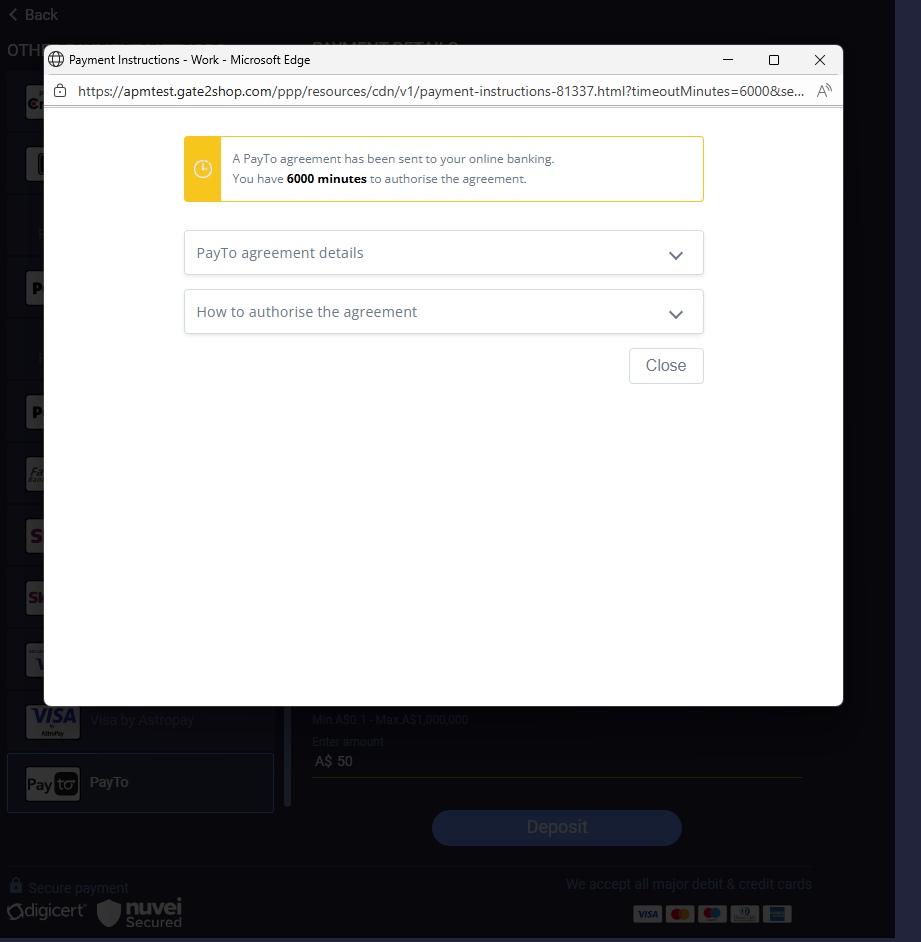
3. Page is displayed with guidance about how to finish the transaction.
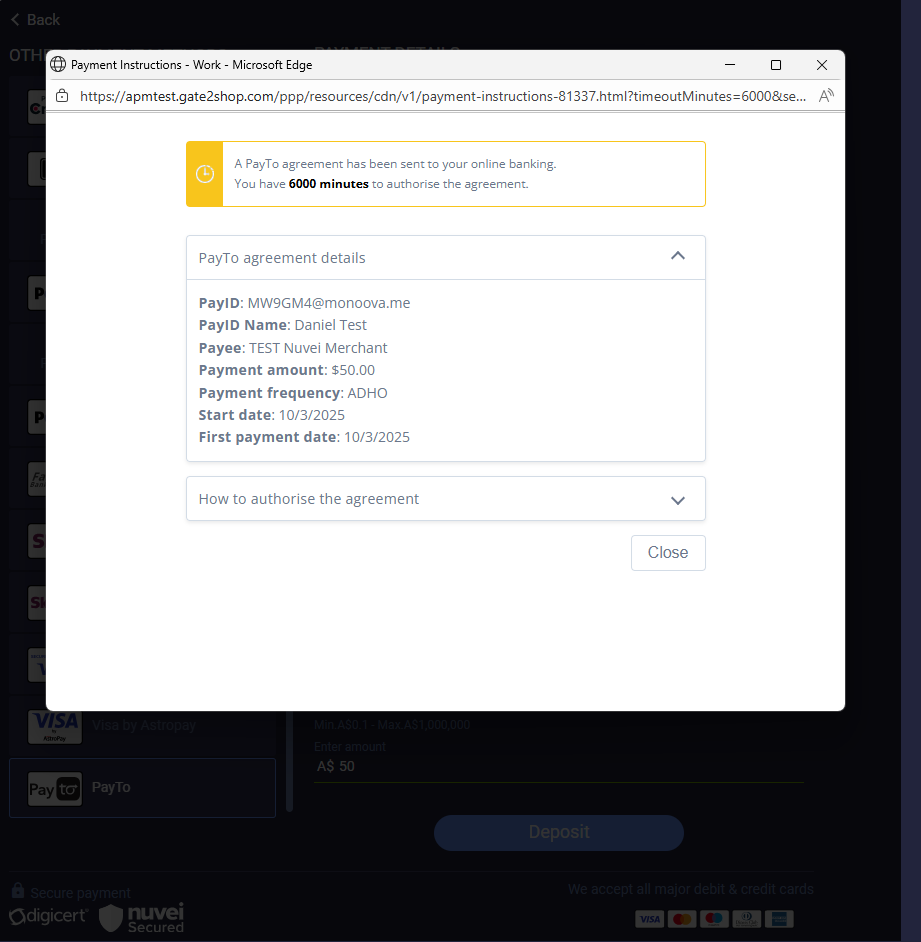
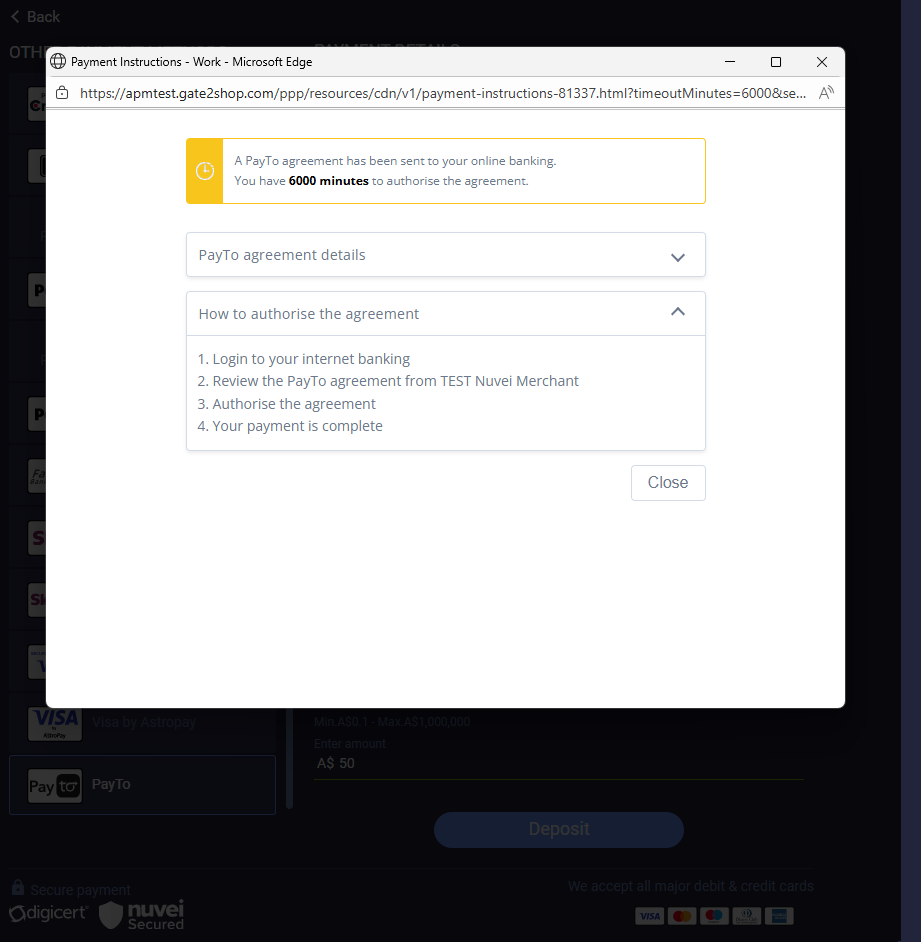
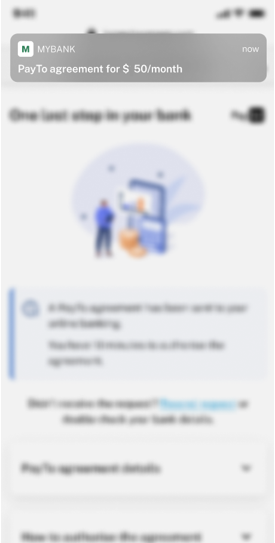
4. Customer receives notification by phone.
5. The bank application is launched and the customer is authenticated.
 6. Customer approves the agreement.
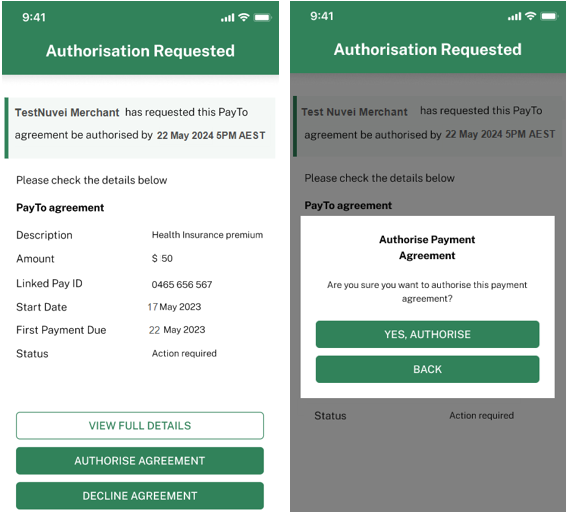
7. Customer receives confirmation that the agreement was signed.
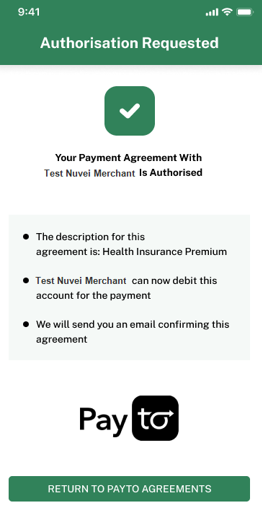
8. Actual payment is performed and the funds are deducted from the customer account.
User Experience – Withdrawal
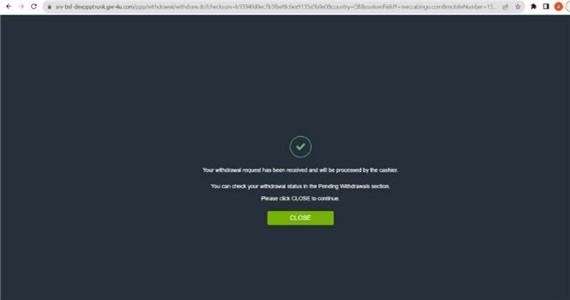
- Customer selects the PayTo UPO on the withdrawal cashier.
- Customer enters the amount for withdrawal.
- The withdrawal request is created.
Test Data
A payment is automatically approved or declined in the Sandbox environment, depending on the amount included in the request.
| Amount Contains Value | Example | Status Received | Reason |
|---|---|---|---|
| 0 | $5.00, $10.00, $50.00 | Approved | Agreement Approved |
| 0.19 | $5.19, $10.19, $50.19 | Declined | Requested By Customer |
| 0.01 | $5.01, $10.01, $50.01 | Declined | Invalid Debtor Account Number |
| 0.03 | $5.03, $10.03, $50.03 | Declined | Closed Debtor Account Number |
| 0.04 | $5.04, $10.04, $50.04 | Declined | Blocked Account |
| 0.05 | $5.05, $10.05, $50.05 | Declined | Invalid Debtor Account Type |
| 0.06 | $5.06, $10.06, $50.06 | Declined | Transaction Forbidden |
| 0.07 | $5.07, $10.07, $50.07 | Declined | Transaction Not Supported |
| 0.08 | $5.08, $10.08, $50.08 | Declined | Not Allowed Currency |
| 0.09 | $5.09, $10.09, $50.09 | Declined | Invalid Amount |
| 0.1 | $5.10, $10.10, $50.10 | Declined | Amount Exceeds Agreed Limit |
| 0.18 | $5.18, $10.18, $50.18 | Declined | No Mandate Service On Customer |
| 0.22 | $5.22, $10.22, $50.22 | Declined | Mandate Cancelled Due To Fraud |
| 0.27 | $5.27, $10.27, $50.27 | Declined | No Answer From Customer |
| 0.28 | $5.28, $10.28, $50.28 | Declined | Regulatory Reason |
| 0.3 | $5.30, $10.30, $50.30 | Declined | Creditor not on Whitelist of Debtor |
| 0.31 | $5.31, $10.31, $50.31 | Declined | Creditor on Blacklist of Debtor |
| 0.32 | $5.32, $10.32, $50.32 | Declined | Unknown end Customer |
 Last modified February 2026